 AI
AIThe best free AI image generators in 2026, ranked by what you can actually publish from the free tier
Free image generators have become good enough that the deciding questions for a small business are no longer about quality. They are about rights and visibility: can you use the picture commercially, can anyone else see it, and does it leave the product in a format you can print. This shortlist ranks four tools - Ideogram, Leonardo.Ai, Adobe Firefly and Canva Magic Studio - by what their documentation says a free account can make and keep, as of October 2026, with the allowance arithmetic spelled out where the vendor publishes it and flagged where it does not. No account was opened for this page; it is built from pricing pages, help centres and public user reports.
Our picks
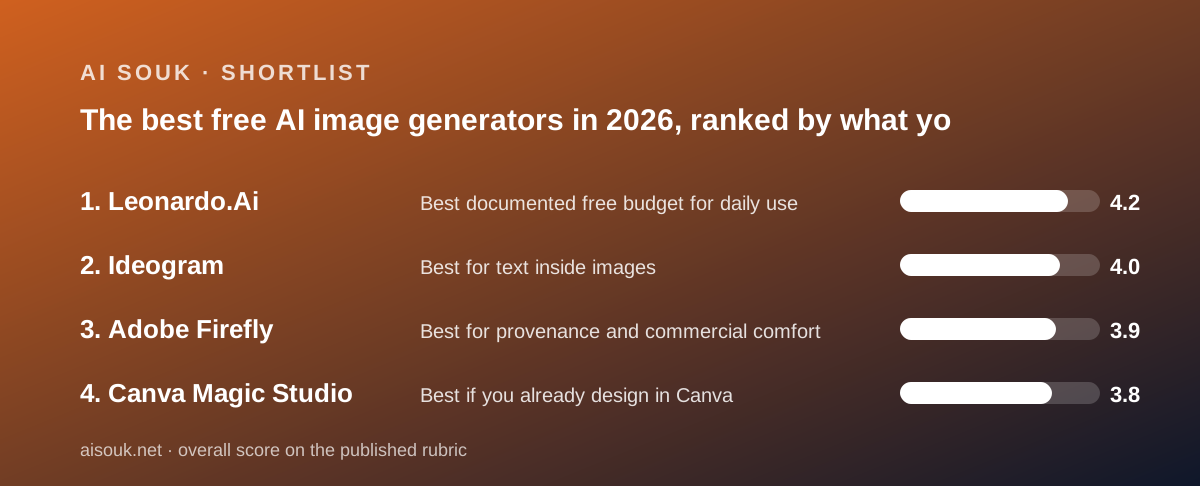
- Best documented free budget for daily use: Leonardo.Ai
- Best for text inside images: Ideogram
- Best for provenance and commercial comfort: Adobe Firefly
- Best if you already design in Canva: Canva Magic Studio
Ask people which free image generator is best and they will argue about rendering quality, which documentation cannot settle and this page will not try to. Ask instead which free tier a business can actually publish from and the answer narrows fast, because the four tools here each give away something different and withhold something different. Ideogram gives 30 credits a week and makes every free image public. Leonardo.Ai gives 150 tokens a day, permits commercial use on free per its help centre, and also makes every free image public. Adobe Firefly gives free daily generations of an unpublished number and the clearest training-data provenance statement in the category. Canva Magic Studio gives up to 20 pooled AI uses a month inside an editor that is already useful without AI. Four allowances, four shapes, and the rights and visibility rules differ on every one. The ranking below weighs those rules at least as heavily as the counts, because a picture you cannot use is not free; it is a demo.
Start with the shape of the allowance, because it decides how you work. Ideogram's is weekly: 30 credits every week, per the plans page at docs.ideogram.ai checked October 7, 2026, with the credit cost per image not published on the plans page but shown in a Usage costs view in the account. Leonardo's is daily: 150 fast tokens that reset every 24 hours and expire unused, per the pricing page and help centre, so it rewards a daily habit and punishes batch work. Firefly's is also daily - the plans page says limits refresh every day across image, video and audio - but the count is not published anywhere on the pages checked, and an older Adobe FAQ describes a different model of 25 credits a month, which no current document reconciles. Canva's is monthly and pooled: up to 20 uses of Standard or Premium AI tools, with the pricing page itself warning that complex tasks or mixing tools push real usage to the lower end of the range. If you generate a few images every day, the daily budgets suit you. If you make a campaign's worth in one afternoon, only a monthly or weekly pool helps, and Canva's twenty is a demo-sized one.
The first trap is visibility, and it catches more business users than any credit cap. Ideogram's documentation states, in the same words on two pages, that on the free plan everything you generate is public, and that unpublishing requires a plan with private generation - so a free user cannot make an image, regret it, and hide it. Leonardo's pricing page lists Creations access as Public on free and Private on every paid tier, and its help centre adds that public images can be viewed and remixed by other users and grant the vendor a broad licence to use, reproduce, adapt and publish them. For a logo concept, a product mock-up or anything built from a client's reference material, that is disqualifying on free regardless of how many tokens you have. Firefly and Canva do not run a public gallery in the same way; Canva publishes a privacy statement that content is not used to improve AI features unless consistent with the user's privacy controls, and those controls exist on the free plan. If the image is confidential, the free tiers of the two most generous generators are not for you.
The second trap is the account itself. Ideogram's plans page states that free accounts get 30 credits a week only if they sign in with Google, Apple or Microsoft, and that accounts created with an email address and password receive no free credits at all. That is an unusual rule, it is documented plainly, and public forums are full of people who found out after signing up the wrong way. Leonardo lists no such restriction. Canva's free plan is a normal Canva account, and the FAQ notes that trial accounts get the same AI allowance as free until the paid plan actually starts. Firefly's free generations are tied to an Adobe account, and the plans page geo-localises prices - it served Japanese yen to one request during research for this site's review - so the US-dollar figures on this page come from the product page and should be confirmed from your own location. None of this is hard to get right; all of it is easy to get wrong on the first day.
The third trap is rights. Leonardo's help centre states that commercial use of generated images is permitted and that this applies to free users too, which is the clearest free-tier commercial statement in this group - with the public-gallery caveat above. Ideogram's documentation refers commercial-use questions to the Terms of Service rather than stating them, so a business user has to read the legal document. Adobe's product page states that Firefly models are trained on licensed Adobe Stock and public-domain content, that Adobe does not train on subscribers' personal content, and that outputs carry Content Credentials indicating AI was used; for a business that must answer where the training data came from before it will publish anything, that provenance statement is the reason to choose Firefly over a prettier output. Canva's AI lives inside a design tool whose licensing a business is probably already comfortable with. Contrast this with audio: ElevenLabs and Suno both restrict free users to non-commercial use outright, and it is worth noticing that none of the four image tools here does the same.
The fourth trap is the file you get out. Ideogram's FAQ states that PNG download and upscaling require a paid plan; free accounts can download JPEG at original size or a transparent PNG at 1K resolution. For a social card that is fine; for print it may not be. Leonardo's free quality setting is listed as Basic against Enhanced on paid plans, and upscaling costs five tokens from the daily 150. Firefly's plan pages do not state whether free outputs carry a watermark, and this page will not guess; Adobe's video sibling in this site's reviews, Runway, lists watermark removal as a paid feature, which is the pattern in generative video but not necessarily in Firefly's still images. Canva exports PDF, JPG and PNG on free, and generated images land in the design rather than needing to be downloaded and re-imported, which is the practical argument for doing AI inside the editor you already use. Decide where the image is going before you decide where to make it.
Then there is the real arithmetic, which only two of the four vendors publish. Leonardo's help centre prices a default 768x768 image at one token, background removal at two, an upscale at five, and the Alchemy modes at eight to sixteen, with full 3D texture generation at thirty; the cost is shown on the generate button before you commit. So a free day is up to 150 plain images or around nine heavier Alchemy images - the most generous documented free budget in this batch, at Basic quality. Canva publishes the pool size, twenty, but not which tools sit in which tier; the pricing page refers that to the Help Centre, which was not retrievable for this site's review. Ideogram publishes the weekly credit count but not the per-image cost. Firefly publishes neither the daily count nor the per-generation rate for free users. The practical consequence is that only on Leonardo can you plan a week's output from the documentation; everywhere else you learn the budget by spending it.
When free is not enough, the first paid step is where the four separate most. Firefly's Standard tier is $9.99 a month per the product page, with 2,000 credits for premium features and - this is the part to notice - unlimited standard image features such as Generative Fill, so a Standard subscriber generating still images with Adobe's own models is effectively unmetered. Leonardo's Essential is $12 a month ex-tax for 8,500 tokens, private creations, Enhanced quality and a rollover bank of three months' tokens. Ideogram's Plus is $20 a month or $15 on an annual plan for 2,400 credits, private images by default, PNG downloads and a slower no-limit queue after credits run out; extra credits can also be bought at one US cent each by anyone, which suits occasional heavy use without a subscription. Canva's Pro is priced per region - the page served Vietnamese dong to this site's reviewer, and the only US figure on an official Canva page was Business at US$20 per person in a 2025 newsroom post - and raises the pool to 200 Premium uses. Prices are as of October 2026 and move; read the current page.
Choosing by situation. If your images need legible text - a poster, a sign, a social card with a headline, a logo concept - Ideogram's documented specialty is text rendering, and the 30 weekly credits are enough to iterate, provided you signed in with Google, Apple or Microsoft and accept that every draft is public. If you want a steady daily trickle of images and can plan from a cost table, Leonardo's 150 tokens a day is the largest documented free budget, with commercial use permitted and the same public-gallery condition. If your business will not publish an AI image until it knows where the training data came from, Firefly's provenance statement and Content Credentials are the reason to accept an unpublished daily limit. If you already make your flyers and posts in Canva, the twenty-use pool is small but it lands the image where you need it without a second tool. And if you only need an occasional illustration, remember that Gemini lists image generation on its free plan and ChatGPT lists limited image creation on its, which may be enough without a dedicated generator.
What none of this settles is which one draws the picture you want, and that is the thing to test for nothing. Prepare the same three prompts - one with text in it, one product-adjacent lifestyle scene, one abstract - and run them through each free tier in a single sitting, reading the cost on the button before each generation on Leonardo and watching the credit counter on the others. Keep the outputs in a folder with the tool name, because by the second week you will not remember which made which. Then look at the one you want to publish and ask the four questions this page is built around: is it public, is it yours to use commercially, is the file format good enough, and did the tool publish the limit you just hit. For the two most direct rivals in this group, this site has a longer side-by-side at Ideogram vs Leonardo.Ai. The documentation changes often - Canva's AI is mid-rebrand to a 2.0 version, Leonardo's plan names changed within the past year, Adobe's two free-tier descriptions still disagree - so the current pricing page is the only page that is current.
Best documented free budget for daily use: Leonardo.Ai
Leonardo.Ai takes first place on the strength of its arithmetic. The pricing page and help centre, as of October 2026, give free users 150 fast tokens a day, resetting every 24 hours and expiring unused, and the help centre publishes what a token buys: a default 768x768 image for one, background removal for two, an upscale for five, Alchemy modes for eight to sixteen, a 3D texture for thirty, with the cost shown on the generate button before you commit. That makes it the only free tier here you can plan a week around from the documentation, at up to 150 plain images or around nine heavy ones a day. The help centre also states that commercial use is permitted and applies to free users. The conditions are real: free creations are public, visible and remixable by other users, and grant the vendor a broad licence, so confidential or client work does not belong on the free plan; quality is set to Basic; and there is no rollover, no top-up and no private generation without paying. Essential at $12 a month ex-tax adds privacy, Enhanced quality, 8,500 tokens and a three-month token bank. Canva Business subscribers may already have Essential included, per Canva's 2025 announcement.
Visit Leonardo.Ai
We have no affiliate relationship with this vendor. Link goes to the official site.
Best for text inside images: Ideogram
Ideogram's documented specialty is the thing that most often goes wrong elsewhere: readable text in a generated image, which is what a poster, a sign, a social card or a logo concept needs. The free plan, per the plans page at docs.ideogram.ai as of October 2026, is 30 credits a week - but only for accounts that sign in with Google, Apple or Microsoft; email-and-password accounts receive no free credits, which the documentation states and public forums confirm. The per-image credit cost is not on the plans page, so this site will not convert 30 credits into a number of images; the FAQ notes that reference images and edits always cost credits. Two more rules decide its place. Everything generated on free is public and cannot be made private afterwards, and PNG download and upscaling require a paid plan - free output is JPEG at original size or transparent PNG at 1K. Commercial use is referred to the Terms of Service rather than stated. Plus is $20 a month or $15 annually for 2,400 credits, private images, PNG and a slower no-limit queue after credits run out; extra credits cost one US cent each, from $1 to $300, and last 365 days, which is a cheap route for occasional heavy use.
Visit Ideogram
We have no affiliate relationship with this vendor. Link goes to the official site.
Best for provenance and commercial comfort: Adobe Firefly
Firefly is the pick for a business that will not publish an AI image until it can answer where the training data came from. Adobe's product page states that Firefly models are trained on licensed Adobe Stock and public-domain content, that Adobe does not train Firefly or partner models on subscribers' personal content, and that outputs carry Content Credentials indicating AI was used - the clearest provenance statement in this group, as of October 2026. The free plan is less clear. The plans page says you do not need a plan to get free daily generations across image, video and audio with select models, naming Nano Banana and Luma Ray3.14 as examples, and that limits refresh every day; it does not say how many, at what resolution, or whether free output is watermarked. An older Adobe help FAQ describes 25 credits a month for free users instead, and no current document reconciles the two. This page reports the plans-page language as authoritative and flags the gap. The first paid step is the cheapest here: Standard at $9.99 a month per the product page gives 2,000 credits for premium features such as video and audio, plus unlimited standard image features like Generative Fill. Prices are regional and the plans page geo-localises; confirm from your own location.
Visit Adobe Firefly
We have no affiliate relationship with this vendor. Link goes to the official site.
Best if you already design in Canva: Canva Magic Studio
Canva's AI is ranked for where it lives rather than how much of it you get. The free plan, per the pricing page and FAQ checked October 7, 2026, allows up to 20 pooled uses a month of Standard or Premium AI tools and no access to the Ultra tier, with the page itself warning that complex tasks or mixing tools reduce real usage to the lower end of the range. Twenty is a demo-sized allowance; a single social campaign would exhaust it, and there is no AI Pass or top-up on free. What makes it worth a place is that the free account is a usable design tool before any AI is involved - 1.6+ million templates and 4.7+ million stock assets per the comparison table - and a generated image or paragraph lands directly in the design, exported as PDF, JPG or PNG, with no second tool. Canva publishes a privacy statement that content is not used to improve AI unless consistent with the user's controls, and those controls exist on free. Which tools count as Standard, Premium or Ultra is not listed on the pricing page. Pro, priced per region, raises the pool to 200 Premium uses; the branding is mid-transition to a Canva AI 2.0 page, so interface names may shift.
Visit Canva Magic Studio
We have no affiliate relationship with this vendor. Link goes to the official site.
How we chose
Four image tools were ranked: two dedicated generators with the most generous documented free allowances, one from a vendor whose training-data provenance is stated more clearly than any rival's, and one design editor whose AI is used by people who never set out to buy an image generator. Each was assessed on five published questions as of October 7, 2026: how big is the free allowance and how does it refresh; are free generations public or private; does the vendor state whether commercial use is permitted on free; what file formats and resolutions leave the product for nothing; and does the vendor publish the per-generation cost so a budget can be planned. Sources were the vendors' pricing and plans pages, their documentation and help centres, privacy statements and terms, and public user reports used only where they match the documentation. No account was opened and no image was generated for this page, so output quality is not graded and no claim is made about it. Where a vendor publishes no number - Firefly's daily count, Ideogram's per-image cost, Canva's tool tiers - this page says so. Prices are US where available, regional elsewhere, and change often.
Frequently asked
Which free AI image generator lets me use the images commercially?
Leonardo.Ai's help centre states that commercial use of generated images is permitted and applies to free users, as of October 2026, with the condition that free creations are public. Ideogram refers commercial use to its Terms of Service rather than stating it. Adobe's provenance statement and Content Credentials are the strongest basis for commercial comfort but the plans page does not spell out free-tier rights. Read the current terms before publishing anything.
Are my free generations private?
Not on the two most generous tools. Ideogram's documentation says everything generated on the free plan is public and cannot be made private later; Leonardo's pricing page lists free creations as Public and private generation as a paid feature. Canva and Firefly do not run a public gallery in the same way. Confidential or client work should not go through a free tier that publishes it.
Why can this page not say how many images the free tiers produce?
Because only one vendor publishes enough to calculate it. Leonardo lists token costs per action, so 150 tokens a day is up to 150 basic images. Ideogram publishes 30 credits a week but not the per-image cost. Canva publishes a pool of 20 uses but not which tools cost what. Adobe publishes neither the daily count nor the per-generation rate for free users. This page reports documentation and does not estimate.
What is the cheapest way to get private images and better output?
As of October 2026, Adobe Firefly Standard at $9.99 a month (unlimited standard image features plus 2,000 credits) and Leonardo Essential at $12 a month ex-tax (private creations, Enhanced quality, 8,500 tokens with rollover) are the two cheapest paid steps in this group. Ideogram Plus is $20 monthly or $15 annually, with extra credits at one cent each for anyone. Canva Pro is priced by region. All prices change; check the current page.