 AI
AI
Runway
A professional video generator whose free plan is a one-time deposit of 125 credits - enough for one or two clips, and honestly labelled as a test.
Scored on the published rubric, from documentation, pricing and verified user reports.
Best for: Someone who needs to see what a current generative video model does to their own image or prompt before deciding whether to pay, and who understands that the free plan is a taste, not a tool.
Verdict
This is a documentation review, not a walkthrough: no account was opened for this page and no screenshots were captured, so nothing here is a first-hand claim about what the interface looks like today. On the documented design, Runway is a serious video generation and editing platform, and its free plan is the most clearly limited one in this batch - which is not a criticism, because the vendor is unusually honest about it. Per the pricing page and help centre (checked October 7, 2026), the free plan includes a one-time deposit of 125 credits that does not expire, 5GB of storage, and a selection of generative creative models to test concepts. The help centre says the current flagship model, Gen-4.5, uses 12 credits per second, and that a generation is five or ten seconds, costing 60 or 120 credits. So the free allowance is two five-second clips or one ten-second clip on the flagship model, once, ever. That is enough to find out whether the model does what you need with your material. It is not enough to make anything, and the pricing page does not pretend otherwise: the first paid tier is where the product begins.
Visit Runway
We have no affiliate relationship with this vendor. Link goes to the official site.
Where it is strong
- The free plan's limits are stated without spin: a one-time deposit of 125 credits that does not expire, 5GB storage, and a selection of models to test concepts, per the pricing page and help centre
- The help centre publishes the credit rate for the flagship model - 12 credits per second for Gen-4.5 - and explains that a five- or ten-second generation costs 60 or 120 credits, so the free budget is calculable
- Free credits never expire, per the help centre, so there is no pressure to spend them before you have a real test to run
- The pricing page lists the paid tiers' features concretely: Standard at $15 a month adds all video and image models, no watermarks, 4K upscaling, five parallel generations and 20GB storage
- Credit mechanics are documented in detail - spend order, rollover by tier, workspace pooling - which is rare clarity for a credit-based product
Where it falls short
- 125 credits once is one or two generations on the flagship model; the free plan cannot sustain any ongoing use and the help centre says free users cannot purchase additional credits
- No watermarks is listed as a feature of the Standard plan on the pricing page, which implies free outputs carry one; the pricing page does not say so directly for Free and this page cannot confirm it
- The free plan gets a selection of models rather than all of them, and the pricing page does not list which ones are in the selection
- On Standard, Pro and Unlimited, monthly credits expire on the billing date with no rollover per the help centre; only the Max and Team tiers carry up to one month forward
- At 12 credits a second, Standard's 625 monthly credits buy roughly 52 seconds of flagship-model video a month - the pricing page's own example - which is a small budget for the entry paid tier
What the free tier actually includes
Everything in this section comes from the Runway pricing page and the help centre article on credits, both checked October 7, 2026. Note that the vendor's domain has moved: the runwayml.com address now redirects to runway.com, and help pages still live under help.runwayml.com.
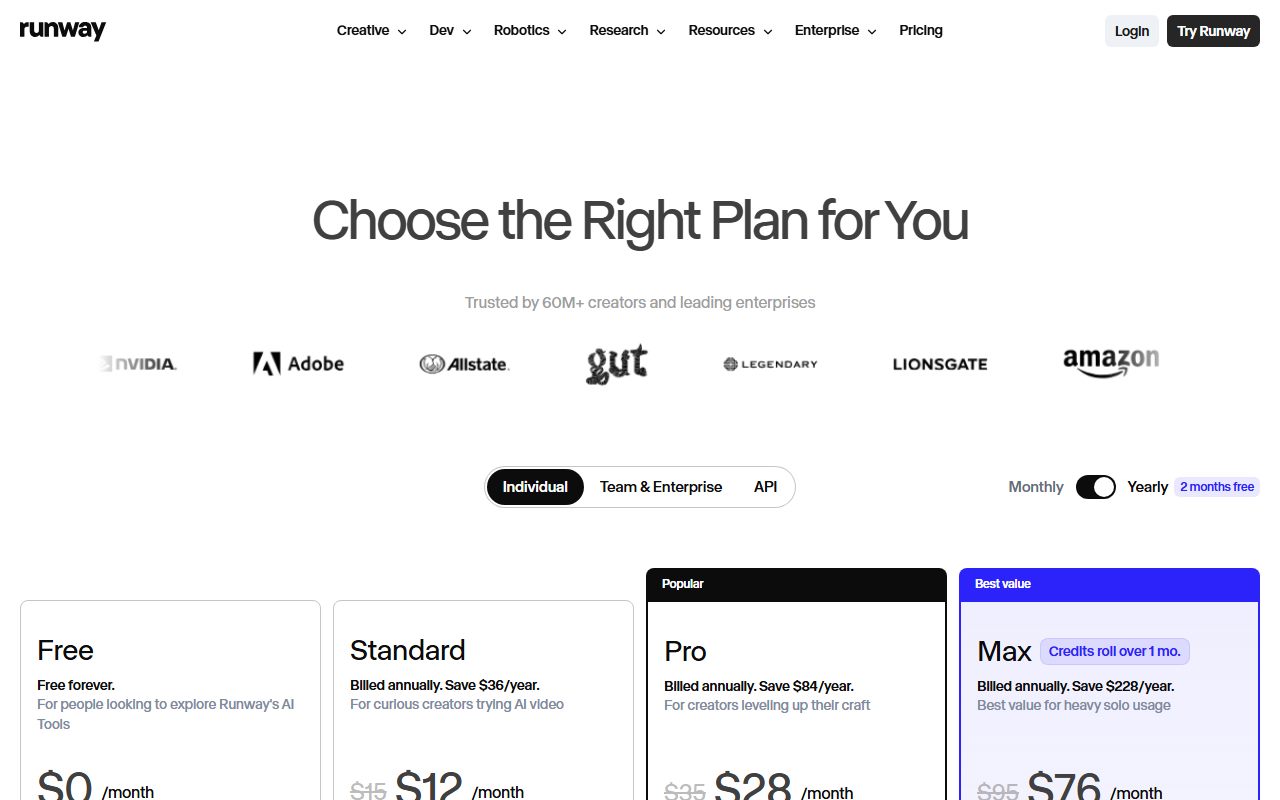
The free plan is listed at $0 a month with three bullets: includes 125 credits (one time), a selection of generative creative models to test concepts, and 5GB asset storage. The help centre's credits article confirms the first in different words - a one-time deposit of 125 credits is included with the Free plan and does not expire - and adds the restriction that credit purchases are not available to Free plan users.
What 125 credits buys is also documented. The help centre says Gen-4.5 uses 12 credits per second of generated video, and that because a generation is five or ten seconds, the total cost is 60 or 120 credits. The same article describes the rates as varying by model, duration and resolution, and refers to a cost table in the app for the rest. Older models and image generation cost less per the public record, but the help centre page retrieved for this review quotes only the flagship rate, so this page does the arithmetic only on that: two five-second clips, or one ten-second clip, from the free deposit. If the selection of free models includes a cheaper one, a free user may get more; the pricing page does not list which models are in the selection.
Storage is 5GB. The pricing page does not list project limits, parallel generations, upscaling or export resolution for Free; those appear in the paid tiers' feature lists as additions, which is the pricing page's way of saying Free does not have them. In particular, the Standard tier lists no watermarks as a feature, which this page reads as free outputs being watermarked, with the caveat that the pricing page does not state it for Free in so many words.
- 125 credits, one time, never expire; no credit purchases on Free (pricing page and help centre, October 2026)
- Gen-4.5 at 12 credits per second: a five-second clip is 60 credits, a ten-second clip is 120
- 5GB storage; a selection of models, not listed; watermark removal appears as a paid feature
What sits behind the paywall
The pricing page lists three self-serve paid tiers plus Team and Enterprise. Standard is $15 a month, or $12 a month billed annually, with 625 credits a month, 20GB storage, access to all AI video and image models, no watermarks, 4K upscaling, up to three projects, five parallel generations, and music, voice and sound-effect generation. Pro is $35 a month, or $28 annually, with 2,250 credits, 100GB storage, up to five projects, fifteen parallel generations, one custom voice clone and unlimited 4K upscaling. Max is $95 a month, or $76 annually, with 9,500 credits, 500GB storage, up to ten projects, twenty parallel generations, three voice clones, studio-grade output options the page lists as HDR, ProRes and image sequences, and credits that roll over one month.
The pricing page translates Standard's 625 credits into examples worth repeating because they set expectations: about 52 seconds of Gen-4.5, or 125 seconds of Gen-4 Turbo, or 78 Gen-4 images at 1080p. The second figure implies the Turbo model costs 5 credits a second, less than half the flagship rate, which is why the model you choose matters as much as the tier.
Rollover and expiry are documented precisely in the help centre. Standard, Pro and Unlimited monthly credits expire on the billing date. Max and Team may roll up to one month of unused credits forward. Purchased credits never expire, and the minimum purchase is 1,000 credits, available to paid plans only. Credits are spent in a fixed order: the current month's plan credits first, then rollover credits, then purchased credits. Workspace credits are shared from one balance. And credits bought for the Runway app are entirely separate from API credits, which the help centre says never cross over.
For a small business, the practical entry is Standard, and the practical budget on Standard is under a minute of flagship video a month or about two minutes of Turbo. That is the number to compare against what you intend to make.
Who it is for, and who should skip it
The free plan is for exactly one activity, and the vendor names it: testing concepts. If you have a product still, a storyboard frame or a prompt, and the question is whether a current generative video model can turn it into a usable five-second clip, 125 credits answers that question once or twice on the flagship model. That is a legitimate use. People deciding between video generators, agencies scoping a pitch, a founder checking whether a demo video is feasible - all of them get real information from two clips.
The paid plans are for people who will make video regularly and can budget in seconds. Standard's 625 credits is, by the pricing page's own arithmetic, about 52 seconds of Gen-4.5 or 125 seconds of Gen-4 Turbo a month. A social-media operation posting a short clip a week on the cheaper model fits; a campaign needing minutes of flagship footage does not, and should be reading Pro and Max.
Who should skip the free plan: anyone hoping to make something with it. It is not a reduced version of the product; it is a sample. Anyone expecting the kind of daily or weekly allowance the image generators in this batch offer - see Leonardo.Ai and Ideogram for what a recurring free allowance looks like - will find Runway's free plan runs out after the first session and never refills.
Who should skip the product: anyone whose need is images rather than video, where the generators above and Adobe Firefly are the relevant pages; and anyone whose first question is training-data provenance, where Firefly's documentation makes claims that Runway's pricing page and credits article do not address. Runway's documentation examined here is about mechanics and cost, not about what the models were trained on; that question needs its terms and policy, not this page.
Limits and what users report
The limits on Free are so plainly stated that the risk is not misunderstanding them but underestimating how fast 125 credits goes. At 12 credits a second on the flagship model, a ten-second generation is the entire deposit. A single mis-prompted attempt is half of it. Free users cannot buy more per the help centre. So the practical advice that follows from the documentation is to prepare the input - the image, the prompt, the duration - before spending anything, and to check whether a cheaper model in the free selection is adequate for the test.
The second limit is the model selection. The pricing page says Free gets a selection of models and Standard gets all of them, and it does not list the selection. A free user may or may not have the flagship model; this page cannot say which models were in the selection on any given day.
The third is the watermark, which the pricing page lists as removed on Standard and does not mention for Free. The reasonable inference is that free outputs are watermarked; the direct statement is not on the page.
The fourth is naming churn: the vendor has moved domains, the help centre lists an Unlimited tier where the pricing page lists Max, and the model lineup changes often, so older guides will quote different models and rates.
On public forums, consistent with the documentation and not independently verified here, the recurring themes are the speed at which credits go, surprise that the free deposit does not refresh, and appreciation that the free credits never expire, so a test postponed is not a test lost.
Privacy and data use
The documentation reviewed for this page - the pricing page and the credits article - is about cost and does not address data use, so this section is a list of what to read in the current privacy policy and terms rather than a summary of them.
Four questions. Whether uploaded images and video - the product stills, the reference footage, the frames you animate - are used to train or improve the vendor's models, and whether that differs between Free, the self-serve paid tiers and Team or Enterprise. How long uploaded assets and generated outputs are retained, including after deletion, and whether the 5GB storage on Free implies anything about retention. Whether generations on the free plan are visible to anyone other than the account holder - several image generators in this category make free output public, and this page found no statement either way for Runway, so it should be checked rather than assumed. And what rights the terms grant over outputs on each tier, which matters for commercial video more than for a social image.
Do not upload an unreleased product, a client's footage or a colleague's face to any tier without reading the policy for that tier. This page cannot verify current policy wording or visibility defaults; for anything commercial, the person who owns that risk should read the policy rather than take a review's word.
Alternatives worth a look
This is the only video product in this batch, so the alternatives on this site are mostly adjacent rather than like-for-like, and the comparison is about what you are actually trying to produce.
Adobe Firefly is the nearest neighbour with video in it. Adobe's plans page describes free daily generations across image, video and audio, refreshing every day, and its Standard tier at $9.99 includes 2,000 credits that the page translates to up to 20 five-second videos a month. That is a recurring free allowance and a cheaper paid entry, with Adobe's provenance claims attached; what it is not is a dedicated video platform with the editing, parallel generation and studio output options Runway's higher tiers list.
Leonardo.Ai lists video and motion generation on its higher tiers, with unlimited relaxed video generation on selected models on Ultimate, and a daily free token allowance that resets every 24 hours. For someone who wants an image generator with video as a secondary capability and a free plan that refills, it is the opposite shape from Runway's.
For the still frames you will animate, Ideogram is the specialist in text inside images and Canva Magic Studio is the layout tool; for the research that precedes a brief, Perplexity is the better tool.
Frequently asked
How much free video do I get? 125 credits, once. The help centre prices Gen-4.5 at 12 credits a second and says a generation is five or ten seconds, so two five-second clips or one ten-second clip on that model. Cheaper models may stretch it; the free selection is not listed.
Do the free credits expire? No. The help centre says the one-time deposit does not expire.
Can I buy more credits on Free? No. The help centre says credit purchases are not available to Free plan users; the minimum purchase on paid plans is 1,000 credits.
Are free videos watermarked? The pricing page lists no watermarks as a Standard feature and does not state the free-plan rule directly. The reasonable reading is yes; this page cannot confirm it.
How much video does Standard buy? Per the pricing page's own example, 625 credits is about 52 seconds of Gen-4.5, 125 seconds of Gen-4 Turbo, or 78 images at 1080p.
Do paid credits roll over? Standard, Pro and Unlimited: no, they expire on the billing date. Max and Team: up to one month forward. Purchased credits: never expire.
Why no screenshots? Because none were captured for this page. That is what a documentation review means here.
Does this page earn a commission? No. There is no affiliate relationship with this vendor; the link goes to the official site.
Bottom line
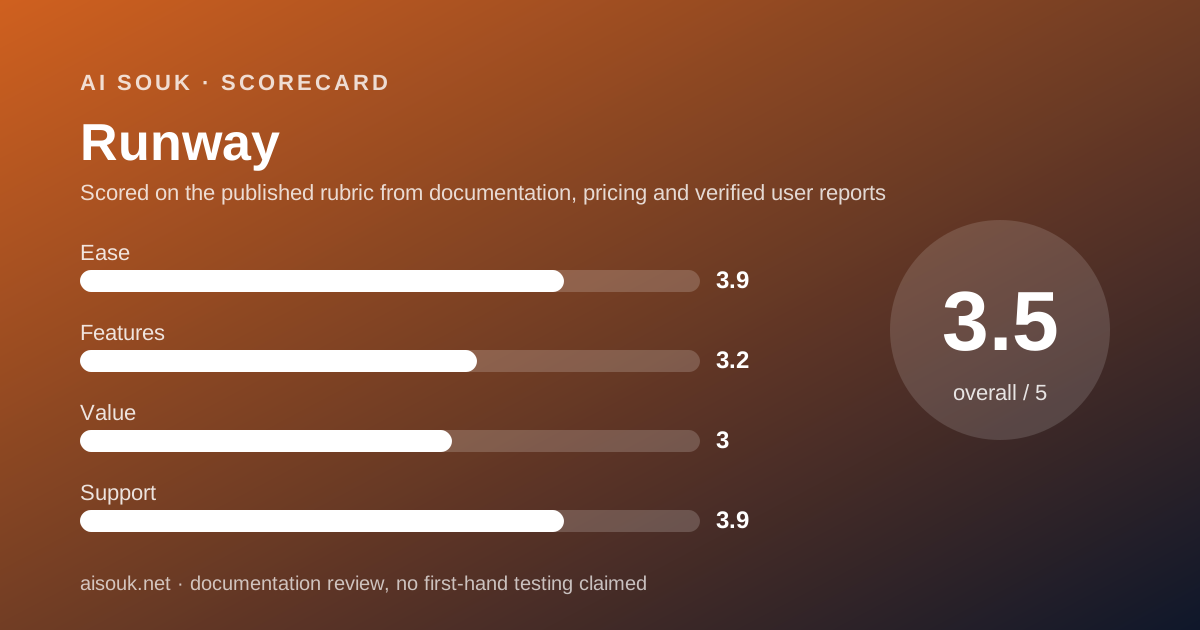
On the documented design, Runway's free plan is a sample and the vendor says so, which earns it more respect than a vague promise would. The value score is the lowest in this batch because 125 credits once is one or two flagship clips and the entry paid tier buys under a minute of flagship video a month; that is the honest arithmetic from the vendor's own pages, and it is simply a more expensive category than still images. The features score is low for the free tier specifically - a selection of models, no listed upscaling, likely watermarked - not for the product, whose paid tiers list a wide and concrete feature set. Ease is reasonable because the free plan needs no card and the credits do not expire. Support is relatively strong because the credit mechanics are documented in more detail than most vendors manage, down to the spend order.
Use the free plan for its stated purpose: one or two tests on material you have prepared carefully, to decide whether a current video model does what you need. If it does, budget in seconds - 12 credits each on the flagship model, roughly 5 on Turbo - and pick the tier whose monthly credits cover a month of what you will actually make. If your need is a recurring free allowance for occasional clips, the Adobe Firefly page describes a different shape that may suit better.
What this page cannot tell you, stated plainly because the site's method requires it: which models are in the free selection today, whether free outputs are watermarked, what the interface looks like, or whether the tier names and credit rates on the pricing page have changed since October 2026. No account was opened and no screenshots were captured. Those facts live on the vendor's pricing page and help centre, and they change more often than this review will.
Visit Runway
We have no affiliate relationship with this vendor. Link goes to the official site.