 AI
AI
Ideogram
The image generator built around getting the words right - with a free plan that is generous on credits and absolute about making everything public.
Scored on the published rubric, from documentation, pricing and verified user reports.
Best for: Anyone who needs an image with readable text in it - a poster, a social card, a sign, a logo concept - and can live with every free generation being visible to the public.
Verdict
This is a documentation review, not a walkthrough: no account was opened for this page and no screenshots were captured, so nothing here is a first-hand claim about what the interface looks like today. On the documented design, Ideogram's distinguishing feature is text rendering - the ability to put specific, legible words inside a generated image - and its documentation treats that as the headline rather than a footnote. The free tier is unusually clearly specified: per the vendor's documentation (checked October 7, 2026), free accounts get 30 credits a week, but only if they sign in with Google, Apple or Microsoft; email-and-password accounts get none. The catch is equally clear and equally absolute: on the free plan, everything you generate is public. That one sentence from the documentation should decide the question for most business users before any discussion of quality. If public is acceptable, the free plan is a real working allowance. If it is not, the entry price is the Plus plan.
Visit Ideogram
We have no affiliate relationship with this vendor. Link goes to the official site.
Where it is strong
- Text inside images is the documented specialty, which is the single most common reason small-business image generation fails elsewhere
- The free allowance is stated as a number - 30 credits a week - rather than hidden behind vague language, and the documentation says exactly who qualifies for it
- Paid plans keep generating after credits run out via a slower queue with no limit, per the plans page, which removes the hard stop that most credit systems impose
- Extra credits are priced plainly at one US cent each, can be bought from $1 to $300, and last 365 days, so occasional heavy use does not force a subscription
- Documentation covers Remix, Describe (image to reusable prompt), reference images, transparent backgrounds, batch runs from a spreadsheet and custom model training, which is a wide feature set for a generator
Where it falls short
- On the free plan and the legacy Basic plan, everything you generate is public - quoted from the documentation - and free users cannot make an image private after the fact
- Accounts created with email and password receive no free credits at all, per the plans page, which is an unusual restriction that catches people out
- PNG download and upscaling require a paid plan; the free tier is limited to JPEG at original size or transparent PNG at 1K resolution, per the FAQ
- Credits do not roll over month to month, and the documentation states that Ideogram does not offer refunds
- Commercial-use rights are referred to the Terms of Service rather than stated in the documentation, so a business user has to read the legal document to know where they stand
What the free tier actually includes
All figures in this section come from the vendor's documentation at docs.ideogram.ai - the Plans and Credits page and the FAQ - checked October 7, 2026. The public pricing page itself was not retrievable during research, so the documentation is the source of record here; the two should agree, but check the pricing page before relying on any number.
The free plan costs nothing and is described in one unusually precise sentence: Free accounts get 30 credits each week if they sign in with Google, Apple or Microsoft. The same page states that accounts created with an email address and password receive no free credits. That is the first thing to know, because it means the sign-in method you choose on day one decides whether the free tier exists for you.
Thirty credits a week is a real allowance. The documentation does not publish a single credit cost per image on the plans page - it directs users to a Usage costs view inside Settings - so this page will not convert 30 credits into a number of images. The FAQ does say that reference images and edits always require credits, which is a hint that the fancier operations cost more than a plain generation.
The second thing to know is visibility. The documentation states, in the same words on two separate pages: On the free plan and the legacy Basic plan, everything you generate is public. Plus, Pro, Team and Enterprise keep new images private until you publish them. The sharing page adds that unpublishing requires a plan that includes private generation, which means a free user cannot generate something, decide it was a mistake, and hide it.
The third is output format. Per the FAQ, PNG downloads require a paid plan; free accounts can download JPEG at original size, or transparent images as PNG at 1K resolution. Upscaling requires a paid plan and additional credits. The feature set otherwise described in the documentation - prompt-to-image, text rendering, Remix, Describe, reference images, Studio editing, transparent backgrounds - is not marked as paid-only, but which parts of it are reachable within 30 weekly credits is for the usage-cost table, not this page, to say.
- 30 credits per week, only with Google, Apple or Microsoft sign-in (per the plans page, October 2026)
- Everything generated on Free is public and cannot be made private later
- JPEG download at original size; transparent PNG at 1K; no PNG download, no upscaling without a paid plan
What sits behind the paywall
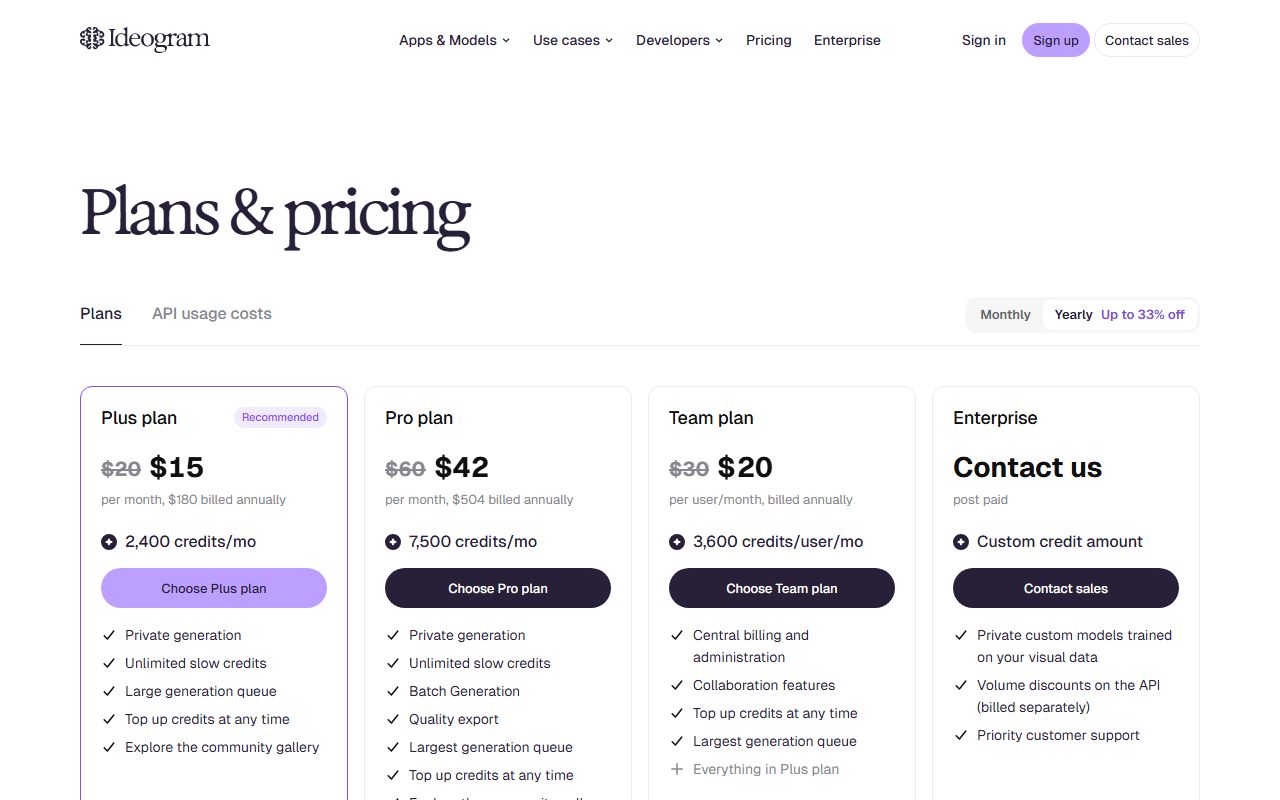
The plans page lists four paid options plus a legacy one. Plus is $20 a month, or $15 a month billed annually ($180 a year), with 2,400 credits a month. Pro is $60 a month, or $42 a month annually ($504 a year), with 7,500 credits a month. Team is $30 per user per month, or $20 per user annually, with 3,600 credits per user. Enterprise is custom. A legacy Basic plan is no longer sold; existing subscribers keep 960 credits a month.
The structural change a paid plan buys is not only the credit count. Three things change in kind. First, privacy: new images stay private until you publish them. Second, continuity: on Plus, Pro and Team you can keep generating with Ideogram models after your credits run out, in what the page calls a slower queue, with no limit - the legacy Basic plan gets the slow queue up to a daily limit, and the FAQ says free and pay-as-you-go accounts need credits for every generation. Third, output: PNG download and upscaling, which the FAQ gates behind a paid plan.
Credits on paid plans do not roll over; the plans page says unused monthly credits are lost at the end of the cycle. Separately, anyone can buy extra credits: the documentation prices them at one US cent each, in preset amounts of $10, $20, $50 or $100 or any amount from $1 to $300, and they expire 365 days after purchase. Purchased credits are spent only after monthly plan credits are gone and survive a cancelled subscription until they expire. The FAQ also notes that users subscribed through the iOS App Store cannot buy credits on the web.
For a small business, the realistic entry point is Plus. At the annual rate it costs $180 a year, and what it buys over Free is mostly the right to keep generated images to yourself, plus roughly eighty times the weekly free allowance and the no-limit slow queue behind it.
Who it is for, and who should skip it
The product earns its place in one job above all: images that have to contain words. A menu board, an event poster, a product label concept, a quote card for social media, a logo exploration with the company name in it. Most image generators treat text as texture and produce something that looks like writing from a distance and dissolves up close. Ideogram's documentation leads with text rendering as a feature, and the public reputation of the product rests on it. If your images need legible words, start here.
Who should skip the free plan specifically: anyone generating something they would not want a stranger to see. Draft logos for a client, mockups for an unannounced product, anything with a real person's likeness, internal campaign concepts. The documentation is unambiguous that free generations are public and cannot be made private later. For those uses, the free plan is not a smaller version of the product; it is a different product with a different risk, and Plus is the real entry point.
Who should skip the product altogether: anyone whose main need is layout rather than generation, who will be better served by generating here and arranging in a design editor - the Canva Magic Studio page covers that shape - and anyone who needs photorealistic lifestyle imagery with no text, where the field is crowded and the documented advantage here is less decisive. And anyone who signs up with an email address and password should know, before they are surprised by it, that the free credits will not appear.
Limits and what users report
The most consequential limit is the public-by-default rule and it has been covered; the second is the sign-in rule, also covered. Three more are worth knowing.
The credit cost per operation is not on the plans page. The documentation sends users to a Usage costs view in their own settings, which means the real question - how many images does 30 credits a week produce - cannot be answered from public documentation and is not answered here. The FAQ's note that reference images and edits always cost credits suggests the basic generation is the cheap operation and everything after it is where credits go.
The slow queue is a paid feature in its documented form. The phrase keep generating after your credits run out appears for Plus, Pro and Team; the FAQ states that free and pay-as-you-go accounts require credits for all generations. So a free user who spends the week's 30 credits by Tuesday waits until the next week. There is no documented way to earn or borrow credits on Free beyond buying them at a cent each, which is available to accounts without a subscription per the extra-credits page.
On public forums the recurring themes, consistent with the documentation and not independently verified here, are surprise at the public gallery and confusion about the sign-in rule for free credits. A smaller theme is that text rendering, while the product's strength, is not perfect on long strings or unusual fonts, so a second or third attempt is often needed; at 30 credits a week, retries are the scarce resource. Third-party guides disagree with each other about the free allowance; this page uses the vendor's own documentation and nothing else.
Privacy and data use
For this product the privacy question is unusually concrete, because the documentation already answers the most important part of it: on the free plan, generated images are public. That is not a training-data question or a retention question; it is visibility, and it applies to every image, including the prompts attached to them in the gallery. Before anything else, decide whether that is acceptable for what you intend to generate.
Beyond that, three questions to answer from the current privacy policy and terms rather than from this page. Whether prompts and uploaded reference images are used to train or improve models, and whether that differs between free and paid tiers. What happens to a reference image you upload - a photo of a product, a face, a brand asset - in terms of retention, and whether it is treated differently from a generation. And what rights the terms grant the vendor over published images, since on Free every image is published by definition.
Commercial use deserves its own line. The FAQ refers the question of whether commercial use is permitted to the Terms of Service, and says users bear responsibility for ensuring content complies with laws, rights and platform terms. This page has not summarised the Terms and will not; if you intend to sell or publish images commercially, read that document for your tier.
Do not upload a client's logo, an unreleased product photo or a colleague's face to a free tier whose output is public. This page cannot verify current policy wording; the policy is the document to read.
Alternatives worth a look
Three products on this site sit next to this one, and the choice between them is mostly about what you are generating and who may see it.
Leonardo.Ai is the closest competitor in shape: a dedicated generator with a documented free allowance (150 fast tokens a day), public generations on Free, and private generation on paid plans. Its documentation does state that commercial use is permitted for free users, which Ideogram's documentation leaves to the Terms. Where Ideogram leads with text in images, Leonardo's documentation leads with its own model family, reference tools and a broader video and motion set.
Adobe Firefly is the choice for a business whose first question is whether it can use the output without licensing worry. Adobe's pages make specific claims about training only on licensed and public-domain content and about not training on subscribers' personal content; neither Ideogram nor Leonardo makes an equivalent claim in the documentation reviewed. Firefly's free plan is described as limited daily generations and its paid plans meter premium features through credits.
Canva Magic Studio is a design editor with AI inside it rather than a generator; if you need a finished post, generate the text-bearing image here and lay it out there. For research before you generate, Perplexity is the better tool than any generator's Describe feature.
Frequently asked
How many free images do I get? The documentation states 30 credits a week for free accounts signed in with Google, Apple or Microsoft, and does not publish a per-image credit cost on the plans page. So the honest answer is: 30 credits, and the number of images depends on the usage-cost table in your own settings.
Why did I get no free credits? Per the plans page, accounts created with an email address and password receive no free credits. Sign-in method decides it.
Are my free images private? No. The documentation says everything generated on the free plan is public, and that unpublishing requires a plan with private generation.
Can I use free images commercially? The FAQ refers this to the Terms of Service and places responsibility on the user. Read the Terms for your tier before selling or publishing anything.
What happens when credits run out? On Plus, Pro and Team, generation continues in a slower queue with no limit. On Free, it stops until the weekly reset, unless you buy credits at one cent each.
Do credits roll over? Monthly plan credits do not. Purchased credits last 365 days.
Can I get a refund? The documentation states that Ideogram does not offer refunds.
Why no screenshots? Because none were captured for this page. It is a documentation review for that reason.
Does this page earn a commission? No. There is no affiliate relationship with this vendor; the link goes to the official site.
Bottom line
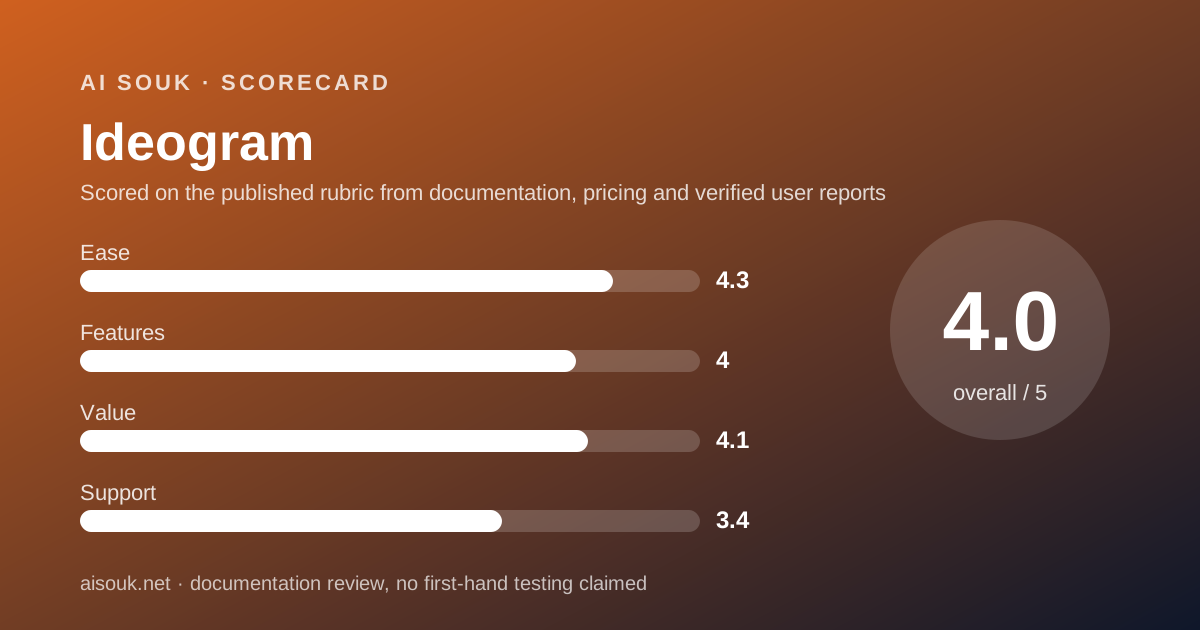
On the documented design, Ideogram is the generator to reach for when the words in the image matter, and its free plan is a genuine working allowance for anyone who can accept two conditions the vendor states plainly: sign in with a major identity provider, and accept that everything you make is public. The ease score is high because the free allowance is a stated number and the sign-up conditions, while unusual, are documented rather than hidden. The features score reflects a broad documented toolset - text rendering, Remix, Describe, reference images, batch runs, transparent backgrounds - with the honest deduction that PNG output and upscaling are paid. The value score is above the category midpoint because the paid entry at $15 a month annually buys privacy, a no-limit slow queue and a large credit pool, and because the one-cent top-up means nobody is forced into a subscription. Support is self-service - an email address, a Discord, the documentation - which is normal at this price and still the weakest part.
Use the free plan for public-safe work: event posters, quote cards, menu concepts, anything you would be happy to see in a gallery. Move to Plus the moment you are generating something for a client or for an unannounced product, not because the free plan is worse at generating but because it publishes.
What this page cannot tell you, stated plainly because the site's method requires it: what the interface looks like today, how many images 30 credits produce, what the Terms say about commercial use, or whether the pricing page matches the documentation this week. No account was opened and no screenshots were captured. Those facts live on the vendor's own pages, and they change more often than this review will.
Visit Ideogram
We have no affiliate relationship with this vendor. Link goes to the official site.