 AI
Best free AI automation tools, ranked by limits
This guide is built from the three vendors' own pricing pages, help centres and licence text, read on October 11, 2026, not from accounts of our own, so nothing below is a first-hand claim about any interface. Our top pick is Make, because its pricing page lists 1,000 credits a month on a permanent free plan with routers and filters included, against Zapier's 100 tasks and two-step cap. Zapier is second on the strength of a 10,240+ app directory. n8n is third and is the best value of the three if you can run Docker, because there is no free cloud plan at all.
Our picks
The three picks at a glance
All three free options are real, and none of them is the same shape. Read the one-line limit beside each pick before the score, because it is the limit that will decide this, not the rating.
- Make - best free allowance overall. 3.9 out of 5. Free plan: 1,000 credits a month, 2 active scenarios. First paid step $9 a month
- Zapier - best app coverage. 3.5 out of 5. Free plan: 100 tasks a month, two-step workflows only. First paid step $19.99 a month billed annually
- n8n - best value if you can self-host. 3.6 out of 5. No free cloud plan; the self-hosted Community edition is free indefinitely. Cloud starts at EUR 20 a month
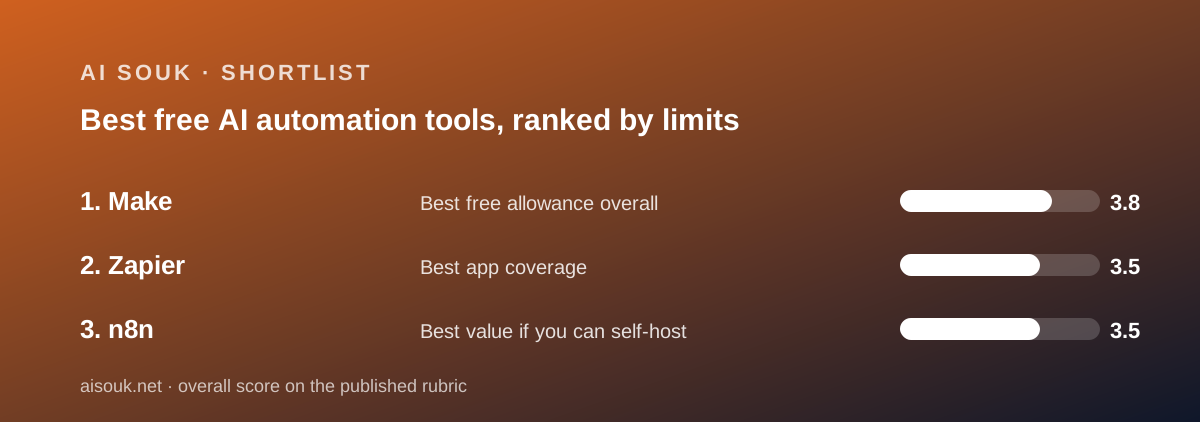
The limit that binds is different in all three
This is the sentence worth carrying away from the page. Each vendor is generous in one column and strict in another, and the strict column is rarely the one the marketing leads with.
Zapier's free plan allows unlimited automations and almost no work: 100 successful action steps a month, which is about three a day by our own arithmetic. The second restriction is two steps per workflow.
Make's free plan allows ten times the work and almost no concurrency: 1,000 credits a month, but a maximum of 2 active scenarios at any moment.
n8n's free edition allows almost everything and asks for a server. The Community edition is free indefinitely under the Sustainable Use License, and the documentation requires Docker on Linux or macOS, or WSL on Windows.
So the right first question is not which is best. It is which of those three restrictions you can live with. The habit of looking for that number is the subject of how to read an AI free tier before you sign up.
The free plans on the numbers (read October 11, 2026)
Every row was read from the vendor's own pricing page, help centre or documentation on October 11, 2026. Not published means the vendor does not state the figure, not that no limit exists.
- Permanent free plan: Make yes / Zapier yes / n8n no, trial only on cloud, free indefinitely if self-hosted
- Free allowance: Make 1,000 credits a month / Zapier 100 tasks a month / n8n unlimited when self-hosted; 1,000 executions in the cloud trial
- Unit metered: Make operations, 1 credit each for non-AI apps / Zapier successful action steps / n8n workflow executions, with no per-node charge published
- Active automations on free: Make 2 / Zapier unlimited / n8n unlimited when self-hosted
- Steps per workflow on free: Make no published cap / Zapier 2 / n8n no published cap
- Branching on free: Make yes, routers and filters listed / Zapier no, Paths is paid / n8n yes
- Minimum interval on free: Make 15 minutes / Zapier 15 minutes / n8n not applicable when self-hosted
- Apps or integrations listed: Make 3,500+ standard and 350+ AI / Zapier 10,240+ / n8n 2,329, with every node on every plan
- First paid step: Make Core $9 a month / Zapier Professional $29.99 monthly or $19.99 billed annually / n8n Starter EUR 20 a month
- Self-hosted option: Make no / Zapier no / n8n yes, and it is the free one
- Trustpilot on October 11, 2026: Make 2.7 out of 5 from 173 reviews / Zapier 1.3 out of 5 from 322 reviews / n8n 2.9 out of 5 from 49 reviews
Why Make sits at number one
Because the free allowance is the only one of the three that can do a month of real work without a server.
1,000 credits a month against Zapier's 100 tasks is a ten-to-one gap in the unit each vendor uses to bill. The units are defined differently, but both count work performed by the platform, so the ratio is the honest headline.
Routers and filters are listed on the free plan. At Zapier, branching lives in Paths and Paths is paid, so a free Zapier user cannot build an automation that takes two different actions depending on a condition. Most real automations need that by the second month.
The AI layer is not withheld either. Maia, the AI applications, Make AI Agents in beta and the Make AI Toolkit are listed across all plans including Free.
And the escape hatch is cheap. Core at $9 a month lifts four ceilings at once: active scenarios from 2 to unlimited, interval from 15 minutes to 1, execution time from 5 minutes to 40, data transfer from 512 MB to 5 GB.
Why Zapier sits at number two
Because 10,240+ apps is a real asset and the free plan is a demonstration rather than a system.
The directory figure, read from zapier.com/apps on October 11, 2026, is roughly three times what Make publishes. If one end of your automation is a niche booking system or a regional payment processor, Zapier is the service most likely to have it, and every price argument above becomes irrelevant.
The free plan is where it loses the ranking. 100 tasks a month and two steps per workflow mean the free tier shows you the idea and then stops. The first paid step is $29.99 a month billed monthly, or $19.99 billed annually, for 750 tasks, which is more than double Make's Core plan.
One genuine credit to Zapier: its help centre publishes the clearest metering document of the three. It states explicitly that triggers, Filter and Paths steps, errored actions, and Formatter, Delay, Looping, Digest, Storage, Zapier Manager, Tables and Forms steps do not consume tasks. That makes 100 less brutal than it reads.
Against it, the public record on billing is the worst here: Trustpilot showed 1.3 out of 5 from 322 reviews on October 11, 2026, with refunds and auto-renewal the repeated themes.
Why n8n sits at number three, and why it might be your number one
Because the free option is conditional, and the condition excludes most readers of this page.
There is no permanent free cloud plan. The pricing page lists a trial with Pro-level features, 1,000 executions, 5 concurrent executions, a 180-second timeout and 1 team project, and the documentation describes it as 14 days. After that the cheapest cloud plan is EUR 20 a month.
What is free indefinitely is the self-hosted Community edition, under the Sustainable Use License version 1.0. The documentation describes it as carrying almost the complete feature set, and the integrations directory listed 2,329 integrations on October 11, 2026, with every node included on every plan.
If you can run Docker and keep it patched, this is the best value in the category by a wide margin, and it is the only option here where the data never leaves your infrastructure. That is why it ranks third on a list for general readers and first for a technical one.
The costs are support and collaboration. The Community edition is community-supported. Workflow and credential sharing, SSO, environments, projects and Git version control are withheld as enterprise features, which makes the free edition a one-person tool in practice.
Three metering units, none of them comparable
The most common mistake in this category is comparing the free allowances as if the numbers meant the same thing. They do not.
Zapier sells tasks. A task is one successful action step, so a workflow with ten actions costs ten times a workflow with one. Triggers, filters and several utility step types are free, which is published and unusually clear.
Make sells credits. For non-AI apps, one operation equals one credit. Third-party AI apps cost one credit per operation plus token usage, and the help centre notes that some built-in modules, such as certain AI Content Extractor modules, consume more than the default one credit because of processing complexity.
n8n sells workflow executions. The pricing page lists 2,500 a month on Starter and 10,000 on Pro, with no per-node charge published anywhere we could read. On that unit, a thirty-node workflow and a three-node workflow cost the same per run.
So the only honest way to compare is to model your own workflow against each meter before you sign anything. Our note on what AI credits actually mean sets out the general method, and how AI Souk grades a free tier explains the rubric behind the scores here.
How to choose between them in ten minutes
Four steps, in this order. Doing them out of order is how people end up paying for the wrong platform.
- Search both public app directories for both ends of your automation. Neither needs an account. If one end exists only in Zapier's 10,240+ list, the decision is made
- Count how many automations you need running at once. Two busy jobs favours Make. Ten occasional jobs favours Zapier's unlimited free Zaps
- Count the steps in your longest workflow. Long workflows favour n8n, which bills per run, and penalise Zapier, which bills per successful action
- Ask whether the records can leave your network. If the answer is no, n8n self-hosted is the only option on this list
Also considered, and why they are not graded here
This list is deliberately three tools, and the omissions are a limit of this edition rather than a verdict on the products.
IFTTT, Pipedream, Activepieces, Zoho Flow and Power Automate all compete in this category and several publish free tiers. None of their pricing pages was read on October 11, 2026, so none of them is graded here. We do not publish scores for products whose published figures we have not read on a stated date, and we will not estimate them from memory or from search snippets.
They will be added to this page when their pricing pages have been read and dated, and the change will be recorded in the changelog rather than quietly inserted.
One category boundary is worth stating too. If what you need is not a platform in the middle but a single tool that already does the job, check the specific review first. Our starter kit for a small business owner lists tools that handle meetings, documents and writing on their own, and building a free-tier stack covers splitting work across free plans without an automation platform at all.
What none of the three publish clearly
Two gaps are worth naming, because every page that pretends otherwise is guessing.
First, model training. We looked for a plain published statement from each vendor about whether customer data is used to train models for the AI features. Several candidate pages on zapier.com returned 404 when fetched on October 11, 2026. Make's AI page described the capabilities without addressing training. n8n's self-hosted edition makes the question moot for the orchestration layer, but a model call still leaves your network under the provider's terms.
So for the two hosted platforms, the honest answer on that date is that we could not read one. If this matters to your business, get it in writing before you connect a system of record. The general shape of the problem is in free AI tiers and your data.
Second, real-world throughput. None of the three publishes how long a typical run takes or what proportion fail, and we did not measure it. Both hosted free plans do publish a 15-minute minimum interval, which is enough to rule them out for anything a customer is waiting on.
Bottom line
Start with Make unless you have a specific reason not to. The free plan is the only one of the three that behaves like a product rather than a sampler, and at $9 a month the first paid step is the cheapest exit.
Start with Zapier if your app exists only in its directory, or if you want one automation running within the hour and would rather not learn a canvas. Expect the 100 tasks to run out.
Start with n8n if you can run Docker. It is the best value here and the only one that keeps your data on your own machines, and the price of that is being your own support desk.
If the choice is really between the two hosted options, our head-to-head on Zapier vs Make goes through the figures row by row. If you are already past the free plans, when to leave the free tier is the checklist to run before the first invoice.
All three were scored on our published rubric from documentation, pricing pages, licence text and verified user reports, not from hands of our own on the products.
Best free allowance overall: Make
Make takes the top spot on one published fact: the pricing page, read October 11, 2026, lists 1,000 credits a month on a permanent free plan, against 100 tasks at the nearest hosted rival. Routers and filters are on that free plan too, so a free automation can carry real logic rather than being capped at two steps. The AI layer is not withheld: Maia, the AI applications, Make AI Agents in beta and the AI Toolkit are listed across all plans. The binding limit is elsewhere, and it is worth knowing before you plan around the allowance: only 2 scenarios may be active at once, execution is capped at 5 minutes per run, and data transfer at 512 MB a month. Core at $9 a month lifts all four of those at once, which is the cheapest escape hatch in this category.
Visit Make
We have no affiliate relationship with this vendor. Link goes to the official site.
Best app coverage: Zapier
Zapier is second because the thing it is best at cannot be bought elsewhere. The app directory stated 10,240+ apps on October 11, 2026, roughly three times what the next competitor publishes, and free users reach the same connectors. If your automation touches a niche booking system or a regional payment processor, this is the service most likely to have it. The free plan is the weakness. 100 tasks a month, two steps per workflow, one user and a 15-minute update time, per the pricing page on the same date. The mitigation is genuine and published: the help centre states that triggers, Filter and Paths steps, errored actions and several utility step types do not consume tasks, so the real cost of a filtered Zap is lower than the firing count suggests. The first paid step is $29.99 a month, or $19.99 billed annually, for 750 tasks.
Visit Zapier
We have no affiliate relationship with this vendor. Link goes to the official site.
Best value if you can self-host: n8n
n8n is third on a list for general readers and arguably first for a technical one, and the reason is a condition rather than a shortcoming. There is no permanent free cloud plan: the cloud offer is a trial with Pro features, 1,000 executions, 5 concurrent runs, a 180-second timeout and 1 team project, after which Starter is EUR 20 a month. What is free indefinitely is the self-hosted Community edition under the Sustainable Use License, described in the documentation as carrying almost the complete feature set, with 2,329 integrations listed and every node available on every plan. Metering is by workflow execution rather than per step, which is the most generous unit in this category for long workflows. The costs are a Docker requirement, community support, and enterprise features withheld from the free edition, including workflow sharing, SSO, environments and Git version control.
Visit n8n
We have no affiliate relationship with this vendor. Link goes to the official site.
How we chose
Three platforms were graded: the two largest hosted automation services with permanent free plans, and the leading self-hostable alternative. We did not run tests of our own; grades come from documentation, pricing pages, licence text and verified user reports checked on October 11, 2026. Each tool was scored on four questions. First, what does the pricing page list on the free plan, and which number is the one that actually binds? Second, what unit does the vendor meter, and what does that unit count? Third, what is the first paid step, and what does it buy? Fourth, what do the vendor's own pages say about where the data goes? Sources were the vendors' pricing pages, their help centres, n8n's documentation and its licence file in the public repository, and Trustpilot for public sentiment, all read on October 11, 2026. Trustpilot scores are reported as sentiment rather than measurement, because that platform attracts billing disputes and the samples are small. Where a vendor does not publish a figure, the row says so instead of carrying an estimate.
Frequently asked
What is the best free AI automation tool?
Make, for most readers. Its pricing page, read October 11, 2026, lists 1,000 credits a month on a permanent free plan with routers and filters included, against Zapier's 100 tasks and two-step cap. If you can run Docker, n8n's self-hosted Community edition is better value still.
Is Zapier or Make better on the free plan?
Make, on published figures. 1,000 credits a month against 100 tasks, branching included rather than paywalled, and a first paid step of $9 against $19.99 billed annually. Zapier's counter-argument is a directory of 10,240+ apps against Make's 3,500+.
Does n8n have a free plan?
Not on its cloud service. The pricing page lists a trial with 1,000 executions, 5 concurrent runs and a 180-second timeout, then paid tiers from EUR 20 a month. The self-hosted Community edition is free indefinitely under the Sustainable Use License.
Can I compare the free allowances directly?
No, because the units differ. Zapier bills successful action steps, Make bills operations at one credit each for non-AI apps, and n8n bills whole workflow executions. Model your own workflow against each meter rather than comparing the headline numbers.
Are the AI features included on these free plans?
Partly. Make lists Maia, the AI applications, AI Agents in beta and the AI Toolkit on all plans. Zapier lists Copilot with an unpublished daily limit. In every case AI steps still consume the platform's unit, and model calls also consume the provider's tokens.
How fast can a free automation run?
Both hosted free plans list a 15-minute minimum interval for scheduled runs, as of October 11, 2026. Paid tiers drop that to 1 or 2 minutes. Webhook-triggered automations arrive rather than being polled for, and neither free plan published a limit on those.
Did you test these tools?
No. These are documentation reviews. Scores come from the vendors' pricing pages, help centres, n8n's documentation and licence file, and public user reports, all read on October 11, 2026. No accounts were opened and no instance was deployed.