 AI
n8n
The automation platform with no permanent free cloud plan and a free self-hosted edition, metered by workflow run rather than by step.
Scored on the published rubric, from documentation, pricing and verified user reports.
Best for: Someone who can run Docker, wants the data to stay on their own infrastructure, and is comfortable being their own support desk in exchange for paying nothing.
Verdict
This page is a documentation review: it is built from n8n's own pricing page, documentation, licence file on GitHub and integrations directory read on October 11, 2026, not from a logged-in account or a running install. The important finding is one that the marketing does not lead with. There is no permanent free cloud plan. The cloud offer is a trial with Pro-level features, 1,000 executions, five concurrent runs, a 180-second timeout and one team project, after which the cheapest plan is EUR 20 a month. What is free, indefinitely, is the self-hosted Community edition under the Sustainable Use License. That is a genuine free option and a genuine condition: you need Docker, a server and the willingness to be your own support desk. In exchange you get almost the complete feature set, 2,329 integrations, and metering by workflow execution rather than by individual step, which is the most generous unit in this category. The features score is the highest in this cluster. The support score is the lowest.
Visit n8n
We have no affiliate relationship with this vendor. Link goes to the official site.
Where it is strong
- The self-hosted Community edition is free indefinitely and carries almost the complete feature set, per the n8n documentation read October 11, 2026
- Metering is by workflow execution rather than by step: the pricing page sells 2,500 executions on Starter and 10,000 on Pro, with no published per-node charge
- Unlimited users and unlimited workflows are listed on every cloud plan, including the cheapest, per the pricing page
- The integrations directory listed 2,329 integrations on October 11, 2026, and the pricing page states every plan includes every integration node
- Self-hosting keeps the data on your own infrastructure; the documentation lists Docker, Docker Compose, AWS, Azure, Google Cloud, DigitalOcean, Hetzner, Heroku and OpenShift as deployment routes
- The project is public: the licence sits in the repository and the pricing page cited 206,926 GitHub stars when read October 11, 2026
Where it falls short
- There is no permanent free cloud plan. The free cloud offer is a trial, documented as 14 days with Pro features and limited to 1,000 executions, 5 concurrent runs, a 180-second timeout and 1 team project
- The free edition is free only if you can host it: the documentation requires Docker on Linux or macOS, or WSL on Windows, and npm installation is deprecated from version 3.0
- The Sustainable Use License restricts use to your own internal business purposes or non-commercial and personal use, so selling n8n as a service to others is not permitted under it
- Enterprise features are withheld from the free edition, including SSO with SAML and LDAP, environments, projects, workflow and credential sharing, Git version control and custom variables
- The jump from Pro at EUR 50 a month to Business at EUR 667 a month billed annually is the steepest price step in this cluster, and Business is listed as self-hosted only
- Public sentiment is weak and split: Trustpilot showed 2.9 out of 5 from 49 reviews on October 11, 2026, with support response times and lost account access the repeated complaints
At a glance
| Starting price | EUR 0 self-hosted (Community edition); no free cloud plan |
|---|---|
| First paid step | EUR 20/mo (Cloud Starter, 2,500 executions) |
| Free trial | Cloud trial with Pro features, 1,000 executions, 5 concurrent, 180-second timeout |
| Integrations listed | 2,329 (integrations directory, October 11, 2026) |
| Users included | Unlimited on every cloud plan |
| Licence | Sustainable Use License v1.0 for the Community edition |
The free tier is not where you think it is
Most pages about n8n describe it as the free automation tool. That is true of one edition and false of the other, and the distinction decides whether this product is right for you.
The cloud service has no permanent free plan. The pricing page, read October 11, 2026, lists a free trial with Pro-level features and then four paid tiers. The trial is capped at 1,000 executions, 5 concurrent executions, a 180-second execution timeout and 1 team project. The documentation describes it as 14 days.
The Community edition is free indefinitely, and you host it. The documentation states a standard self-hosted version is available on GitHub, and that it carries almost the complete feature set.
So the honest answer to is n8n free depends on a question about you, not about n8n: can you run Docker on a server and keep it running.
If that is a no, this page is useful mainly as a reason to look elsewhere. Our note on how to read an AI free tier before you sign up is the general version of the trap this product sets.
What n8n actually is
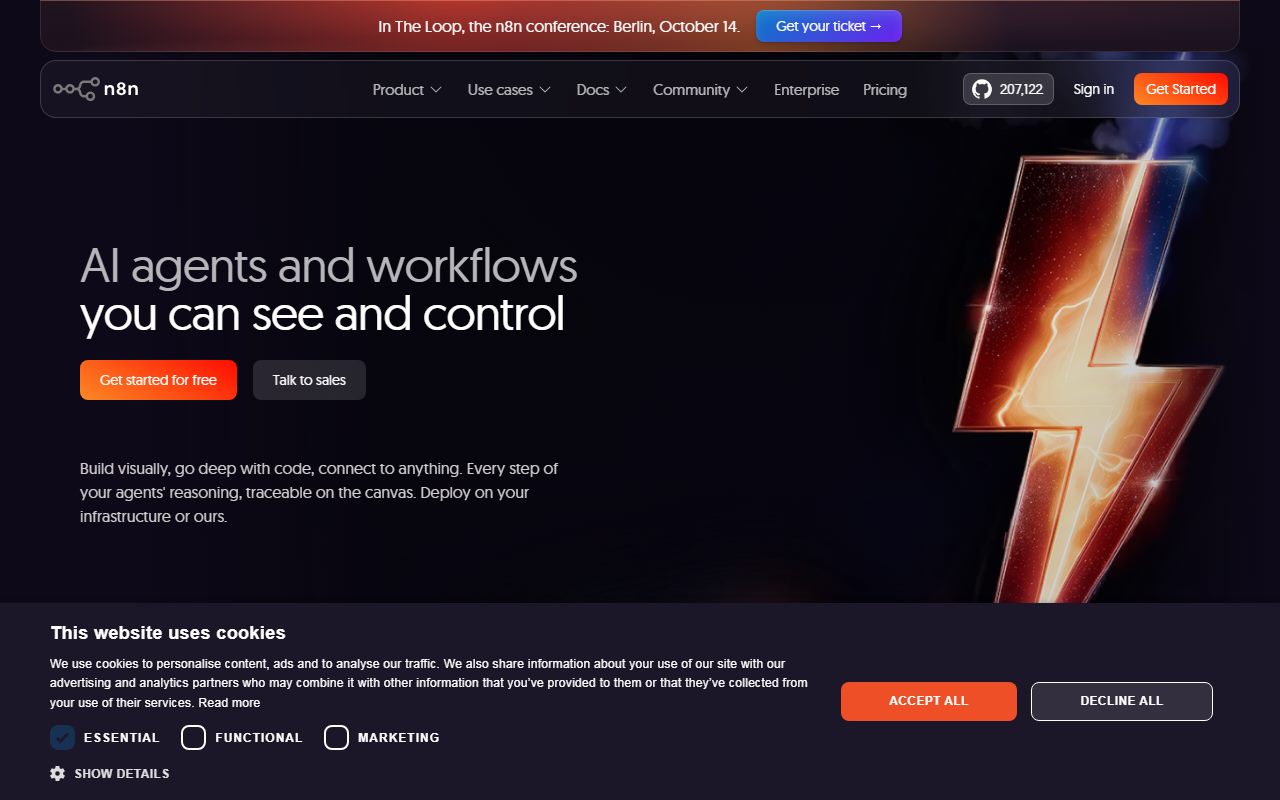
n8n is a node-based workflow engine. You connect nodes on a canvas, each node does one job, and the connections carry data between them.
The design sits closer to a developer tool than the rest of this category. There are code nodes, and the whole engine is a piece of software you can read, patch and deploy yourself.
The integrations directory listed 2,329 integrations on October 11, 2026, and the pricing page states every plan includes every integration node. There is no premium-connector tier, which is a real structural difference from the hosted competition.
The AI positioning is heavy. Model nodes, retrieval components and agent patterns are a central part of what the project markets, and the code nodes mean an awkward step can be written rather than worked around.
If you already use a coding assistant such as Cursor, the model here will be familiar. If you have never opened a terminal, it will not.
The metering unit is the best thing on the pricing page
n8n sells workflow executions. The pricing page lists 2,500 a month on Starter, 10,000 on Pro and 40,000 on Business, with no separate per-node charge published.
That unit is worth understanding, because it is not what the rest of this category sells. Zapier bills successful action steps, so a workflow with ten actions costs ten times a workflow with one. Make bills credits, and for non-AI apps one operation is one credit.
On n8n's published unit, a workflow with thirty nodes and a workflow with three nodes both consume one execution per run. For long, data-heavy automations, that difference is larger than any price gap in this cluster.
We are reading the published unit name rather than auditing the meter, and we did not run workflows to verify the count. What we can say is that the page sells runs, not steps, and that no per-step figure is published anywhere we could read on October 11, 2026.
The general warning about metering units applies here too, and we set it out in what AI credits actually mean.
How the pricing is structured
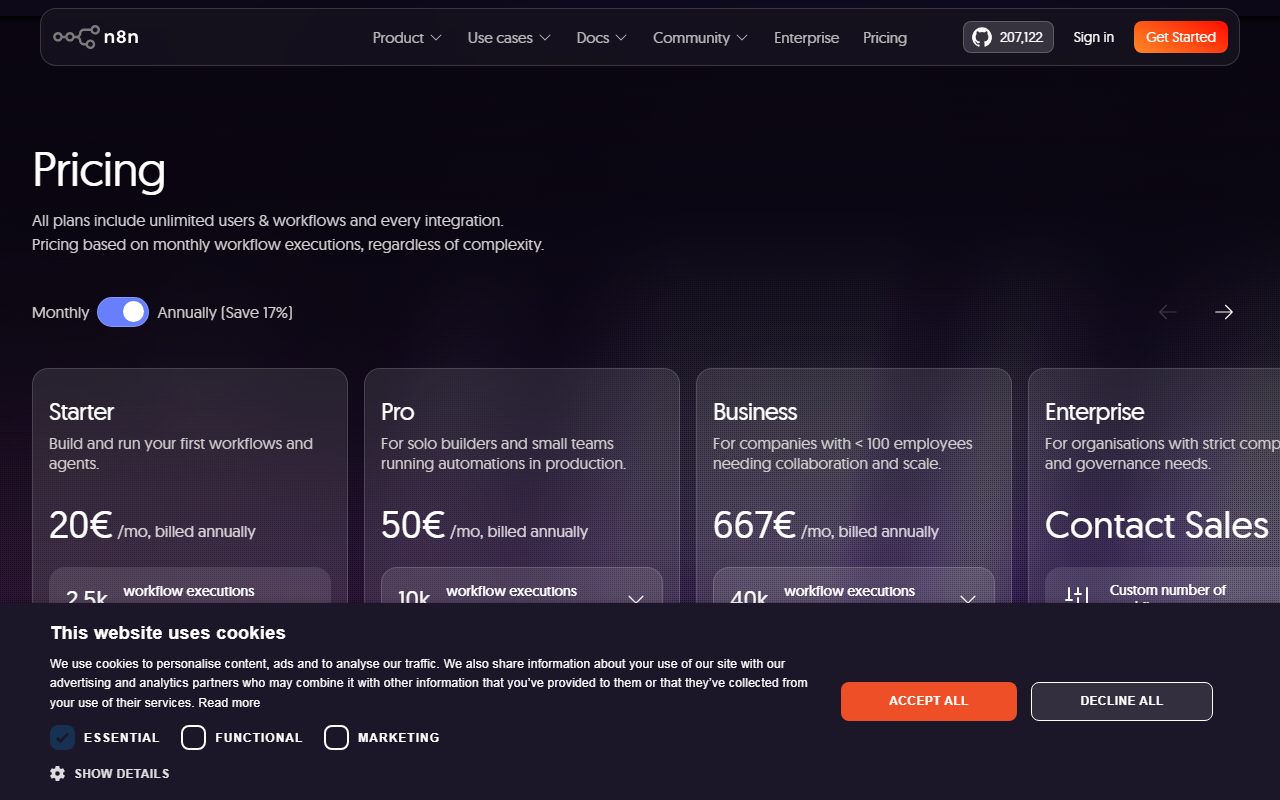
Four tiers, priced in euros, read from the pricing page on October 11, 2026.
Starter is listed at EUR 20 a month, with 2,500 executions, 1 shared project, 5 concurrent executions, and unlimited users and workflows.
Pro is listed at EUR 50 a month, with 10,000 executions, 3 shared projects and a concurrency band of 20 to 50.
Business is listed at EUR 667 a month billed annually, with 40,000 executions, 6 shared projects, and described as self-hosted only. The page notes that the Business trial requires a credit card.
Enterprise is quoted by sales, with custom execution volume, unlimited shared projects, more than 200 concurrent executions, and a choice of hosted or self-hosted.
Two things stand out. Unlimited users on every tier means a team of twenty pays the same as one person, which no per-seat tool can match. And the gap between Pro and Business is more than tenfold, which makes the middle of this ladder uncomfortably empty.
What the licence lets you do, in plain terms
The Community edition is published under the Sustainable Use License, version 1.0, and the text sits in the repository. We read it on October 11, 2026.
The grant permits you to use, copy, distribute, make available and prepare derivative works of the software. The restriction is the sentence that matters: you may use or modify the software only for your own internal business purposes or for non-commercial or personal use.
You may distribute it to others free of charge for non-commercial purposes. You may not alter, remove or obscure licensing, copyright or other notices, and modifications must carry a prominent notice saying you modified it.
Plain reading: running n8n inside your own company is permitted. Reselling it, or wrapping it as a service you charge for, is not. Certain files in the repository carry a separate enterprise licence.
The licence does not define internal business purposes, so the boundary is genuinely unclear at the edges. If your plan sits near that edge, get legal advice rather than taking a review's word for it.
Ease of use: the lowest score here, for documented reasons
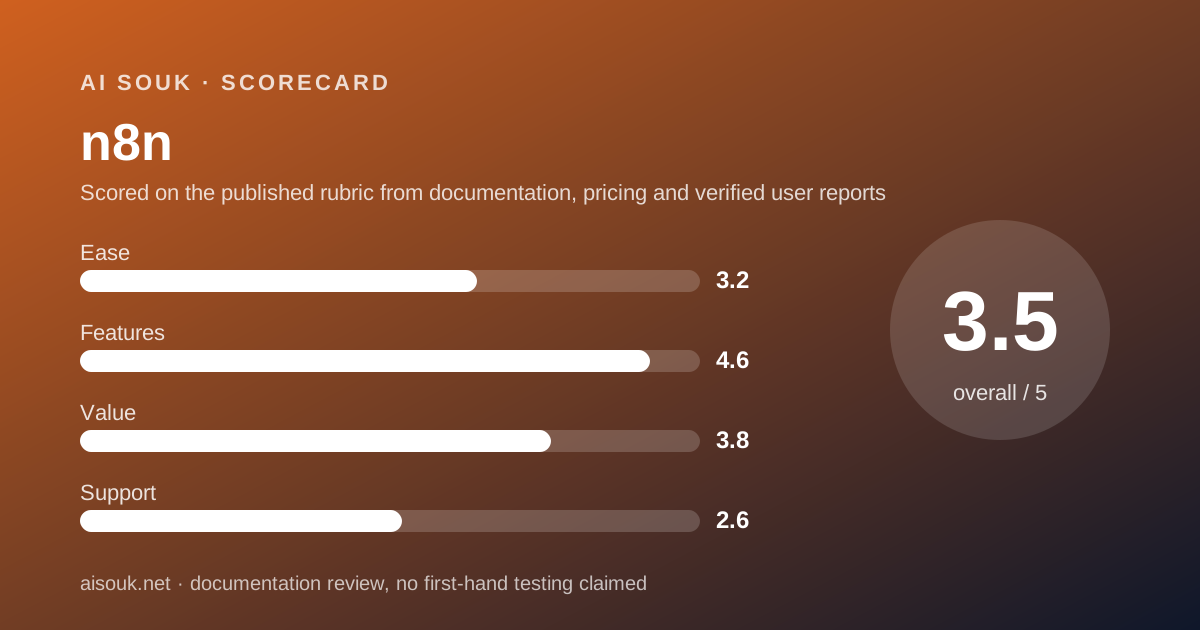
3.2 out of 5. The canvas is not the problem. The prerequisites are.
The documentation's one-line setup requires Docker on Linux or macOS, or WSL on Windows. Production deployment is documented through Docker Compose with databases and services. Installation via npm is deprecated from version 3.0.
None of that is hard for someone who already runs servers. All of it is a wall for someone who wanted an automation tool, and it is the price of the free edition.
The cloud route removes the wall and removes the free plan at the same time. At EUR 20 a month you get a hosted editor with nothing to patch.
Inside the product, public reviewers describe the interface as accessible even without automation experience, which is a sentiment rather than a measurement. Against that, the node-based model with code nodes assumes more than a two-step builder does.
No account was opened and no instance was deployed for this page. This score reads the published requirements, not the experience of meeting them.
Features: the deepest of the three, with an asterisk
4.6 out of 5, the highest feature score in this cluster.
The case is straightforward. 2,329 integrations with every node on every plan. Code nodes for anything the nodes do not cover. Execution-based metering rather than per-step. Unlimited users and unlimited workflows on every cloud tier. A self-hosted option that no competitor here offers at all.
For AI work specifically, the model providers are nodes on the canvas, so a workflow can route a prompt to ChatGPT or Claude and branch on the answer. Self-hosting means the orchestration stays on your infrastructure even though the model call does not.
The asterisk is what the free edition does not get. Per the documentation, enterprise features require paid licensing: SSO with SAML and LDAP, environments, projects, workflow and credential sharing, Git version control and custom variables.
Workflow sharing is the one that surprises teams. On the free edition, collaborating on a workflow is not a supported feature, which turns a team tool into a single-operator tool.
The documentation also warns that feature availability changes over time and differs by plan and edition, and names the pricing page as the definitive source. Check it before you commit.
Value: excellent if you host, mid-range if you do not
3.8 out of 5, and the score is an average of two very different answers.
Self-hosted, the value is the best in this category by a wide margin. Almost the complete feature set, 2,329 integrations, unlimited workflows, your own data, for the price of a small virtual server. Nothing else here comes close.
On the cloud, the value is ordinary. EUR 20 a month for 2,500 executions is reasonable against Zapier's 750 tasks for $19.99 billed annually, especially given the different metering unit and unlimited users. But Make's Core plan is $9, and n8n has no free cloud plan to fall back on when the trial ends.
The Pro-to-Business gap also costs the score a mark. Going from EUR 50 to EUR 667 a month to get from 10,000 to 40,000 executions is a hard step for a growing team, and Business is self-hosted only.
If you are weighing the move off a free tier generally, our checklist for leaving a free tier covers the questions that apply to any of these vendors.
Support: what verified users report
2.6 out of 5, the lowest in this cluster, and the free edition is the reason only in part.
The Community edition is community-supported by design. If your instance breaks at midnight, the forum is the help desk. That is the deal, and it is stated plainly enough in the documentation.
The paid side is where the public record is uncomfortable. Trustpilot showed 2.9 out of 5 from 49 reviews on October 11, 2026, with a split of roughly half five-star and more than a third one-star. The repeated complaints are slow or unresponsive support, difficulty recovering account access with proof of ownership, and token-based charges consuming credit on diagnostic queries. The repeated praise is the self-hosting model, the depth of the automation features and reliability at scale.
49 reviews is a very small sample and Trustpilot attracts billing and access disputes, so read it as a signal rather than a measurement. We did not contact support and make no claim about response times.
Against that, the documentation is strong and the source is public, which is a form of support neither hosted rival offers.
Privacy and data use
This is the one axis where n8n wins outright, and it wins by architecture rather than by policy.
Self-hosted, the workflow engine runs on infrastructure you control. The documentation states you can self-host n8n on your own infrastructure, on-premises or in a private cloud, and lists deployment routes for the major clouds as well as Docker on your own box.
That removes the question that neither hosted rival answered for us. There is no vendor processing your records in the middle, because there is no middle.
Two caveats worth stating plainly. Model calls still leave your network: if a node sends a prompt to a hosted model, that provider's terms govern the prompt, not n8n's. And self-hosting moves the security burden onto you, including patching, backups and credential storage.
On the n8n cloud, the usual hosted questions apply, and we did not read a published training statement for the cloud service on October 11, 2026. The general shape of this question is in our note on free AI tiers and your data.
Alternatives worth a look
Make is the right alternative if the self-hosting requirement is a deal-breaker. Its pricing page lists a permanent free plan with 1,000 credits a month, routers and filters, and a first paid step of $9 a month, read October 11, 2026. Choose Make if you want a free hosted account today. Choose n8n if the data must stay on your own machines.
Zapier is the right alternative if coverage decides it. Its app directory states 10,240+ apps against n8n's 2,329 integrations. Choose Zapier if your app exists only there. Choose n8n if your workflows are long, because Zapier bills per successful action and n8n bills per run.
And check whether you need an automation platform at all. Our starter kit for a small business owner lists the tools that already do most of these jobs on their own, and building a free-tier stack covers how to split work across free plans without a platform in the middle.
Frequently asked
Is n8n free? The self-hosted Community edition is, indefinitely, under the Sustainable Use License. The cloud is not: the free cloud offer is a trial and Starter is EUR 20 a month.
What is in the trial? Pro-level features with 1,000 executions, 5 concurrent executions, a 180-second timeout and 1 team project, per the pricing page on October 11, 2026.
What is an execution? One run of a workflow. The pricing page sells 2,500 a month on Starter and 10,000 on Pro, with no per-node charge published.
Can I use the free version at work? The licence permits use for your own internal business purposes. Reselling n8n as a service is not permitted under it.
What do I lose on the free edition? SSO, environments, projects, workflow and credential sharing, Git version control and custom variables, per the documentation.
What do I need to self-host? Docker on Linux or macOS, or WSL on Windows, for the one-line setup; Docker Compose for production. npm installation is deprecated from version 3.0.
Bottom line
n8n is the best-value automation platform in this category and the only one whose free option asks something of you first.
If you can run Docker, there is no close second. Almost the complete feature set, 2,329 integrations, unlimited workflows, metering by run instead of by step, and your data staying where you put it, for the cost of a small server.
If you cannot, be clear about what you are buying. There is no free cloud plan to fall back on, the trial ends, and the cheapest permanent cloud plan is EUR 20 a month with no free tier underneath it.
The things to weigh against it are support and collaboration. The public review record is the weakest in this cluster, the free edition is community-supported, and workflow sharing is an enterprise feature, which makes the free edition a one-person tool in practice.
Scored on our published rubric from documentation, pricing pages, the licence text and verified user reports, not from a running instance. No instance was deployed and no account was opened for this page.
Buy it if
- You can run Docker and keep it patched. That single ability is what converts this from a paid tool into a free one
- The data cannot leave your infrastructure. No hosted competitor in this cluster offers a self-hosted edition at all
- Your workflows are long rather than numerous. Execution-based metering does not punish a workflow for having thirty steps
- You want unlimited users without a seat charge. Every cloud plan lists unlimited users and unlimited workflows
Skip it if
- You wanted a free cloud account. There is not one. Read this before you plan around a free tier that does not exist
- You have nobody to fix a broken server. The Community edition is community-supported, and the public review record on paid support is the weakest here
- You need SSO, environments or Git version control. Those are withheld from the free edition and sold as enterprise features
Frequently asked
Is n8n free?
The self-hosted Community edition is free indefinitely under the Sustainable Use License, per the n8n documentation read October 11, 2026. The cloud service is not: the free cloud offer is a trial, and the cheapest permanent cloud plan is Starter at EUR 20 a month.
What does the n8n free trial include?
Per the pricing page on October 11, 2026, the cloud trial gives Pro-level features with 1,000 executions, 5 concurrent executions, a 180-second execution timeout and 1 team project. The documentation describes it as 14 days. Business trials are listed as requiring a credit card.
What is a workflow execution?
It is one run of a workflow, and it is the unit n8n sells. The pricing page lists 2,500 executions a month on Starter and 10,000 on Pro, with no separate charge per node published, which is a different model from per-task or per-credit metering.
How much does n8n cloud cost?
Starter is listed at EUR 20 a month, Pro at EUR 50 a month, and Business at EUR 667 a month billed annually, per the pricing page checked October 11, 2026. Enterprise is quoted by sales. All plans list unlimited users and unlimited workflows.
Can I use the free self-hosted version at work?
The Sustainable Use License states you may use or modify the software only for your own internal business purposes or for non-commercial or personal use. Internal company use is permitted on that wording. Reselling n8n as a service to your own customers is not.
What do I lose by self-hosting for free?
Per the documentation, enterprise features require paid licensing: SSO with SAML and LDAP, environments, projects, workflow and credential sharing, Git version control and custom variables. The documentation describes what remains as almost the complete feature set.
What do I need to self-host n8n?
The documentation lists a one-line setup script requiring Docker on Linux or macOS, or WSL on Windows, and Docker Compose for production deployments. Cloud provider guides cover AWS, Azure, Google Cloud, DigitalOcean, Hetzner, Heroku and OpenShift. Installation via npm is deprecated from version 3.0.
Sources
- n8n plans and pricing - checked October 11, 2026
- n8n documentation: choosing an n8n edition - checked October 11, 2026
- n8n Sustainable Use License, version 1.0 - checked October 11, 2026
- n8n self-hosting documentation - checked October 11, 2026
- n8n integrations directory - checked October 11, 2026
- Trustpilot reviews for n8n.io - checked October 11, 2026
Visit n8n
We have no affiliate relationship with this vendor. Link goes to the official site.