 AI
AI
Cursor
An AI-first code editor whose free plan is deliberately vague about its limits, and whose paid plans are priced like a utility bill.
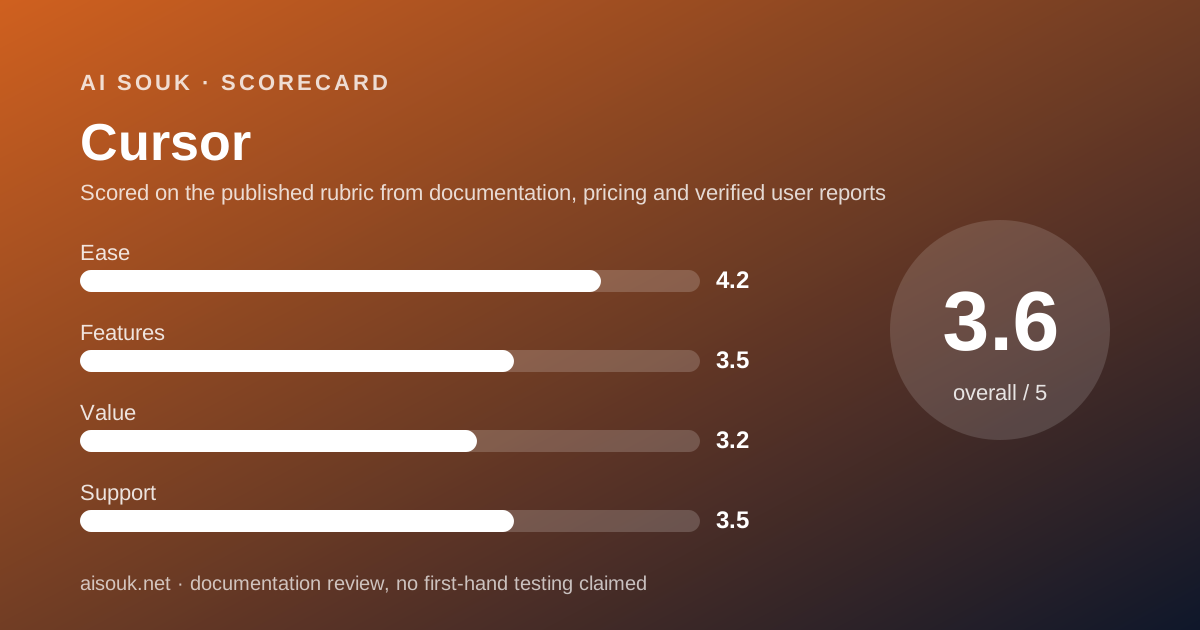
Scored on the published rubric, from documentation, pricing and verified user reports.
Best for: Developers who want to find out whether an agent-driven editor changes how they work, and who are prepared to treat the free plan as a short trial rather than a tool, because the vendor does not publish how much of it you get.
Verdict
This is a documentation review, not a walkthrough: no account was opened for this page and no screenshots were captured, so nothing here is a first-hand claim about what the editor looks like today. On the documented design, Cursor is a code editor built around an AI agent that can read, edit and run code across a project, and the free Hobby plan exists to let you try that agent. The pricing page, checked October 7, 2026, describes Hobby in three lines: no credit card required, limited Agent requests, and access to the vendor's own Composer model. It does not say how many requests, and the pricing documentation does not mention the Hobby plan at all. That absence is the central fact of this review. The paid plans are documented in far more detail, and their structure is usage-based: each plan includes a pool of model usage, consumption depends on which model you choose, and anything beyond the included amount is billed on demand in arrears. For a working developer the question is less whether the free plan is enough and more whether the paid plan's effective cost is predictable, and the documentation's own guidance that daily agent users typically spend $60 to $100 a month answers that honestly. The value score is low not because the product is poor but because the free tier is unquantified and the paid tier is a meter.
Visit Cursor
We have no affiliate relationship with this vendor. Link goes to the official site.
Where it is strong
- The free Hobby plan requires no credit card and includes access to the vendor's own Composer model and the agent, so the defining feature can be tried without paying, per the pricing page
- The paid tiers are documented clearly: Pro at $20, Pro+ at $60 and Ultra at $200 a month, each with unlimited tab completions and extended agent limits, per the pricing documentation
- The two-pool model is explained: a pool for the vendor's own models with significantly more included usage, and a pool for third-party models charged at the model's API price
- The documentation publishes realistic spending bands - tab-only users typically stay within included usage, daily agent users typically $60 to $100 a month - which is unusually candid for the category
- Included usage resets each billing cycle and overage can be added on demand rather than forcing an upgrade, per the billing documentation
Where it falls short
- The vendor does not publish the Hobby plan's limits: the pricing page says only limited Agent requests, and the pricing documentation does not mention a free plan at all, as of October 2026
- Paid usage is consumed at different rates depending on the model, and the documentation says Auto mode routes requests to models billed at their list price plus a token rate for third-party choices, which makes the effective monthly cost hard to predict
- The documentation's own guidance implies that a daily agent user on the $20 Pro plan should expect to spend three to five times that in total usage
- On-demand usage is billed in arrears after included usage is consumed, and the billing documentation does not describe a spend cap, so the control has to come from the user
- Team pricing jumps from $40 to $120 per user per month between Standard and Premium, with the difference described only as five times the agent limits
What the free tier actually includes
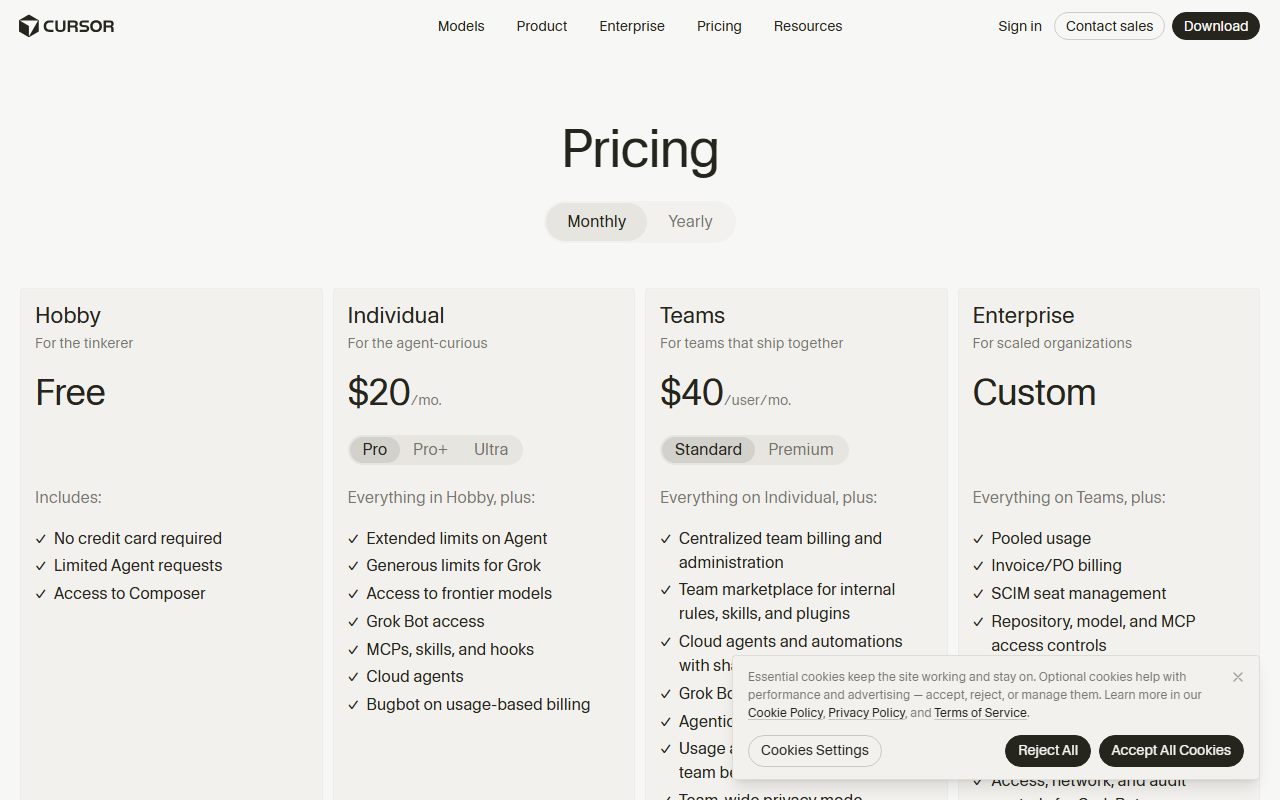
According to the pricing page, checked October 7, 2026, the Hobby plan is free and lists three inclusions: no credit card required, limited Agent requests, and access to Composer, which is the vendor's own model family. The Individual plan is described as everything in Hobby plus extended limits on the agent, generous limits for the vendor's Grok models, access to frontier models, Grok Bot access, support for MCPs, skills and hooks, cloud agents, and Bugbot on usage-based billing.
Reading those two lists against each other is the only way to reconstruct what Hobby contains, and it yields a rough shape rather than a number. A free user can run the agent, within an unstated limit, using the vendor's own model. A free user appears not to get the third-party frontier models, cloud agents, or the Bugbot code-review tool, since those are listed as Individual additions. The pricing page does not state whether tab completions are limited on Hobby; the pricing documentation says the paid plans include unlimited tab completions, which implies a limit below them but does not state one.
The pricing documentation itself, as read on the same day, contains no section on a Hobby or free plan. It describes Pro, Pro Plus, Ultra, a regional Start plan, and the team tiers. The billing documentation likewise does not discuss a free tier.
So the honest description of the free plan is this: it is a way to install the editor and try the agent with the vendor's own model for an unpublished number of requests, with no card on file. That is a trial. It is not a tool you can plan work around, because you cannot know when it stops until it does.
The practical advice that follows: install it, point it at a real but low-stakes repository, and use the agent on real tasks until the limit appears. The number of tasks you got through before that happened is the only measurement of the free plan that exists, and it is yours to take.
- Free; no credit card required (pricing page, October 7, 2026)
- Limited Agent requests - the number is not published
- Access to Composer, the vendor's own model family
- Frontier third-party models, cloud agents and Bugbot are listed as Individual-plan additions, implying they are not on Hobby
- The pricing and billing documentation do not mention a free plan
What sits behind the paywall
The paid plans are where the documentation becomes precise, and the precision is about how usage is metered rather than about a fixed number of requests.
The pricing page lists Individual at $20 a month, with Pro, Pro+ and Ultra variants; the pricing documentation gives the variants as Pro at $20, Pro Plus at $60 and Ultra at $200 a month. All three, per the documentation, include unlimited tab completions, extended agent usage limits on all models, access to Bugbot and access to cloud agents. The difference between them is the size of the included usage.
Included usage is organised into two pools. The documentation describes a Cursor Models pool, with significantly more included usage for the vendor's own Grok and Composer models, and an Other Models pool for third-party models, charged at the model's API price. Pro, Pro Plus and Ultra include both pools.
The documentation is explicit that model selection determines how fast included usage is consumed, because different models have different API costs. It also describes an Auto mode with three settings - Cost, Balance and Intelligence - each of which bills at the list price of whichever model the request is routed to, with an additional token rate when a third-party model is chosen.
When included usage runs out, the documentation describes two options: add on-demand usage at the same rates with pay-as-you-go billing, or upgrade. The billing documentation states that included usage resets with the billing cycle and that usage beyond it appears as on-demand usage billed after the included amount is consumed. It does not describe a spend cap.
The documentation also publishes something most vendors do not: expected spend by usage pattern. Daily tab users typically stay within included usage. Daily agent users typically spend $60 to $100 a month in total. Power users running multiple agents or automation often spend $200 or more. Those bands are the most useful sentence in the vendor's pricing material, and anyone considering Pro should read them as the real price.
Teams are $40 per user per month on Standard and $120 on Premium, which the documentation describes as five times the Standard agent limits. Enterprise is custom.
Read the current pricing page and documentation before deciding; the model lists and rates change frequently.
Who it is for, and who should skip it
The free plan is for a developer who wants to answer one question: does working with an agent that can read, edit and run code across a project change how I work, enough to pay for it. The Hobby plan gives you the editor, the agent and the vendor's own model with no card, which is enough to find out on a real repository, provided you accept that the limit is unstated and will arrive without warning.
It is not for anyone who needs to rely on the free plan for ongoing work. Because the vendor publishes no number for Hobby's agent requests, there is no way to plan around it, and the absence of the third-party models and cloud agents means a free user is seeing a narrower product than a paying one.
The paid plans are for developers who use the agent daily and who have read the spend bands. The documentation's own guidance is that a daily agent user typically spends $60 to $100 a month in total, which means the $20 Pro plan is a floor, not a price. A developer who finds that acceptable is the customer; a developer who expected a flat $20 is going to be surprised by on-demand billing, and the documentation told them in advance.
Small businesses buying for a team should read the Standard versus Premium distinction carefully. The jump from $40 to $120 per user per month is described only as five times the agent limits, and the right choice depends entirely on how agent-heavy the team's work is, which the free plan will not tell you.
Limits and what users report
The documented limits on paid plans are usage pools rather than request counts, and the documentation explains the consequences well: your model choice sets your burn rate, Auto mode routes to models billed at list price, and overage is on demand. The documented limit on the free plan is the phrase limited Agent requests, and nothing more.
What users on public forums most often report is consistent with that asymmetry. The dominant theme over the past year has been confusion and frustration about how usage is counted, particularly after changes to the metering model, and about on-demand charges appearing when people expected a flat subscription. The vendor's current documentation, with its two pools, its model-dependent consumption and its published spend bands, reads as a direct response to that history. Whether it has settled the confusion is not something a documentation review can judge.
The second recurring theme is the free plan running out faster than people expected, and the related complaint that nobody can say exactly how fast. That matches the documentation's silence precisely.
The third theme is positive and consistent: developers who adopt the agent report that it changes their working pattern, and that the value is in delegating multi-file changes rather than in autocomplete. That is the thing the Hobby plan lets you test, and it is the thing worth testing.
This page cannot verify today's limits. The pricing documentation and your usage page inside the product can.
Privacy and data use
An AI editor is a different privacy proposition from a chat assistant, because the thing it reads is your codebase, and a codebase is often the most confidential asset a small business has. Four questions to answer from the vendor's own policy before pointing the editor at anything real.
First, whether code and prompts are used to train or improve models, and whether that differs by plan. The pricing page's FAQ includes a question on how the vendor uses data, and the Teams plan lists team-wide privacy mode as a feature. The existence of a team-wide setting implies an individual setting; find it and read what it does on whatever plan you are on, including Hobby.
Second, what leaves your machine. An agent that edits across a project sends context to a model, and with the Other Models pool that model belongs to a third party charged at its own API price. The question of which third parties see your code under which terms is answered in the vendor's documentation and subprocessor list, not in a review.
Third, what the agent is allowed to do. The Enterprise tier lists auto-run, browser and network controls as features, which is a reminder that at lower tiers an agent that can run commands is running them with your permissions. Read what auto-run means on your plan before enabling it on a machine that can reach production.
This page is a documentation review and cannot confirm current policy wording.
Alternatives worth a look
Within this site's current reviews, the nearest neighbours are not editors but the tools a developer reaches for around the editor.
For questions about an unfamiliar library, a current API or an error message that needs a researched answer with sources, Perplexity searches and cites rather than answering from training data, and its free tier contains the core behaviour. Developers who use an agent for changes and an answer engine for checking tend to keep both open.
For understanding a large body of documentation you already have - an internal wiki, a vendor's API reference, a pile of design documents - NotebookLM answers only from the sources you upload, with citations back to the passage. It is the right shape when the question is what our own documents say rather than what the internet says.
Frequently asked
How many free agent requests do I get? The vendor does not publish the number. The pricing page says limited Agent requests, and the pricing documentation does not describe a free plan at all as of October 2026. Install it and find out; that measurement is the only one that exists.
Is Pro a flat $20 a month? Pro is $20 a month with an included amount of model usage. The documentation says usage beyond that is billed on demand in arrears, and its own guidance is that daily agent users typically spend $60 to $100 a month in total. Treat $20 as the floor.
What decides how fast I use my included usage? The model you pick. The documentation says different models have different API costs, that third-party models are charged at their API price, and that Auto mode bills at the list price of whichever model it routes to.
Does unused usage roll over? No. The billing documentation says included usage resets with your billing cycle.
Can I use frontier third-party models for free? The pricing page lists access to frontier models as an Individual-plan addition over Hobby, which implies not.
What is the difference between Teams Standard and Premium? $40 versus $120 per user per month, and the documentation describes Premium as five times the Standard agent limits.
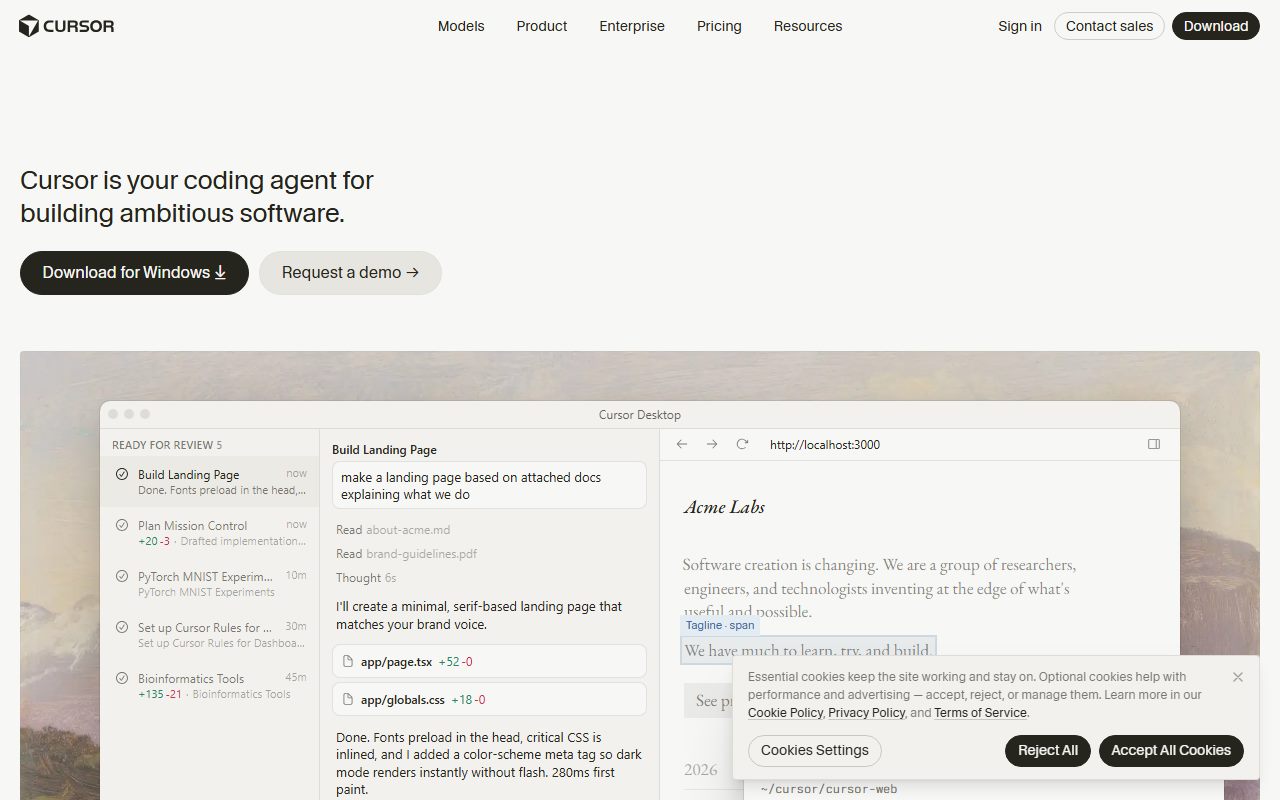
Why no screenshots on this page? Because no account was opened for it. That is what a documentation review means here, and the method page explains the distinction.
Does this page earn a commission? No. There is no affiliate relationship with this vendor; the link goes to the official site.
Bottom line
On the documented design, Cursor's free Hobby plan is a trial that refuses to say how long it is. It gives you the editor, the agent and the vendor's own model with no card, which is genuinely enough to discover whether agent-driven editing changes your work, and that discovery is worth making. But the vendor publishes no number for the free limit and its own documentation does not mention the plan, so nobody should plan work around it or be surprised when it ends.
The paid plans are the real product and they are priced as a meter, not a subscription. The documentation is unusually candid about this: it explains the two model pools, says plainly that your model choice sets your burn rate, describes on-demand billing in arrears, and publishes spend bands that put a daily agent user at $60 to $100 a month. A reader who takes those bands at face value and decides the value is there is making an informed purchase. A reader who sees $20 and stops reading is not.
If you try it, do three things. Use the free plan on a real repository until the limit appears and note how far it got you. Read the data-use setting on your plan before opening anything confidential. And if you upgrade, watch the usage page for the first month and decide whether the meter matches the value, because the documentation has told you it will run.
What this page cannot tell you, stated plainly because the method requires it: how many requests the free plan allows, what the editor looks like today, how the agent performs on your code, which models are in which pool this month, or what controls exist for capping spend. No account was opened and no screenshots were captured. The pricing documentation holds the current figures, and in this category they change faster than almost anywhere else.
Visit Cursor
We have no affiliate relationship with this vendor. Link goes to the official site.