 AI
AI
Claude
An assistant whose free tier gives you the workspace features and meters the usage, rather than the other way round.
Scored on the published rubric, from documentation, pricing and verified user reports.
Best for: A small-business owner who wants projects, file creation, web search and memory on a free plan, and who works in sessions rather than all day, so a five-hour usage window is a rhythm rather than a wall.
Verdict
This is a documentation review, not a walkthrough: no account was opened for this page and no screenshots were captured, so nothing here is a first-hand claim about what the interface looks like today. On the documented design, Claude's free tier is shaped differently from most of its rivals. Instead of listing capabilities and marking each one limited, Anthropic's pricing page, checked October 7, 2026, puts web search, file creation, code execution, memory across conversations, app connections, Artifacts and up to five projects on the free plan, and then meters the whole thing with a usage allowance the page describes as covering everyday questions, with no fixed message count. The help center describes that allowance as session-based, refreshing every five hours, and varying with demand. The trade is clear: free users get the shape of the paid product and less of it, on the Sonnet and Haiku models rather than the top of the range. Pro at $20 a month buys more usage, the full model line-up, Claude Code and the Design, Slides, Docs and Science tools. The things to understand are that the free allowance is not a number you can plan around, and that the training setting is one you should visit on day one.
Visit Claude
We have no affiliate relationship with this vendor. Link goes to the official site.
Where it is strong
- Projects (up to five), web search, file creation, code execution, Artifacts and memory are all on the free plan, per the pricing page as of October 2026
- Free users can connect apps and tools, which most rivals reserve for paid tiers
- Usage is one allowance rather than a dozen separate caps, so the question is simply how much, not which feature
- Documented data controls: a training toggle, incognito chats excluded from training, and connector content excluded from training data
- Projects cache their content, and the help center says cached content counts less against your limits when reused
Where it falls short
- The free allowance is not published as a number; the pricing page says there is no fixed message count and the help center says it varies with demand
- Opus and Fable, the stronger models, are Pro and above; free users get Sonnet and Haiku only
- Claude Code, the Research feature, Claude Science and Claude Design are absent from the free plan
- Pro is $20 a month with no cheaper intermediate tier, so the first paid step is larger than ChatGPT's $8 Go or Gemini's $4.99 Plus
- Support is self-service in character; several help center pages referenced by search were unreachable when checked, which is itself a data point
What the free tier actually includes
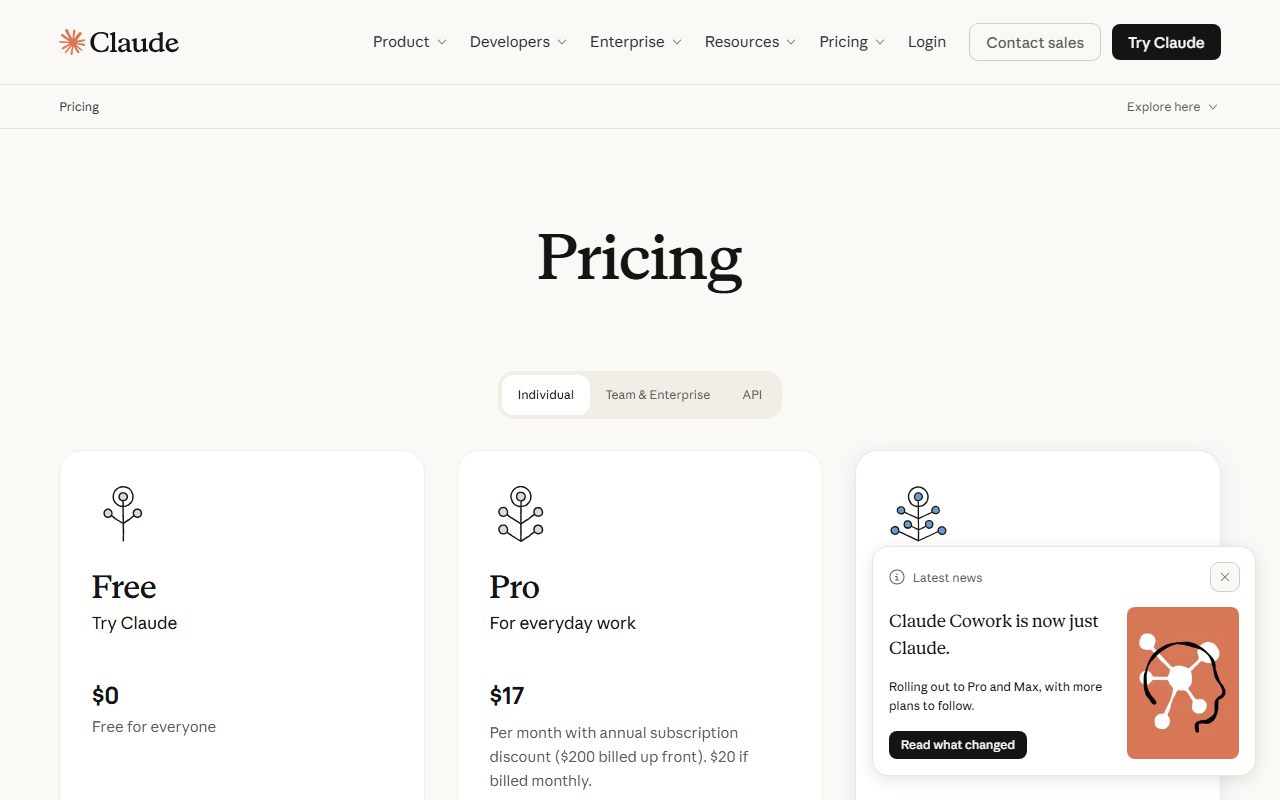
Anthropic's pricing page, checked October 7, 2026, lists the free plan at $0 a month and describes it with five capability lines and two restrictions. The capability lines are: chat on web, desktop and mobile; search the web, create files and run code; memory across conversations; connect your apps and tools; and create Artifacts. The page also states that free accounts get up to five projects.
The restrictions are the model line and the specialist tools. Free users get Sonnet and Haiku; Opus and Fable are listed for Pro and above. And the page marks Claude Code, Claude Science, the Research feature and Claude Design as not included on free.
What is notable is what is not restricted. Web search, file creation, code execution and app connections are commonly paid features elsewhere in this category. Here they are on the free plan, and the page meters them with a single statement about usage rather than a list of per-feature caps: free covers everyday questions, and there is no fixed message count, because usage depends on the complexity of what you ask.
The help center's usage-limit guidance, which was reachable when checked, fills in the mechanism. Usage is consumed by message and attachment length, conversation history, tool use such as research and web search, the model chosen, Artifact creation and multi-step tasks. It also states that content in projects is cached and counts less against your limits when reused, which is a direct incentive to put reference material into a project rather than pasting it into each chat.
- Chat on web, desktop and mobile
- Web search, file creation, code execution, Artifacts, memory across conversations
- App and tool connections
- Up to five projects
- Sonnet and Haiku models; no Opus or Fable
- No Claude Code, Research, Claude Science or Claude Design
What sits behind the paywall
Pro is listed at $20 a month, or $17 a month on an annual plan billed at $200 a year, as of October 2026. Max starts at $100 a month and comes in two sizes described as 5x and 20x the usage of Pro. Check the current page before relying on any of these.
The Pro list on the pricing page is, in order: more usage; hand off and schedule tasks; Claude Design, Slides and Docs; Claude Science; projects; more Claude models; Claude in Chrome and Microsoft 365; and Claude Code. The model line on Pro is the full set - Fable, Opus, Sonnet and Haiku.
The way to read that list is that Pro buys three distinct things. First, quantity: more usage, which the help center describes on paid plans as a five-hour session limit plus a weekly limit across all models, visible as progress bars under Settings and Usage. Second, the stronger models, which for complex drafting, analysis and code is the difference most people notice. Third, the specialist surfaces: Claude Code for developers, the Design, Slides and Docs tools for producing finished documents, Science for research workflows, and the browser and Microsoft 365 integrations.
Max is described as 5x or 20x the Pro usage, higher output limits, early access to advanced features and priority at busy times. It is a plan for people who work in Claude all day, not a small-business starting point, and this page does not grade it.
The absence worth noting is a cheap middle tier. ChatGPT has an $8 Go plan and Gemini has a $4.99 Plus plan; Claude's first paid step is $20. If the free allowance is nearly enough, there is no $8 way to buy a little more.
Who it is for, and who should skip it
The free plan fits a reader whose work is organised. If you have three or four recurring contexts - a client, a product line, a set of policies - the five free projects let you keep the background material in one place and, per the help center, reuse it at a lower usage cost than re-pasting it. Someone who writes proposals from the same company boilerplate every week is the textbook case.
It also fits someone who wants files out, not just text. File creation and Artifacts are on the free plan, which means a draft can arrive as a document or a working snippet rather than a wall of chat.
It is a poorer fit for two kinds of reader. The first is anyone who works in one continuous stretch and needs the assistant for all of it. The free allowance is described as session-based and demand-dependent, and for someone chatting steadily from nine to five it will be the thing they meet first. The second is anyone whose work needs the strongest model - long legal drafting, hard analysis, serious code. Those models are Pro, and no amount of patience on the free plan unlocks them.
Developers should also note that Claude Code is Pro and above. The free plan runs code inside the chat, but the terminal tool is paid.
If what you need is research with sources rather than drafting, that is a different product shape; the Perplexity review covers it, and the Research feature on Claude itself is Pro only.
Limits and what users report
The free allowance is the one fact everyone wants and the one fact Anthropic does not publish as a number. The pricing page says there is no fixed message count. The help center describes free usage as a session-based limit that resets every five hours, with the number of messages varying based on demand, and notes that other limits may be imposed to keep access fair. That description comes from the help center article as indexed by search; the article's own page was not reachable when checked for this review, so treat the wording as reported rather than quoted.
What the reachable help center guidance does make clear is what spends the allowance: long messages and attachments, long conversation history, tool use, model choice, Artifacts and multi-step tasks. The practical consequence is that two users with the same number of messages can have very different experiences. Someone pasting a forty-page document into a fresh chat each time will hit the limit much sooner than someone who put the document in a project once.
Public forum discussion of the free plan clusters on two themes, both consistent with the documents. The first is that the allowance arrives sooner than expected during long conversations, and that starting a new chat helps, which matches the help center's note that conversation history consumes usage. The second is that the free plan feels generous in features and stingy in quantity compared with rivals that cap features individually. That is not a contradiction; it is the design.
One observation from preparing this review belongs here: several help center pages about free usage and increasing limits that appear in search results returned not-found errors when opened. That may be reorganisation rather than removal, but a reader looking for the official statement of free limits should expect to search the help center rather than follow an old link.
Privacy and data use
Anthropic publishes a privacy center article on whether consumer data is used for training, and the shape is simple enough to act on.
Consumer chats and coding sessions are used to improve Claude if you choose to allow it. The article frames it as a choice, and the setting lives in your privacy settings. Incognito chats are not used to improve Claude even when that setting is on. Conversations flagged for safety review may be analysed for policy enforcement separately, and programs such as the Trusted Tester Program are explicit opt-ins.
Two details are useful for a business reader. First, raw connector content - files reached through a connected Google Drive, for instance - is excluded from training data unless you copy the material into a conversation yourself. Second, feedback given through the thumbs up and down buttons is stored for up to five years in a secured back end and de-linked from your identity before use. The article does not state a retention period for ordinary chat data used in training, and this review will not guess one.
The practical steps are the same as for every product in this category. Open the privacy settings on day one and decide the training toggle deliberately. Use incognito for anything you would not want in a training set. And for client, employee or regulated material, read the current terms for the plan you are actually on and get the decision from whoever owns that risk. A free consumer account is not where a confidentiality obligation should be discharged, regardless of how good the toggle is.
Alternatives worth a look
ChatGPT is the obvious comparison and the design is nearly inverted. Its free tier offers unlimited plain text chat and caps each other tool separately, where Claude puts the tools on free and caps the total. If your work is mostly words and you rarely upload or build anything, ChatGPT's free plan may go further; if you want projects and files out on a free plan, Claude's does. ChatGPT also has an $8 tier below $20, which Claude does not.
Google Gemini is the price comparison. Google AI Plus at $4.99 a month is the lowest paid step in this batch, and the free tier lists Deep Research, image generation and Gemini Live. The important caveat is a documented change to which models free users get from October 9, 2026, covered in that review.
Mistral Le Chat, now called Vibe, is the European alternative with a $14.99 Pro tier, a free tier that includes image generation, and a training opt-out that free users must set manually. Microsoft Copilot is relevant only if you already pay for Microsoft 365.
For questions with sources rather than drafting, Perplexity and NotebookLM are different product shapes and better for that job.
Frequently asked
How many messages do free users get? Anthropic does not publish a number. The pricing page says there is no fixed message count because usage depends on complexity, and the help center describes a session-based allowance that resets every five hours and varies with demand.
Which models are free? Sonnet and Haiku, per the pricing page as of October 2026. Opus and Fable require Pro or above.
Are projects free? Yes, up to five. The help center says content in a project is cached and counts less against your limits when reused, so projects are the efficient way to work with recurring material.
Is Claude Code free? No. It is listed under Pro and above. Code execution inside the chat is on the free plan.
Are my chats used for training? Only if you allow it in privacy settings, per Anthropic's privacy center. Incognito chats are excluded regardless.
What does Pro cost? $20 a month, or $17 a month billed annually at $200, as of October 2026. Check the current page.
Why no screenshots? Because no account was opened for this page. That is what a documentation review means on this site.
Does this page earn a commission? No. There is no affiliate relationship with Anthropic; the link goes to the official site.
Bottom line
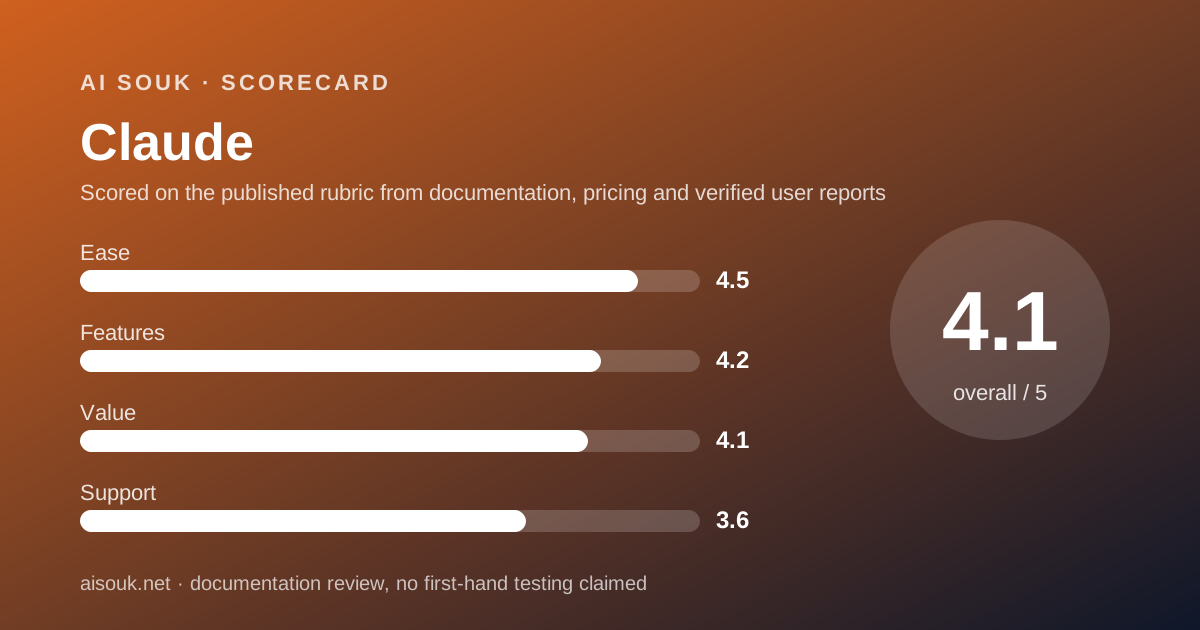
On the documents, Claude's free plan is the most workspace-like free tier in this batch. Projects, file creation, code execution, web search, memory and app connections are all present, and the single allowance that meters them is a more honest design than a list of seven features each marked limited. The cost of that honesty is that the allowance is not a number, and a free user cannot plan around what they cannot see.
The ease score is high because nothing needs configuring and the free plan already behaves like the paid one. Features is strong for the same reason, held back only by the missing top models and specialist tools. Value is good but not the best here: $20 is a real step, and there is no cheaper rung for someone who needs just a little more. Support is self-service, with the added note that the help center's own free-plan pages were partly unreachable when checked.
The practical advice: put your recurring material into the five free projects, work in sessions rather than one long chat, set the training toggle on day one, and see whether the allowance fits your week. If the thing you miss is the model rather than the quantity, Pro is the answer; if it is the quantity alone, consider whether a rival's cheaper middle tier does the job.
What this page cannot tell you: what the interface looks like today, how much the free allowance actually delivers on a given afternoon, or whether the pricing page has changed since October 7, 2026. No account was opened and no screenshots were captured.
Visit Claude
We have no affiliate relationship with this vendor. Link goes to the official site.