 AI
AICanva Magic Studio vs Adobe Firefly free: twenty uses in your editor, or unpublished daily generations with provenance
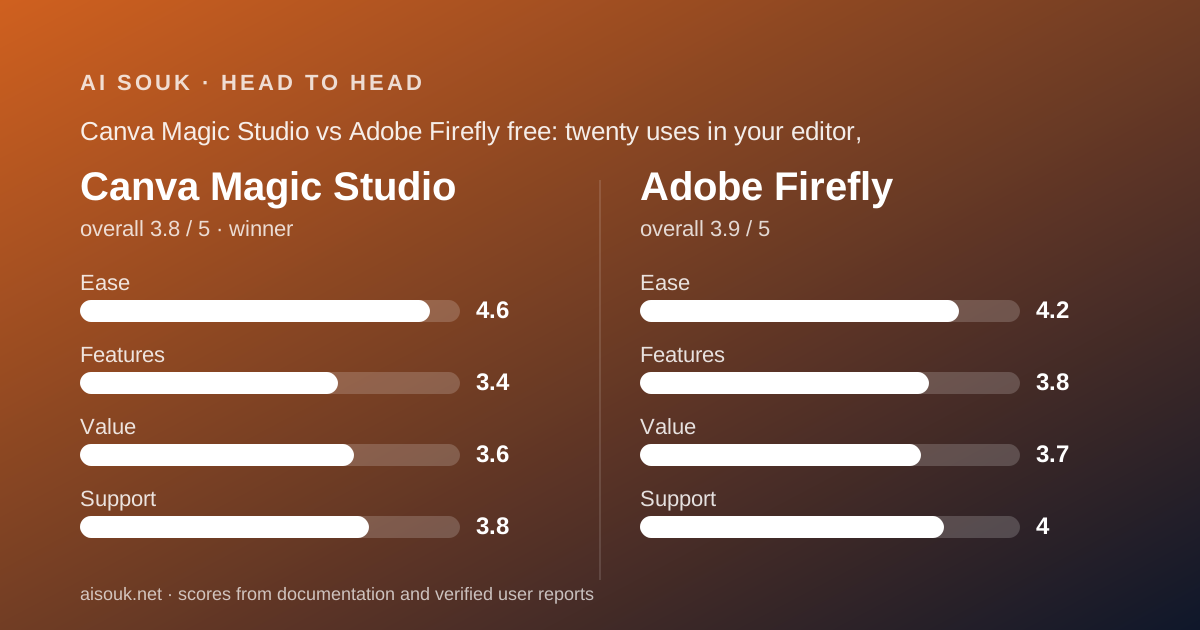
This is a comparison between a design editor with AI inside it and an AI generator with design apps around it. Canva's free plan gives you the full non-AI editor plus a shared monthly allowance the pricing page states as up to 20 uses. Adobe Firefly's free plan gives you daily-refreshing generations across image, video and audio whose count the plans page does not state, from models Adobe says were trained on licensed and public-domain material. Short answer: Canva for a small business that already designs in Canva and wants a known allowance; Firefly for one that needs to answer the training-data question before using AI images at all. Figures are the vendors' own as of October 2026.
 3.8Canva Magic Studio
 3.9Adobe Firefly
The short answer
This is a documentation comparison. It uses the Canva pricing page and FAQ, the Canva AI page and the October 2025 newsroom announcement of Canva Business, and Adobe's Firefly product page and plans page plus one older Adobe help FAQ, all checked October 7, 2026. Both vendors localise pricing: the Canva page viewed showed Vietnamese dong, the Adobe plans page showed Japanese yen from one location and dollars from another. No account was opened. The single-product pages are Canva Magic Studio and Adobe Firefly.
Canva wins, narrowly, for a typical small business, on two grounds. First, it publishes its free allowance as a number, up to 20 pooled uses a month, with the caveats stated beside it; Adobe's plans page says limited free daily generations and gives no count, no model list for free and no resolution. Second, the Canva free plan is a usable design tool before any AI is involved, 1.6 million-plus templates and 4.7 million-plus stock assets per the pricing page, so the AI is an add-on to something you would use anyway.
Firefly wins the case its documentation is built for: provenance. The product page states that Firefly models are trained on licensed Adobe Stock and public-domain content, that Adobe does not train on subscribers' personal content, and that outputs carry Content Credentials indicating AI was used. For a business whose legal or brand team asks where the pixels came from, that is the clearest answer in this site's image batch, and it applies on the free plan. It is close, and the winner depends on which question you are asking.
What each free tier includes (as of October 2026)
Canva Free, per the pricing page comparison table: 4.7 million-plus stock photos, graphics, fonts, videos and audio; 1.6 million-plus templates; custom dimensions; PDF, JPG and PNG export; social sharing. The AI is governed by what the FAQ calls a shared monthly AI allowance, with tools sorted into Standard, Premium and Ultra tiers that draw on the same pool at different rates. The FAQ's estimate for Free reads: up to 20 uses of Standard AI tools, or Premium AI tools, no access to Ultra AI tools, resetting monthly. The tools on the Canva AI page include Magic Write, a photo generator, a video generator, Magic Background, Resize, Style Match, a 3D content generator, an AI photo editor and Magic Layers; which tool sits in which tier is referred to the Help Centre and not listed on the pricing page. The FAQ says Translate and Magic Write can be used abundantly on paid plans without drawing on the allowance; whether that applies on Free is not explicit, and this page does not assume it.
Firefly's free plan, per the product page: limited free daily generations across both standard and premium features, with select image, video and audio models. Per the plans page: no plan is needed for free daily generations across image, video and audio, with access to popular models like Nano Banana and Luma Ray3.14, and limits that refresh every day. That is the whole of what the vendor publishes about the free allowance. An older Adobe help FAQ, dated to February 2025 by search results and not directly retrievable, describes 25 generative credits for free users expiring a month after allocation; the current plans page describes daily refresh instead, and no document found reconciles them. Whether free outputs carry a watermark is not stated on either page.
So Canva's free tier is a number with asterisks and Firefly's is a mechanism without a number. Canva's AI reaches into an editor with export; Firefly's reaches into Adobe's own generator with Content Credentials. Both include image generation on free; Firefly adds video and audio models on free, which Canva's allowance may or may not reach depending on which tier those tools occupy.
Daily limits and what happens when you hit them
Canva's limit is monthly, pooled and estimated. The pricing page says the 20-use figure assumes simple tasks with one kind of tool, and that mixing tools or completing complex tasks may reduce your total to the lower end of the range. A free user who generates an image, edits it and resizes the design has drawn three times from one pool at possibly three rates. When the pool is empty, the documented routes to more, AI Pass and AI top-ups, are only available to Pro and Business subscribers who signed up online; there is no way to buy more AI on Free. Public reports of reaching the limit sooner than the headline suggests are consistent with the vendor's own caveat.
Firefly's limit is daily and unquantified. The plans page says limits refresh every day; the product page says they apply across standard and premium features. A free user discovers the size in the app. Public reports, not verified here, describe confusion over why some generations cost credits and others do not, which the standard-versus-premium split on paid plans explains and which the free plan's language does not address. The older 25-credit FAQ may or may not still apply alongside the daily language.
The practical difference is predictability. A Canva free user knows the ceiling is twenty and the floor is unpublished. A Firefly free user knows the allowance comes back tomorrow and does not know what it is. For a business planning a month of social posts, Canva's number is something to budget against, even with its caveats; Firefly's daily refresh is better suited to a trickle of concept images than a campaign. Fair-use limits apply on Canva to the tools described as abundant, and the vendor does not publish those either.
Quality of output for everyday work
Output quality cannot be graded from documentation. What the documents support is a statement about where the output lands and what it carries with it.
Canva's AI output lands in a design. A generated image or a Magic Write paragraph goes directly into the social post, the flyer or the deck in the same editor, and exports as PDF, JPG or PNG on the free plan. That is the product's argument: no export, re-import or second tool. The AI page lists Magic Layers, which turns a generated image into editable layers, as the newer capability. The branding is in flux, the Magic Studio URL now resolves to a Canva AI 2.0 page marked Coming Soon, so interface names and documentation may disagree for a while.
Firefly's output lands in the Firefly web or mobile app, with Photoshop on web and mobile bundled from the Pro tier upward and Adobe Express Premium on Standard. Every output carries Content Credentials indicating AI was used, which is a feature for a business that must disclose AI imagery and an inconvenience for one that would rather not. The model line on free names third-party models, Nano Banana and Luma Ray3.14, alongside Adobe's own, so the free user is not limited to Adobe's models; the public debate about whether Adobe's own models produce output as striking as competitors trained on broader data is a question of taste that documentation cannot settle.
For everyday small-business work, a post, a flyer, a cover, Canva's free plan finishes the job inside one tool; Firefly's free plan produces the image and leaves layout to Adobe Express or something else. For a concept image that needs a provenance trail, Firefly's output arrives with one and Canva's does not.
Privacy and training defaults
This is where Firefly's documentation is strongest and Canva's is specific but conditional.
Adobe's product page states that Firefly models are commercially safe and trained on licensed Adobe Stock content and public-domain content where copyright has expired; that Adobe does not train Firefly or partner models on any Creative Cloud subscribers' personal content; and that outputs include Content Credentials. Three questions remain: the personal-content statement names Creative Cloud subscribers, and whether an identical commitment covers a free account with no subscription should be confirmed in the free-tier terms rather than assumed; partner models run under Adobe's umbrella, and which party's terms govern a prompt sent to one is answered only by the training statement; and retention of uploaded reference images is a separate question. The commercial-safety language is about training data, not a licence to use any output anywhere.
Canva's AI page states that Canva does not use your content to improve AI-powered features unless it is consistent with your privacy controls, and that granular privacy settings exist on Free and Pro with admin controls on Business and Enterprise. That sentence is conditional on the controls, which means the default state of a new free account's controls is what decides the outcome, and this page cannot verify it. Canva Shield, a package of privacy, security and indemnification commitments, is described for enterprise customers with over 100 seats, not for Free. If you are on a Business plan that bundles Leonardo.Ai, which vendor's terms govern images from that bundle is a question for the policy.
The general rule applies to both: a design is often a disclosure of unreleased plans, and a prompt is a disclosure of intent. Product launches, pricing changes and client names in a draft have left your building the moment they are in a cloud editor or generator. Read the policy at your tier; Firefly gives more documented reason to trust the training side, Canva gives you a control to find and set.
Price of the first paid step
Canva's prices are regional and the page viewed showed Vietnamese dong, Pro at 150,000 dong a month and Business at 210,000; the only US-dollar figure found on an official Canva page is the October 30, 2025 newsroom statement that Canva Business is US$20 per person per month. Do not take any of these as your price; open the pricing page from your own location. What Pro changes for AI, per the FAQ: up to 200 Premium uses or 20 Ultra uses a month, framed as 10x the free allowance, with Standard tools no longer drawing on the pool at all except on a Pro Lite plan. Business and Enterprise get 400 Premium or 40 Ultra uses, and Business bundles Leonardo.Ai's Essential plan and Flourish per the newsroom. Beyond AI, paid tiers unlock the premium library, brand kits, background removal and CMYK export.
Firefly Standard is $9.99 a month per the product page, with 2,000 generative credits a month per the plans page; Pro is $19.99 with 4,000; Pro Plus is $49.99 with a first-year promotional price of $34.97 that the plans page says ends October 21, with 10,000; Premium carries 50,000 credits and unlimited access to the Firefly Video Model. The structure is the same on each: unlimited standard image features such as Generative Fill, plus a credit pool for premium features, Text to Video, Generate Speech, partner model outputs, sound effects and music. Standard's 2,000 credits are translated on the page into examples: up to 20 five-second videos, 6 minutes of audio translation, 200 sound effects, 100 minutes of music. Credits reset on the billing date and do not roll over; add-on packs are sold regionally.
In US terms, Firefly's first step at $9.99 is the cheaper and the better documented, and for still images on Adobe's own models it is effectively unmetered. Canva's first step, whatever it costs where you are, buys a tenfold AI allowance and an editor's worth of premium assets. A business that mainly needs images should compare $9.99 against its local Canva Pro price; a business that mainly needs finished designs is buying Canva Pro for the editor and getting the AI with it. Promotions on both pages carry end dates; read the current pages.
Pick this one if…
Pick Canva if you already make your social posts, flyers and decks in Canva. The AI lands in the design, the free editor is useful on its own, and twenty uses a month is enough to learn what the AI tools do before paying.
Pick Firefly if someone in your business will ask where the training data came from. Licensed and public-domain sources, no training on subscribers' content and Content Credentials on every output is the answer, and it is on the free plan.
Pick Canva if you want to know your allowance before you start. Up to 20 is a number with caveats; Firefly's free count is not published.
Pick Firefly if you want to try video or audio generation for nothing. Both are named on its free plan; on Canva they depend on which tier those tools occupy, which the pricing page does not say.
Pick Firefly if your first paid step must be under $10 in US dollars and the job is still images. Pick Canva if the first paid step must also buy brand kits, premium templates and print export, and the AI is the bonus.
Frequently asked
Is twenty Canva uses really twenty? It is the ceiling. The pricing page says the estimate assumes simple tasks with one kind of tool and that complex tasks or mixing tools reduce the total to the lower end of the range. Treat it as somewhere between a handful and twenty, and note that Ultra tools are not reachable on Free at any count.
How many free generations does Firefly give a day? The plans page and the product page do not say, and an older FAQ describing 25 monthly credits has not been reconciled with the current daily-refresh language. This page will not supply a number the vendor does not. A free account will show you in the app, and the paid Standard tier is where Adobe starts publishing quantities.
What if the job is a lot of images rather than a few designs? Neither of these is the generous free generator. Leonardo.Ai gives 150 tokens a day with a published cost table, at the price of every free image being public, and Canva Business bundles its Essential plan; Ideogram is the one to read if the images must contain legible text. Both of those make free output public, which neither Canva nor Firefly documents as a condition, and that difference is worth more than the allowance for client-facing work.
Visit Canva Magic Studio
We have no affiliate relationship with this vendor. Link goes to the official site.
Visit Adobe Firefly
We have no affiliate relationship with this vendor. Link goes to the official site.