 AI
AIThe best free AI meeting note-takers in 2026, ranked by what you keep after the call
Three meeting bots - Otter.ai, Fireflies.ai and tl;dv - will join your Zoom, Google Meet or Microsoft Teams calls for nothing, record them, and write something afterwards. The free plans differ not in whether they do that but in what they ration: Otter rations minutes, Fireflies rations summaries, tl;dv rations AI notes and how long your archive survives. This shortlist ranks them by what a small business actually keeps after the meeting, adds NotebookLM for the week when you need to make sense of a quarter of transcripts, and flags the consent and data-use questions the pricing pages do not put on the front. Everything is from vendor documentation and public reports checked in October 2026.
Our picks
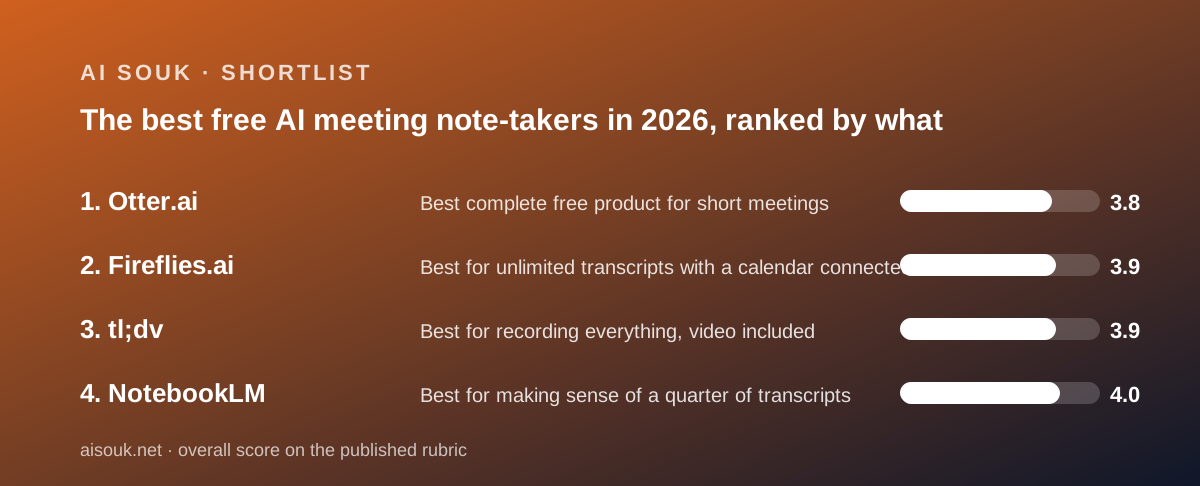
- Best complete free product for short meetings: Otter.ai
- Best for unlimited transcripts with a calendar connected: Fireflies.ai
- Best for recording everything, video included: tl;dv
- Best for making sense of a quarter of transcripts: NotebookLM
The pitch for every tool in this category is identical: connect a calendar, and a bot joins your meetings, transcribes them and sends you notes. The free plans are where they diverge, and they diverge in an unusual way. Most software free tiers give you a little of everything. These three each give you an unlimited amount of one expensive thing and a small amount of another. Otter.ai gives you the whole product - bot, transcript, summary, search, AI chat - and meters minutes: 300 a month, 30 per conversation, per the pricing page as of October 2026. Fireflies.ai gives you unlimited transcription under a condition explained in the help center, and meters the summaries. tl;dv gives you unlimited recordings including video, and meters the AI notes and the shelf life of the archive. So the first question is not which bot is best. It is which scarce thing you can live without: minutes, summaries, or permanence.
To compare them you need four meters in mind, because each vendor puts a different one on its headline. The first is minutes per month: Otter publishes 300; Fireflies and tl;dv describe transcription as unlimited. The second is minutes per meeting: Otter caps the transcript at 30 minutes per conversation, with the help center noting the recording continues but only the first 30 minutes of text are accessible until you upgrade; Fireflies documents a two-hour recording limit per meeting on free; tl;dv publishes no per-meeting cap in the posts checked. The third is AI output: Otter's summary comes with every conversation, with AI Chat limited to 20 queries a month; Fireflies' summaries draw down a small credit balance; tl;dv writes AI notes for ten meetings a month and answers ten Ask queries. The fourth is what remains: Otter shows free accounts their five most recent conversations and archives the rest; Fireflies stores 400 minutes; tl;dv's privacy policy states free recordings are retained for three months. A 45-minute weekly client call runs into a different meter on each of the three: Otter's transcript stops at the half-hour, Fireflies spends a summary credit, and tl;dv records the whole thing but may not write notes for it by the end of the month.
Otter's free plan, called Basic, is the easiest to reason about because the help center documents it precisely. Per the pricing page checked October 7, 2026: 300 transcription minutes a month, 30 minutes of transcript per conversation, three file imports for the lifetime of the account rather than per month, 20 AI Chat queries a month, one meeting recorded at a time, five custom vocabulary terms, and OtterPilot - the assistant that joins Zoom, Teams and Meet calls from your calendar - included on free. Two help-center details decide whether it suits you. Deleted conversations still count against the monthly minutes, so a recording started by accident is spent. And the 30-minute cap is a capability limit dressed as a quantity limit: a 45-minute meeting on the free plan is a broken transcript, not a smaller one. Conversation history is where the vendor's own pages disagree - the pricing page says the five most recent, an older help article says 25 - and the safe assumption is the smaller figure. For someone whose meetings are short, this is the most complete free product in the group.
Fireflies' free plan is listed on the pricing page as unlimited transcription with an asterisk, limited AI summaries, 400 minutes of storage and 20 AI credits, as of October 2026. The asterisk is the most important paragraph in this category. The help center states that a new free account receives a handful of transcription credits - three when signing up on the web, five through the Chrome extension, ten on mobile - and one credit is consumed per meeting to transcribe and summarise it. But with the auto-join calendar toggle switched on, credits are spent only on summarising, not transcribing, which the vendor describes as unlimited transcriptions with no cap on meetings. In plain terms: let the bot join automatically and every transcript is free; the summary is what the credits buy. Two further facts are documented. Transcripts cannot be downloaded on the free plan, and the free plan does not record video. The help center also notes the current credit rules apply to accounts created on or after September 1, 2026, so a review from 2025 describes a different plan. The 400-minute storage figure is stated per team on one page and per seat on another.
tl;dv is the opposite shape. Per the vendor's July and August 2026 posts - the pricing page itself could not be retrieved on October 7, 2026, which is a caution in its own right - the free plan records and transcribes without limit across Zoom, Google Meet and Microsoft Teams in more than 30 languages, video included. What is capped is the finished product: ten meetings a month get AI-written notes, ten Ask tl;dv queries, five uploads. And what is temporary is the archive: the August 2026 post warns that free-plan retention runs up to three months, and the privacy policy states the same, with paying users' recordings kept until account deletion. One July post says three days, which this site reads as an error given the policy, but check the live page. The company is German and operates under GDPR, and the privacy policy states customer content is not used to train foundation models. For a solo user who wants to go back and find what someone said, this is the most generous raw material on offer. For anyone who wants a summary in the inbox after every call, the cap arrives in the second week.
The trap nobody prints on the pricing page is the recorder in the room. All three bots join as a participant, and the most common complaint on public forums, consistent across all three, is from people who did not expect one: colleagues, clients, prospects. Otter's assistant joining meetings its owner forgot were on the calendar is widely reported, and Fireflies and tl;dv have the same mechanism. Each vendor documents controls for which meetings the bot joins; the practical advice, which the documentation supports, is to set those controls before connecting a calendar, not after the first awkward call. tl;dv's privacy policy states the vendor collects consent from non-client participants before the meeting, which implies a notification mechanism, though this page cannot describe how it appears today. Whatever the tool does, say that you are recording. Recording-consent law varies by jurisdiction, and a bot in a client call is a business decision before it is a software one.
The second trap is what the vendor does with the audio. The three privacy policies say different things, and for a business recording client conversations this may matter more than any cap. Otter's privacy policy states the company trains its proprietary AI on de-identified recordings and on transcriptions, which may contain personal information. Fireflies' privacy policy states that personal information is not used for AI model training and that its vendors are contractually prohibited from doing so. tl;dv's policy states that customer content is not used to train, fine-tune or improve foundation models, and names its hosting providers' ISO 27001 and SOC certifications. None of these is a reason to avoid a product on its own, but a firm with confidentiality obligations - legal, financial, medical, HR - should read the current policy before the bot meets a client, because the free tier does not come with a data-processing agreement and the policy is the whole of what you have.
The third trap is getting the notes out. Free tiers in this category are built to keep the archive inside the product, and each does it differently. Fireflies' help center states transcripts cannot be downloaded on the free plan; the notes exist on screen and nowhere else until you pay. tl;dv allows five uploads on free and expires recordings after three months, so anything that matters has to be exported before it disappears, and exporting is itself rationed. Otter allows three file imports for the life of a free account and shows only the most recent few conversations, archiving the rest until you upgrade. If your workflow is to drop meeting notes into a CRM, a project tracker or a shared drive, check which of these lets you do that for nothing: on the documentation, Otter's free transcript is viewable and the other two are either locked or temporary. For a team that treats the archive as a record, this is where the free plans end and Pro begins.
There is a fourth tool on this list that is not a meeting bot, and it answers a different question: not what was said in this meeting, but what was said across all of them. NotebookLM takes a pile of documents - transcripts exported from any of the three above, pasted notes, slides - and answers questions grounded only in those sources, with inline citations pointing at the passage behind each claim. Its free tier delivers the actual product rather than a demonstration, and the per-notebook and per-source caps, which the vendor changes often enough that this page will not quote them, are the only constraint. Grounding reduces invention; it does not remove it, and a misread passage still produces a confident wrong sentence with a citation attached. But for the end-of-quarter question - what did every client say about pricing this year - it is the free tool that does the job, provided you got the transcripts out of the meeting tool first, which brings you back to the previous paragraph.
Choosing by situation. If your meetings are short - under half an hour - and you want transcript, summary, search and a bot for nothing, Otter is the most complete free product, and Pro at $8.33 a user a month billed annually ($16.99 monthly) lifts the cap to 90 minutes a meeting and 1,200 minutes a month. If you want every meeting transcribed and are happy to ration the summaries, Fireflies with auto-join on is the documented route to unlimited transcripts, and Pro at $10 a seat annually ($18 monthly) adds downloads, video and 8,000 minutes of storage. If you want video and audio of everything and only need AI notes on a few calls a month, tl;dv's free plan is the most generous in raw material, with Pro at $18 a seat annually ($29 monthly) removing the notes cap and the retention limit. All prices are from the vendors' pages or posts as of October 2026 and move often. For the two most common head-to-head finalists, this site has a longer side-by-side at Otter.ai vs Fireflies.ai. Transcript accuracy on your audio, your accents and your microphones is the one thing no documentation can tell you; run one real meeting through each before deciding.
Best complete free product for short meetings: Otter.ai
Otter's Basic plan is the only free tier in this group that contains the whole product with no asterisk: the OtterPilot bot joins Zoom, Teams and Meet calls from your calendar, every conversation gets a transcript and an automated summary, and search and AI Chat are included. What it meters is time, and the help center publishes the numbers: 300 transcription minutes a month, 30 minutes of transcript per conversation, 20 AI Chat queries a month, three file imports for the life of the account, one concurrent meeting, five custom vocabulary terms, and the five most recent conversations visible with older ones archived, all as of October 2026. The 30-minute cap is the fact to plan around - recordings continue past it, minutes are still consumed, but the transcript stops - and deleted conversations still count. The privacy policy states Otter trains its AI on de-identified recordings and transcriptions, which a confidentiality-bound business should weigh. Pro at $8.33 a user a month billed annually ($16.99 monthly) buys 1,200 minutes, 90-minute meetings, ten imports a month and 50 chat queries; Business at $19.99 annually removes most caps.
Visit Otter.ai
We have no affiliate relationship with this vendor. Link goes to the official site.
Best for unlimited transcripts with a calendar connected: Fireflies.ai
Fireflies' free plan is listed as unlimited transcription with an asterisk, and the asterisk is the whole story. Per the help center as of October 2026, free accounts receive a few transcription credits at signup - three on web, five via the Chrome extension, ten on mobile - and spend one per meeting, but with the auto-join calendar toggle on, credits are used only for summaries, which the vendor describes as unlimited transcriptions. Turn auto-join on before the first meeting and every transcript is free; the summary is the rationed item. The bot covers Zoom, Meet and Teams, transcribes in more than 100 languages, and the desktop app, mobile apps, Chrome extension, integrations and API are all on the free plan. The limits that bite: 400 minutes of storage (per team on one page, per seat on another), no transcript downloads, no video recording, and 20 AI credits for the assistant features described as one-time on the billing page. The privacy policy states personal information is not used for model training. Pro at $10 a seat billed annually ($18 monthly) adds downloads, video and 8,000 minutes of storage. Rules apply to accounts created from September 1, 2026; older reviews describe a different plan.
Visit Fireflies.ai
We have no affiliate relationship with this vendor. Link goes to the official site.
Best for recording everything, video included: tl;dv
tl;dv gives away the thing the others sell - unlimited video recordings and unlimited transcription across Zoom, Google Meet and Microsoft Teams in more than 30 languages - and rations the finished product instead, per the vendor's July and August 2026 posts. Ten meetings a month get AI-written notes, ten Ask tl;dv queries are included, and five uploads are allowed. The constraint people meet last and resent most is retention: the privacy policy states free users' recordings are kept for three months, and the vendor's own August 2026 post warns not to treat the free plan as an archive. Export what matters before it expires. The company is German, operates under GDPR, and states that customer content is not used to train foundation models, which makes it the natural choice for European buyers. Two cautions: the pricing page could not be retrieved on October 7, 2026, so every figure here is from vendor posts, and those posts disagree on the Business tier price. Pro is consistent at $18 a seat a month billed annually ($29 monthly) and removes the notes cap, adds templates, follow-up drafts, global search, unlimited storage, and API and webhook access.
Visit tl;dv
We have no affiliate relationship with this vendor. Link goes to the official site.
Best for making sense of a quarter of transcripts: NotebookLM
NotebookLM is not a meeting bot and does not join calls; it is where the transcripts go afterwards. Upload a mixed pile - exported transcripts, pasted notes, slides, documents, web pages - and ask questions that are answered only from those sources, with inline citations pointing at the passage behind each sentence, so verification is one click rather than a research task. That is the step the meeting tools do not do well on their free plans, where AI chat is capped at 20 queries (Otter), spends credits (Fireflies) or ten questions a month (tl;dv). The free tier delivers the actual product; the constraints are per-notebook and per-source caps that the vendor changes often enough that this page quotes none. Two honest limits. Grounding reduces invention but does not remove it - a misread passage still produces a confident wrong sentence with a citation attached - and the model will not tell you a source is unreliable or contradicted by one you left out. And it only works on transcripts you managed to get out of the meeting tool, which on the free plans above is itself the hard part.
Visit NotebookLM
We have no affiliate relationship with this vendor. Link goes to the official site.
How we chose
Three meeting bots were ranked and one document tool was added for the step after the meeting. The bots were chosen because each has a free plan that includes the bot itself, not merely manual upload, and because each covers Zoom, Google Meet and Microsoft Teams. Ranking rested on four published meters - minutes per month, minutes per meeting, AI output per month, and what is retained or exportable - plus two things buyers tend to discover late: what the privacy policy says about training on recordings, and whether notes can leave the product on the free plan. Sources were the vendors' pricing pages and help centers checked October 7, 2026, the vendors' own 2026 pricing posts where the pricing page was unreachable (tl;dv), privacy policies, and public user reports used only where they match the documentation. No account was opened and no meeting was recorded for this page; transcript accuracy is therefore not graded. Where vendor pages disagree with each other - Otter's history count, Fireflies' storage unit and AI-credit refill, tl;dv's retention window - both versions are reported and the more conservative is recommended. Prices are US and change often.
Frequently asked
Which meeting note-taker is genuinely unlimited on the free plan?
None is unlimited in everything. As of October 2026, tl;dv's free plan records and transcribes without limit but caps AI notes at ten meetings a month and keeps recordings for three months. Fireflies transcribes without limit only when the auto-join calendar toggle is on, and meters the summaries. Otter caps minutes at 300 a month and 30 per conversation but includes the summary on every one.
Can I download my transcripts on the free plans?
Fireflies' help center states transcript downloads require a paid plan. Otter's free transcript is viewable in the app, with only the most recent few conversations shown and older ones archived. tl;dv's free recordings expire after three months per its privacy policy, and uploads are limited to five. If getting notes into another system is the point, check the current export rules before relying on any free plan.
Do these tools train AI on my meeting recordings?
Per the privacy policies as checked in October 2026: Otter states it trains its proprietary AI on de-identified recordings and transcriptions. Fireflies states personal information is not used for model training and vendors are contractually barred from it. tl;dv states customer content is not used to train or fine-tune foundation models. Read the current policy before the bot joins a client call.
Is there a free way to search across all my meetings at once?
On the bots' free plans, cross-meeting AI search is capped: 20 AI Chat queries a month on Otter, credit-metered on Fireflies, ten Ask queries a month on tl;dv. NotebookLM's free tier answers questions across an uploaded pile of transcripts with citations to the source passage, subject to per-notebook and per-source caps the vendor does not hold constant. The practical route is to export transcripts and build a notebook.