 AI
AI
Otter.ai
The best-known meeting transcriber, with a free tier that is a monthly minute budget rather than a demo - and a 30-minute ceiling per meeting that decides who it suits.
Scored on the published rubric, from documentation, pricing and verified user reports.
Best for: Solo operators and small teams whose meetings are short - under half an hour - and who want a transcript plus a summary without paying until the habit sticks.
Verdict
This is a documentation review, not a walkthrough: no account was opened for this page and no screenshots were captured, so nothing here is a first-hand claim about what the interface looks like today. On the documented design, Otter's Basic plan is a real working allowance rather than a teaser: per the pricing page (checked October 7, 2026) it gives 300 transcription minutes a month, the OtterPilot bot that joins Zoom, Google Meet and Microsoft Teams calls, a summary, and 20 questions a month to the AI chat. The number that decides whether it is usable is not the 300 minutes but the 30-minute cap on each conversation - a free account captures the first half-hour of a meeting and locks the rest behind an upgrade. That makes it a strong fit for short check-ins and a poor one for hour-long client calls. The privacy policy states that de-identified recordings and transcripts are used to train Otter's own models, which is the other fact to weigh before letting a bot into a confidential meeting.
Visit Otter.ai
We have no affiliate relationship with this vendor. Link goes to the official site.
Where it is strong
- 300 free transcription minutes a month is enough for a real weekly meeting habit, not a one-off trial, per the pricing page as of October 2026
- The OtterPilot assistant that joins Zoom, Google Meet and Microsoft Teams calls is documented as included on the free Basic plan, so the core automation is not paywalled
- Every free conversation gets a transcript plus an automated summary, and the help center states older conversations are archived rather than deleted
- Paid tiers are priced per user with a clear ladder - Pro raises the caps, Business removes most of them - so the upgrade decision is legible
- The help center documents the free-plan limits precisely, which is rarer than it should be in this category
Where it falls short
- Each free conversation is capped at 30 minutes; the help center states the recording continues but only the first 30 minutes of transcript are accessible until you upgrade
- File imports on the free plan are three for the lifetime of the account, not per month, per the help center
- The privacy policy states Otter trains its proprietary AI on de-identified recordings and on transcriptions, which may contain personal information
- Conversation history on the free plan is limited to the most recent few - the pricing page says 5, an older help article says 25 - and the vendor's own pages disagree
- Deleted conversations still count against the monthly minute limit, per the help center, so there is no undo on a wasted recording
Read this first: what kind of page this is
This page is a documentation review. No free account was opened for it, no bot was sent into a meeting, and no screenshots were captured, so nothing below is a first-hand account of what the dashboard looks like, how accurate the transcript is on your accent, or how long the summary takes to arrive. Everything comes from the vendor's pricing page, its help center and its privacy policy, all read on October 7, 2026, plus the public record of how the product has changed.
The reason this matters more for a meeting tool than for a chat assistant is that the numbers are the product. A transcription service is a budget of minutes and a set of caps, and those are exactly the figures that move between pricing revisions. Where this page quotes one, it says where it came from and when. Where the vendor's own pages disagree with each other - and on one figure they do - it says that too.
What the free tier actually includes
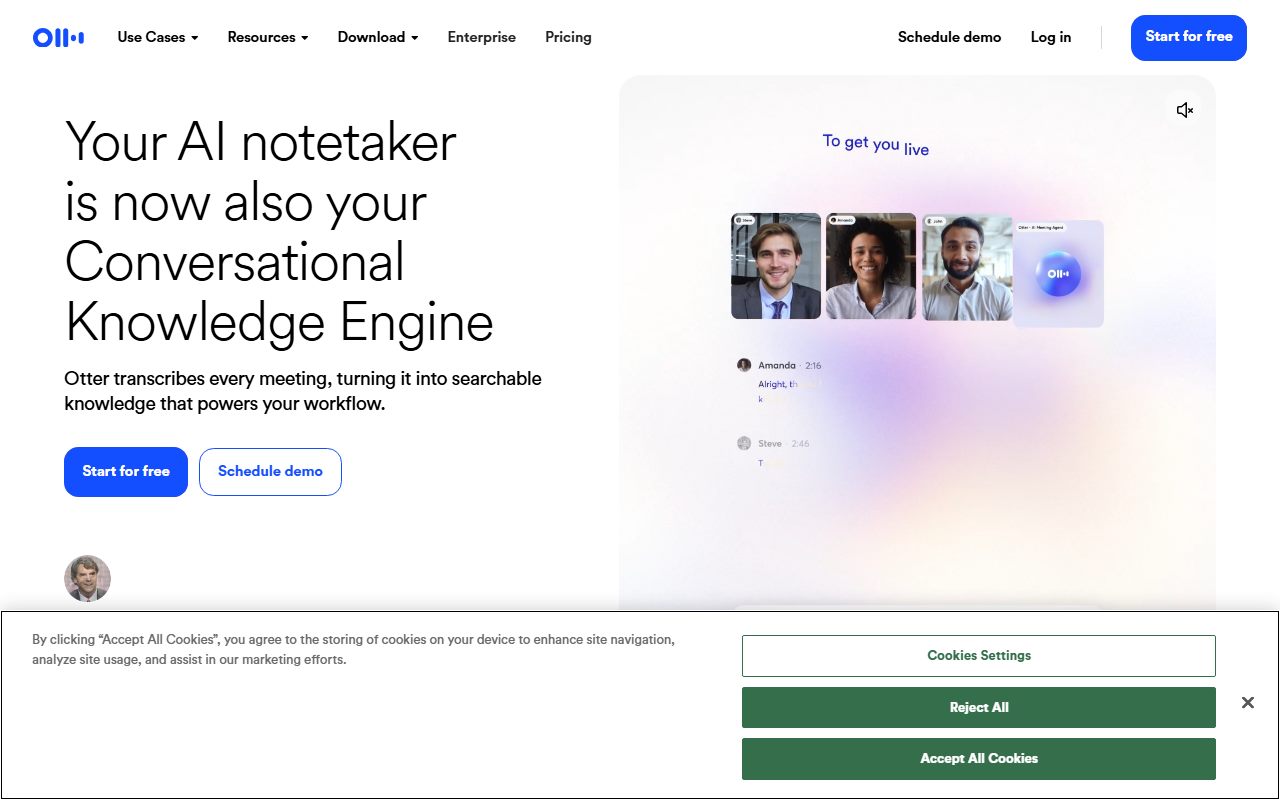
Otter calls its free plan Basic, and per the pricing page (checked October 7, 2026) it includes the following. There are 300 transcription minutes a month. Each conversation - a live recording or a meeting the bot joined - is capped at 30 minutes of transcription. You can import three audio or video files for transcription, and the help center is explicit that this is three per account for its lifetime, not three per month. The Otter AI Chat, which lets you ask questions across your transcripts, is limited to 20 queries per user per month. You can have one meeting being recorded at a time, custom vocabulary is limited to five terms, and playback is at normal speed only.
The part that is not limited, and that makes the free plan more than a demo, is OtterPilot. The vendor's documentation describes the meeting assistant as included on Basic: it can be set to join your Zoom, Microsoft Teams and Google Meet calls from your calendar, record, transcribe in real time and produce an automated summary afterwards. Those minutes come out of the same 300-minute monthly budget as anything else you record.
Two details from the help center are worth knowing before you rely on it. First, if a conversation runs past 30 minutes the recording does not stop; you simply cannot see beyond the 30-minute mark of the transcript until you upgrade, at which point the full text can be unlocked. Second, deleted conversations still count toward the monthly limit, so a recording you start by accident is spent.
On conversation history, the vendor's own pages disagree. The pricing page states a free account sees its 5 most recent conversations; a help center article last updated in December 2023 says 25. Both agree that older conversations are archived rather than deleted and become visible again on a paid plan. Treat the smaller figure as the safe assumption and check the current page.
What sits behind the paywall
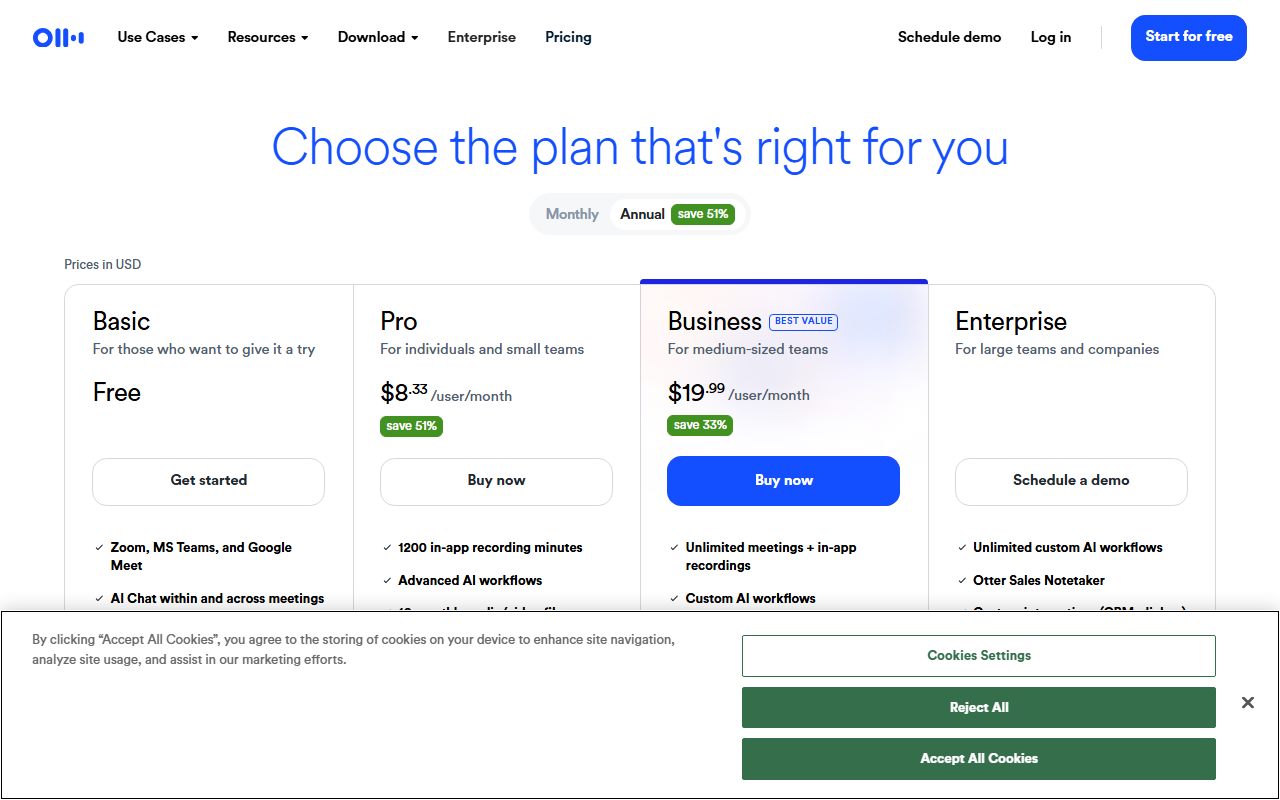
The paid ladder has three rungs, and per the pricing page as of October 2026 the prices are: Pro at $16.99 per user per month billed monthly or $8.33 per user per month billed annually; Business at $30 per user per month monthly or $19.99 annually; and Enterprise at custom pricing. Prices in this category change often, so read the current pricing page before deciding anything on the basis of this paragraph.
What Pro changes is mostly quantity. The pricing page lists 1,200 in-app recording minutes a month, up to 90 minutes per meeting, 10 file imports a month instead of three for life, 50 AI Chat queries a month, and two concurrent meetings. Business is where the caps mostly disappear: unlimited meetings and in-app recording, unlimited file imports, meetings up to four hours, three concurrent meetings and 200 AI Chat queries per user. The help center also notes that Business file imports run to 6,000 minutes a month.
The structural reading is that Otter sells the same product at three sizes rather than withholding capability from the free tier. The transcript, the summary, the bot, the search and the AI chat all exist on Basic. What you buy is longer meetings, more of them, more imports, and the full history. That is a fair shape, and it means the free plan is a genuine evaluation of the thing you would pay for - with the one exception of the 30-minute cap, which is a capability limit dressed as a quantity limit, because a 45-minute meeting on the free plan is a broken transcript, not a smaller one.
Who it is for, and who should skip it
The free plan fits a specific person well: someone whose meetings are short and whose volume is modest. A weekly 25-minute team sync, a handful of 15-minute customer calls, a few voice memos - that is comfortably inside 300 minutes and under the per-conversation cap. For that person the free plan is the product, indefinitely, and the upgrade question may never arise.
It also fits anyone who wants to find out whether a meeting bot is tolerable in their culture before paying for it. Some teams dislike a visible bot participant; some clients object outright. The free plan lets you learn that for nothing.
Who should skip it, or go straight to a paid tier: anyone whose typical meeting runs over half an hour. The 30-minute cap is the single most important fact on this page, and it is not a soft limit - the documentation is clear that the rest of the transcript is withheld. An hour-long discovery call on the free plan produces a transcript of its first half, which is arguably worse than no transcript because it looks complete. Pro raises the ceiling to 90 minutes, which covers most business meetings; four hours on Business covers workshops.
Also skip it if your workflow is upload-driven. Three lifetime imports is a trial allowance, not a working one, and anyone with a backlog of recorded interviews or podcasts should look at the per-month import counts on Pro and Business, or at a different tool. The Fireflies review on this site documents a free plan with a different shape - per-file limits rather than a lifetime count - and the tl;dv review covers one that documents unlimited recording with limits on AI notes instead.
Limits and what users report
The documented limits are above; this section is about which of them matter in practice and what shows up in public discussion.
The minute budget and the per-conversation cap interact in a way that is easy to misjudge. Three hundred minutes sounds like ten half-hour meetings, and it is, but the help center notes that recordings continue past the cap, so a 50-minute meeting still consumes its minutes while only yielding 30 of transcript. Users on public forums commonly describe this as the moment they either upgraded or left, and it is a reasonable reaction.
Transcript accuracy cannot be graded from documentation and this page will not pretend to; the general pattern reported publicly for the whole category is that clean single-speaker audio transcribes well and crosstalk, accents and bad microphones degrade it.
The bot itself is a recurring theme. OtterPilot joining meetings automatically from a calendar is the feature people value most and the one that causes the most friction: it has been widely reported that the assistant can join meetings its owner forgot were on the calendar, including ones where other participants did not expect a recorder. The settings to control which meetings it joins exist in the documentation; the practical advice is to configure them before connecting a calendar rather than after.
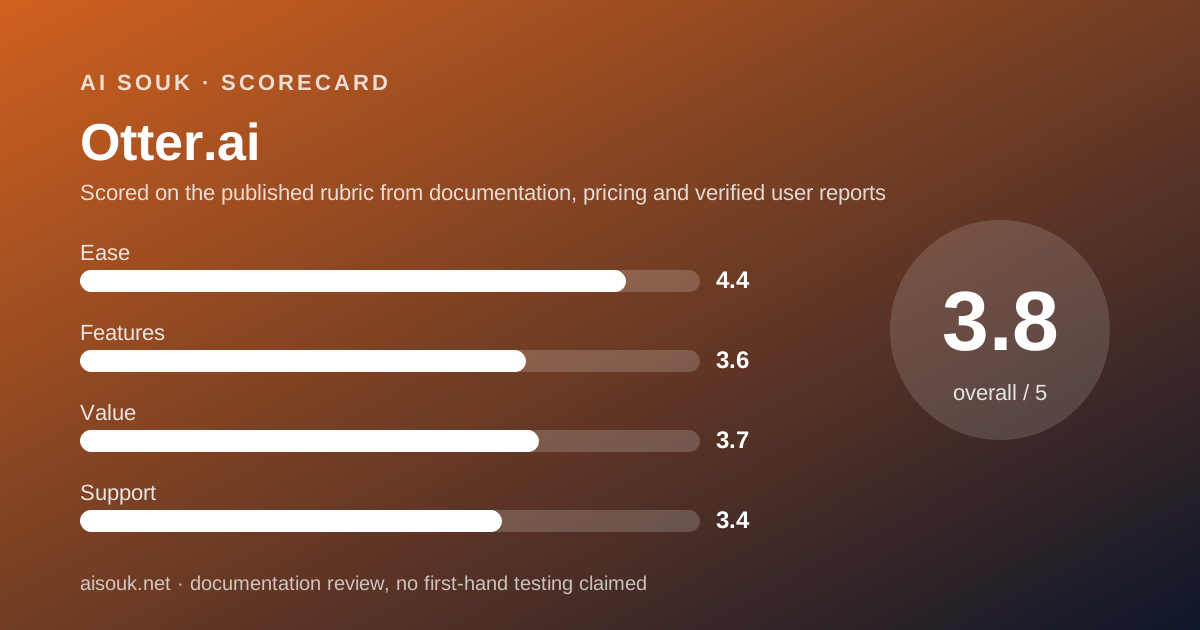
The sub-scores reflect this. Ease is high because starting costs nothing and the bot does the work. Features is middling because the 30-minute cap removes a large share of real meetings from the free plan. Value is middling for the same reason: the free tier is useful, but the first upgrade is where the product becomes complete.
Privacy and data use
This is the section to read before sending a bot into a client meeting, and it has two parts: what the vendor says it does with your data, and what you are responsible for.
On the first, the privacy policy (read October 7, 2026) states that Otter trains its proprietary AI technology on de-identified audio recordings and on transcriptions, and it notes in the same sentence that transcriptions may contain personal information. It describes de-identified or aggregated data as data that will not directly or indirectly reveal your identity. It states personal information is kept as long as necessary for the purposes in the policy or as required by law, and that on deletion the vendor takes measures to render the data irrecoverable. This page cannot tell you whether a consumer-tier setting exists today to opt out of training; read the current policy and the account settings for the tier you are on, because that is the single most consequential setting in the product.
On the second, the policy puts the burden of permissions on you: it asks that you have the necessary permissions from co-workers, friends or other third parties before sharing their personal information. In plain terms, recording consent is your problem, not the vendor's. Depending on where participants are, recording a call without telling them may be unlawful, and a bot with a visible name in the participant list is not the same as consent. The sensible practice is a one-line notice at the start of every recorded call, regardless of what any tool does.
For regulated or confidential work - legal, medical, HR, anything under an NDA - a consumer free plan is the wrong instrument by construction. The vendor offers Business and Enterprise tiers with their own terms; that conversation belongs with whoever owns the risk in your organisation, not with a review page.
Alternatives worth a look
Two direct alternatives are reviewed on this site and the comparison is mostly about which limit you would rather live with.
Fireflies documents a free plan built around transcription credits and a storage cap rather than a monthly minute budget, with a documented route to unlimited transcription when its auto-join feature is enabled. It also states in its privacy policy that it does not use personal information for AI model training, which is the clearest point of contrast with the policy described above. Its free plan does not include video recording.
tl;dv documents unlimited recordings and transcription on its free plan and puts the limits on AI-generated notes instead - a set number of meetings with AI notes per month and a retention window on free recordings. If your problem is the 30-minute cap, that shape may suit you better; if your problem is that you want the summary on every meeting, it may not.
For what to do with the transcripts afterwards, NotebookLM accepts them as sources and answers questions with citations. And if your organisation already pays for Zoom, Google Workspace or Microsoft 365 at a tier with native AI summaries, check that before adding a third-party bot.
Frequently asked
Is the free plan really free, forever? The help center states you can use the Basic plan as long as you like. The limits reset monthly; there is no documented time limit on the plan itself.
What happens when a meeting goes past 30 minutes? Per the help center, the recording continues, but only the first 30 minutes of transcript are accessible. Upgrading to a paid plan unlocks the full transcript of that conversation.
Does the bot work on Zoom, Google Meet and Teams on the free plan? The vendor's documentation describes OtterPilot as included on Basic for all three. Minutes it records count against the same 300-minute monthly allowance.
Can I upload old recordings? Three files, for the life of the account, per the help center. Pro moves to 10 a month and Business to unlimited, per the pricing page as of October 2026.
What does Pro cost? Per the pricing page on October 7, 2026, $8.33 per user per month billed annually or $16.99 month to month. Check the current page; these figures change.
Is my audio used to train Otter's AI? The privacy policy states that de-identified recordings and transcriptions are used to train the vendor's proprietary AI. Read the current policy and your account settings for the controls available on your tier.
Why are there no screenshots? Because no account was opened for this page. That is what a documentation review means on this site.
Does this page earn a commission? No. There is no affiliate relationship with this vendor; the link goes to the official site.
Bottom line
Otter's free plan is a working allowance with one sharp edge. Three hundred minutes a month, a bot that attends your calls, a transcript and a summary - that is enough to run a real meeting habit for nothing, and it is more than most tools in the category give away. The sharp edge is the 30-minute cap per conversation, which turns any longer meeting into a truncated transcript that looks whole. If your meetings are short, the free plan is the product. If they are not, the free plan is a trial, and Pro at $8.33 a month on an annual plan (as of October 2026) is where the product becomes complete.
Two things to settle before the first recorded call: configure which calendar meetings the bot may join, and decide how you feel about the privacy policy's statement that de-identified recordings and transcripts train the vendor's models. Neither is a reason not to use it; both are reasons to read the current settings rather than assume.
What this page cannot tell you, stated plainly because the site's method requires it: how accurate the transcript is on your audio, what the dashboard looks like today, whether the free-plan history limit is currently 5 or 25, or what any of these prices are next month. No account was opened and no screenshots were captured. The pricing page and help center are the source of record, and they will change before this page does.
Visit Otter.ai
We have no affiliate relationship with this vendor. Link goes to the official site.