 AI
AIOtter.ai vs Fireflies.ai free: 300 minutes a month, or unlimited with a catch
Both of these will send a bot into your Zoom, Google Meet or Teams call and hand you a transcript and a summary for nothing. The free plans are shaped very differently. Otter gives you 300 minutes a month with a hard 30-minute cap per conversation and documents every limit precisely. Fireflies gives you transcription with no meeting cap, but only when the bot joins from your calendar automatically, and rations the summaries with a small credit balance. Short answer: Fireflies for most small teams, Otter if your meetings are short and you want numbers you can plan around. Figures are from the vendors' pricing pages and help centers as of October 2026.
 3.8Otter.ai
 3.9Fireflies.ai
The short answer
This is a documentation comparison, assembled from the Otter.ai pricing page and help center, the Fireflies.ai pricing page, help center and billing page, and both privacy policies, all read October 7, 2026. No bot was sent into any meeting for this page and no transcript accuracy was measured. The single-product pages are Otter.ai and Fireflies.ai.
Fireflies wins for a typical small team on two documented grounds. First, with calendar auto-join enabled, its help center says credits are spent only on summaries, which the vendor describes as unlimited transcription with no cap on the number of meetings; Otter's free plan is capped at 300 minutes a month and 30 minutes per conversation, and a 45-minute client call on Otter's free plan is a transcript that stops two-thirds of the way through. Second, Fireflies' privacy policy states personal information is not used for AI model training; Otter's states that it trains its proprietary AI on de-identified recordings and transcriptions.
Otter wins a real case too. Its limits are published as plain numbers that have been stable for years, its bot and summary are on the free plan without a credit mechanism to understand, and for someone whose meetings run under half an hour the 300-minute budget is a genuine weekly habit. Fireflies' free plan has a 400-minute storage cap, no video, no transcript download and a credit system whose rules changed for accounts created from September 1, 2026. It is the better free plan with more fine print.
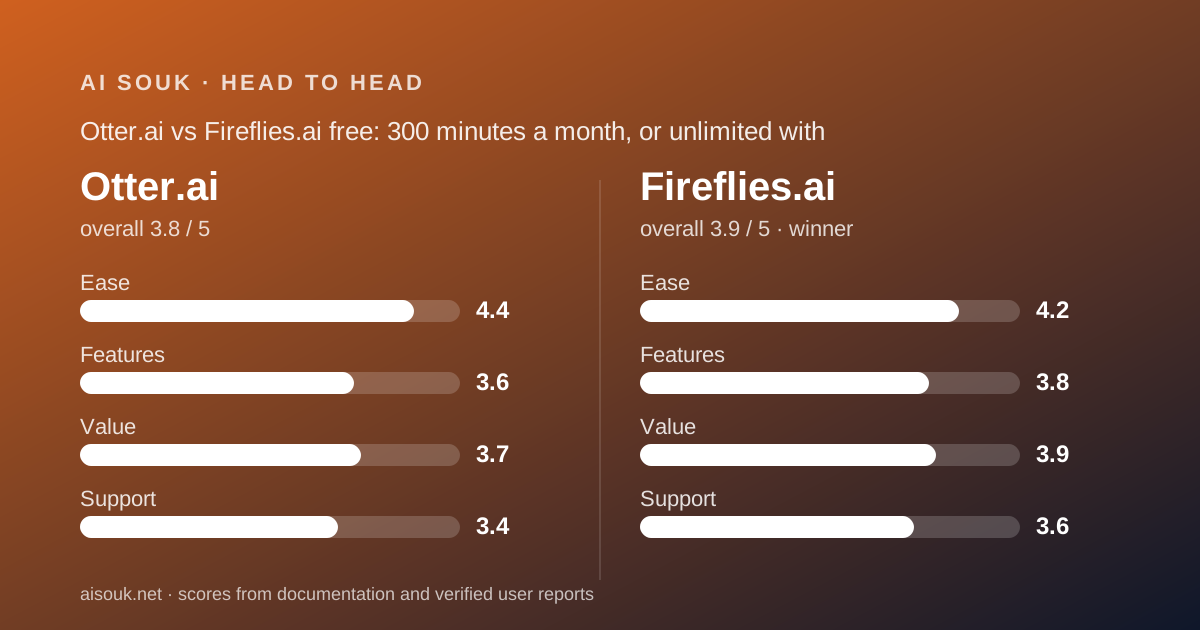
What each free tier includes (as of October 2026)
Otter's Basic plan, per the pricing page checked October 7, 2026: 300 transcription minutes a month; 30 minutes of transcript per conversation; three audio or video file imports for the lifetime of the account, which the help center is explicit is not per month; 20 Otter AI Chat queries a month; one meeting recorded at a time; five custom vocabulary terms; playback at normal speed. The OtterPilot assistant that joins Zoom, Teams and Meet from your calendar is documented as included, and every conversation gets a transcript plus an automated summary. Conversation history is limited to the most recent few, with the pricing page saying 5 and an older help article saying 25; older conversations are archived, not deleted.
Fireflies' free plan, per the pricing page the same day: unlimited transcription marked with an asterisk, limited AI summaries, 400 minutes of storage per team (a help article says per seat), 20 AI credits, the Zoom, Meet and Teams bot, transcription in more than 100 languages, real-time notes, meeting search, the AskFred assistant, audio and video upload, desktop and mobile apps, a Chrome extension and API access. The help center explains the asterisk: a new free account gets a small number of transcription credits, three on the web, five via the extension, ten on mobile, one per meeting, but with the auto-join calendar toggle on, credits are used only for summarising and transcription is uncapped. Uploads run to 100 MB and 150 minutes per file, meetings to two hours.
The two lists differ in what is scarce. On Otter the scarce thing is minutes, and everything else is included. On Fireflies the scarce things are summaries, storage and output: the help center states transcript downloads require a paid plan and the pricing page lists video recording from Pro upward. The free Fireflies user sees everything on screen and cannot take it anywhere; the free Otter user can take it anywhere and runs out of it.
Daily limits and what happens when you hit them
Otter's help center is unusually specific about the edges. If a conversation runs past 30 minutes the recording continues, but only the first 30 minutes of transcript are accessible until you upgrade, at which point the full text can be unlocked. Deleted conversations still count toward the monthly limit, so an accidental recording is spent. The monthly 300 minutes and the per-conversation 30 interact: a 50-minute meeting consumes its minutes while yielding 30 of transcript. Public forum discussion commonly names that moment as the point of upgrading or leaving.
Fireflies' edges are about credits and storage rather than minutes. Without auto-join, each meeting costs a transcription credit and a new web account has three. With auto-join, transcription is uncapped and the summary draws down the credit balance; users on public forums report running out of free summaries faster than expected, which is the documented behaviour. The 20 AI credits for AI Skills, the assistant and voice agents are described on the billing page as a one-time grant and in one help article as monthly; assume one-time. The 400-minute storage cap is rolling, not monthly, and what happens to recordings beyond it is a question for the current help center. The help center also states the present rules apply to accounts created on or after September 1, 2026, so earlier reviews describe a different plan.
The practical shape: Otter runs out on a schedule you can see coming; Fireflies runs out of the finished product while the raw material keeps flowing. A team that reads transcripts is fine on Fireflies indefinitely; a team that only reads summaries hits the wall in the first week on either.
Quality of output for everyday work
Transcript accuracy cannot be graded from documentation and this page will not pretend otherwise; the pattern reported publicly for the category is that clean single-speaker audio transcribes well and crosstalk, accents and poor microphones degrade it, on both products.
What the documents do say about output differs. Otter's free plan produces a transcript, an automated summary and a searchable record for every conversation, with the Otter AI Chat answering questions across your transcripts up to 20 times a month. Fireflies' free plan produces a transcript with speaker detection in more than 100 languages, a summary while credits last, meeting search and the AskFred assistant, and the pricing page says limited AI summaries without putting a number beside it.
The output difference that matters most for everyday work is portability. Fireflies' help center states that downloading transcripts requires a paid plan, so the free notes live inside Fireflies, visible through its apps and reachable through its integrations and API but not as a file you own. Otter's documentation does not gate export on the free plan in the same way, and its free tier includes three file imports, so a free Otter user can both bring in an existing recording and take out the result. For a team whose notes must land in a CRM or a shared drive, that is a daily difference rather than a theoretical one.
The bot in the room is the same on both. OtterPilot and the Fireflies notetaker join from the calendar, and the most common public complaint for both is participants who did not expect a recorder. Both vendors document controls over which meetings the bot joins; set them before connecting a calendar, not after the first awkward call.
Privacy and training defaults
This is the section that decides the comparison for any business that records client calls, and the two policies point in opposite directions.
Fireflies' privacy policy, read October 7, 2026, states that the vendor does not use personal information for AI model training and contractually prohibits its vendors from doing so, and separately that it does not collect, use or sell personal data for the purpose of training large language models. It describes a zero-data-retention arrangement with the third-party processors of meeting content: audio, video, transcripts and summaries are not stored by those vendors after processing, not accessed afterwards and not used for training. Account data is deleted within 30 days of closure. A help article lists SOC 2 Type II and GDPR compliance; a feature list is not a certificate, so ask for the report if it matters.
Otter's privacy policy, read the same day, states that Otter trains its proprietary AI technology on de-identified audio recordings and on transcriptions, and notes in the same sentence that transcriptions may contain personal information. It describes de-identified data as data that will not directly or indirectly reveal your identity, and says personal information is kept as long as necessary. Whether a consumer-tier setting exists to opt out of training is not something this page can confirm; read the current policy and the account settings, because it is the most consequential setting in the product.
Both policies put recording consent on you. Otter asks that you have the necessary permissions from co-workers and third parties before sharing their information; Fireflies notes that a participant without an account who wants deletion should ask the meeting host. A bot with a visible name is not consent, laws vary by jurisdiction, and a spoken notice at the start of every recorded call is the practice that works everywhere. For regulated or confidential work, neither free plan is the instrument; the Business and Enterprise paper is, with a decision from whoever owns the risk.
Price of the first paid step
Otter Pro, per the pricing page as of October 2026, is $16.99 per user per month billed monthly or $8.33 billed annually. It raises the caps rather than changing the product: 1,200 in-app recording minutes a month, up to 90 minutes per meeting, 10 file imports a month, 50 AI Chat queries and two concurrent meetings. Business is $30 monthly or $19.99 annually and removes most limits: unlimited meetings and recording, meetings up to four hours, unlimited imports, 200 AI Chat queries per user.
Fireflies Pro is $18 per seat per month billed monthly or $10 billed annually. It changes the product more than it raises caps: storage rises from 400 to 8,000 minutes per seat, video recording is included, and transcripts, summaries and recordings become downloadable, with more transcription credits and advanced exporting. Business is $29 monthly or $19 annually, with unlimited storage, analytics on the API, private channels and a three-hour meeting limit. AI credits step to 30 on Business and 50 on Enterprise per the billing page.
The arithmetic for one user on annual billing: Otter Pro at $8.33 against Fireflies Pro at $10. The arithmetic for what the step buys: on Otter, the 30-minute wall moves to 90 and the budget quadruples; on Fireflies, the notes become files you can download and the meetings gain video. A team that upgraded Otter because of the 30-minute cap gets the thing it wanted; a team that upgraded Fireflies because it could not export gets the thing it wanted. Both pricing pages say prices change; read the current one.
Pick this one if…
Pick Fireflies if your meetings run over half an hour. Otter's free 30-minute transcript cap is a capability limit dressed as a quantity limit, and most client calls are longer than that.
Pick Fireflies if the privacy policy is the deciding document. No training on personal information and zero data retention with processors is the strongest commitment among the meeting tools on this site.
Pick Otter if your meetings are short and you want to know exactly where you stand. Three hundred minutes a month, 30 per conversation, three imports, 20 chat queries: nothing to interpret.
Pick Otter if you need to get notes out as files on the free plan. Fireflies' help center states downloads require a paid plan.
Pick Fireflies if you want an API, a Chrome extension and 50-plus integrations on free, and your notes can live inside the product or flow through an integration rather than a download.
Frequently asked
Is Fireflies really unlimited for free? Only in one configuration. With the auto-join calendar toggle on, the help center says credits are spent on summaries, not transcripts, and transcription is uncapped. Without it, a new web account has three transcription credits. The summaries are rationed either way, the storage cap is 400 minutes, and the rules apply to accounts created from September 1, 2026, so older reviews praising a different free plan are describing a plan that no longer exists.
Which one has the better summary? This page cannot grade it. Both document an automated summary on the free plan; Otter's is one per conversation within the minute budget, Fireflies' is one per credit. If summaries are the point, read the paid section, because that is where both vendors sell them in quantity.
What if neither fits? tl;dv records and transcribes without limit on its free plan, including video, and rations the AI notes to ten a month; it is the third option in this category on this site and the one to read if you want the archive rather than the summary, keeping in mind its free recordings expire after three months.
Visit Otter.ai
We have no affiliate relationship with this vendor. Link goes to the official site.
Visit Fireflies.ai
We have no affiliate relationship with this vendor. Link goes to the official site.