 AI
AI
Descript
Edit a recording by editing its transcript, with a free plan that is real but small and watermarks everything you export.
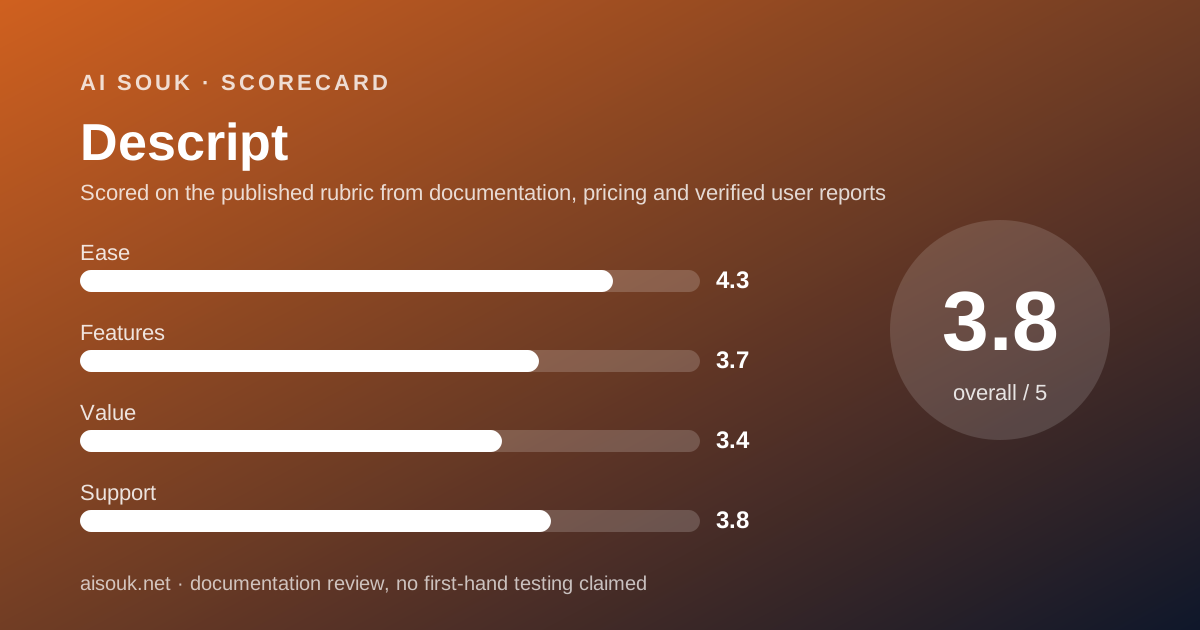
Scored on the published rubric, from documentation, pricing and verified user reports.
Best for: Anyone who records people talking - podcasts, interviews, tutorials, meetings - and wants to find out whether cutting the recording by editing its transcript suits them before paying for a plan without watermarks.
Verdict
This is a documentation review, not a walkthrough: no account was opened for this page and no screenshots were captured, so nothing here is a first-hand claim about what the interface looks like today. On the documented design, Descript's defining idea is that a recording of speech is best edited as text: it transcribes what you upload, and deleting a sentence from the transcript deletes it from the audio or video. The free plan, per the pricing page checked October 7, 2026, includes 60 media minutes a month, 100 AI credits that are granted once and never refill, 5 GB of storage and export at 720p with a watermark. That is enough to learn the editing model on a real short recording, which is the decision the free plan exists to support. It is not enough to produce anything you would publish, because of the watermark and resolution, and the one-time AI credits mean the product's AI features are a brief taster rather than a free capability. The paid plans are priced per month on a per-drive basis and the value score reflects a free tier that is honest and small.
Visit Descript
We have no affiliate relationship with this vendor. Link goes to the official site.
Where it is strong
- The core editing idea - cut the recording by cutting the transcript - is available on the free plan, so the thing that makes the product different can be evaluated without paying
- The pricing page publishes exact free-plan numbers: 60 media minutes a month, 100 one-time AI credits, 5 GB storage, 720p export, 25 transcription languages
- The help centre documents how media minutes and AI credits are counted, including that still images count as one second and that some tools have a published maximum credit cost
- The first paid tier is modest - Hobbyist is listed at $24 a month or $16 a month on annual billing - and removes the watermark, lifts export to 1080p and gives 10 media hours
- Media minutes are counted on upload and recording regardless of whether you transcribe, which is stated plainly rather than discovered
Where it falls short
- Every free export is watermarked and capped at 720p, per the pricing page, so free output is for learning rather than publishing
- The 100 AI credits on the free plan are one-time, not monthly: once spent they do not return, and the help centre states that credits do not roll over on any plan
- Media minutes count uploads and recordings whether or not they are transcribed, which means a long file eats the allowance even if you only need a clip from it
- Underlord, the agentic editor, has a documented non-deterministic credit cost: the help centre says the same task can use different amounts depending on media length, model and what it generates, which makes a small credit balance hard to plan around
- Plans and billing are per drive, so a person working across two drives does not carry one subscription between them, per the billing documentation
What the free tier actually includes
According to the pricing page, checked October 7, 2026, the Free plan is $0 and includes 60 media minutes per month, 100 AI credits granted one time only, 5 GB of cloud storage, export at 720p with a watermark, and transcription in 25 languages. Access to the AI features - Underlord, Studio Sound, filler-word removal, voice cloning - is listed as limited.
The two meters need explaining because they are the whole shape of the plan.
Media minutes are the recording budget. The pricing FAQ states that media hours track uploaded media files and media recorded in Descript, regardless of whether they are transcribed. The help centre adds that this includes video, audio, room sessions and screen, webcam or microphone recordings, and that still images count as one second each. So a 40-minute interview uploaded to pull one clip from costs 40 of the month's 60 minutes, transcribed or not.
AI credits are the generative budget. The FAQ says they track usage of AI features like Underlord, Studio Sound, Green Screen, Eye Contact and AI-generated media and avatars. The help centre states that manual AI features scale with the size of the job, that some tools such as Studio Sound have a maximum cost of 30 credits per file, and that Underlord's cost is non-deterministic because the same kind of task can use different amounts depending on media length, model and output.
The free plan's 100 credits are one-time. The help centre states that unused media minutes and AI credits do not roll over, and that allowances reset when a subscription renews; the free plan's credits are described on the pricing page as one-time, so there is no renewal to reset them. Spend them on the features you most need to judge.
What the free plan can do, then, is let you transcribe and edit about an hour of real material a month, try the AI tools a few times, and export watermarked 720p files to see the result.
- 60 media minutes per month, counted on upload or recording whether or not transcribed (pricing page, October 7, 2026)
- 100 AI credits, one time only; no rollover on any plan per the help centre
- 5 GB storage; 720p export with watermark; 25 transcription languages
- Limited access to Underlord, Studio Sound, filler-word removal and voice cloning
- Still images count as one second of media; Studio Sound capped at 30 credits per file
What sits behind the paywall
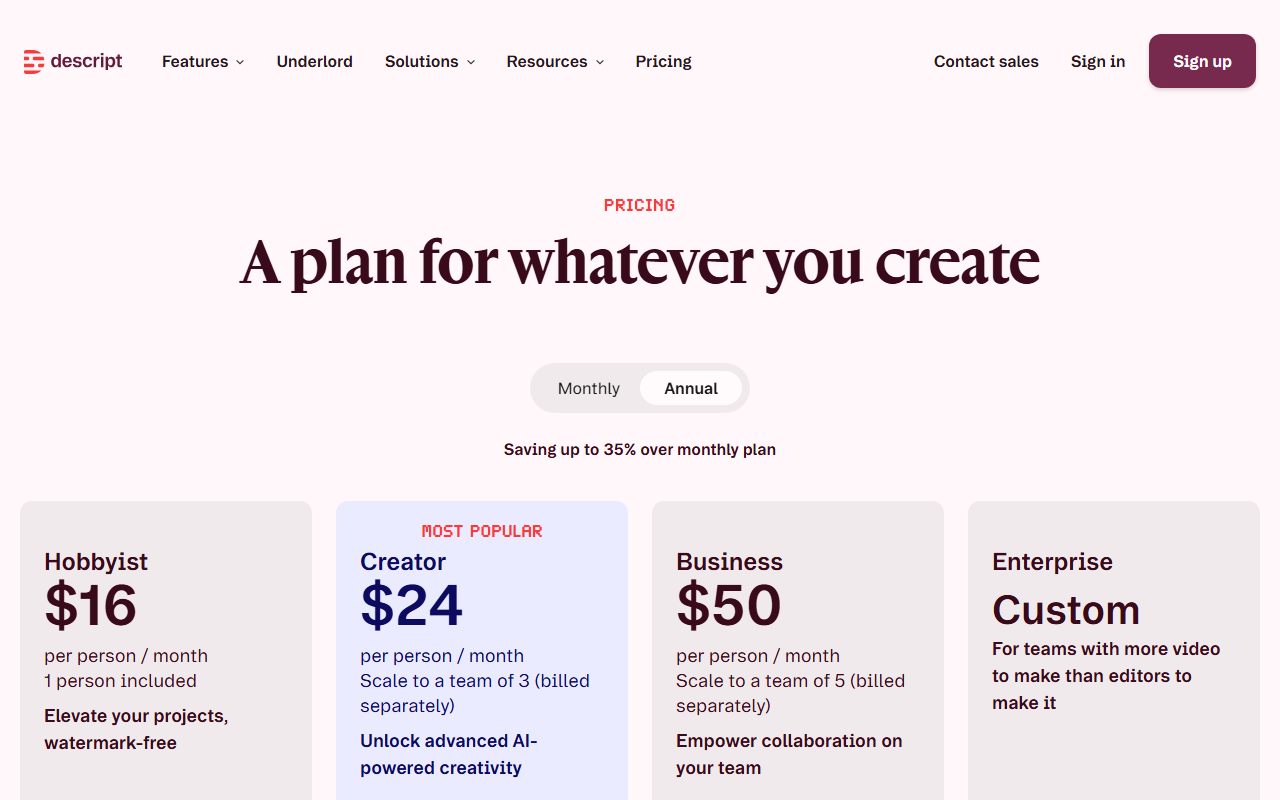
The pricing page lists three self-serve paid tiers above Free, each shown with a monthly price and a lower annual-billing price.
Hobbyist is $24 a month, or $16 a month billed annually. It includes 10 media hours a month, 400 AI credits a month, watermark-free export at 1080p, 100 GB of storage, full Underlord access, Studio Sound, filler-word removal and custom voice clones, with top-ups available for more hours and credits.
Creator is $35 a month, or $24 a month annually, with 30 media hours, 800 credits, 4K watermark-free export, 1 TB of storage, video generation and unlimited royalty-free stock media.
Business is $65 a month, or $50 annually, with 40 media hours, 1,500 credits, 2 TB, a brand studio, translation into 30-plus languages with proofreading, custom avatars and priority support with a service-level agreement. Enterprise is custom.
Three structural points are worth more than the numbers.
First, the watermark and the resolution cap are the first things to go, at the first paid tier. If your only problem with the free plan is that you cannot publish the output, Hobbyist is the answer and nothing higher is required.
Second, credits refill monthly on paid plans but still do not roll over, per the help centre, and the same article says top-ups can be bought from the usage tab when a monthly limit is reached. So a paid user who has a heavy month pays for it; one who has a light month does not bank it.
Third, the billing documentation states that each drive has its own plan, billing cycle and paid editor members. A subscription belongs to a drive, not a person. Anyone who collaborates across more than one workspace should understand that before buying.
Prices on this page are a snapshot. Read the current pricing page, and check whether the figure shown is monthly or annual billing.
Who it is for, and who should skip it
The free plan is for anyone who records speech and has never edited it as text. That is a larger group than it sounds: podcasters, people recording tutorials or walkthroughs, teams that record meetings, teachers, researchers transcribing interviews. For all of them, the question is whether the transcript-first model fits how they think, and the free plan answers it with one or two short real recordings a month.
It is also for someone evaluating the AI cleanup tools, with a caveat. The 100 one-time credits are enough to run Studio Sound and filler-word removal on a short file a few times and form a view. They are not enough to evaluate Underlord thoroughly, because its documented cost varies per task and a careless session could spend most of the balance on one request.
Who should skip the free plan and decide about paying directly: anyone who needs to publish. The watermark and the 720p cap make free output unsuitable for anything client-facing or public, and the pricing page is explicit about both. Hobbyist at $16 a month on annual billing is the entry point for publishable work.
Who should be cautious about the product regardless of tier: people whose recordings are long and whose edits are small. Because media minutes count the whole upload whether or not it is transcribed, a workflow built on uploading hour-long files to pull short clips consumes allowance quickly on every plan. The help centre is clear about this; it is the limit most likely to surprise.
Limits and what users report
The published limits are the two meters, the storage cap, the export cap and the watermark, all of which are on the pricing page and have been described above. What the documentation says about the meters' behaviour is unusually specific, and that specificity is the most useful thing a prospective user can read.
On credits, the help centre states that the cost of a manual AI feature scales with the length of the media and the model selected, that some tools have a published maximum per file, and that Underlord charges for both the agent deciding what to do and the tool doing the work. For a free user with 100 credits that will never refill, the practical implication is to use the fixed-cost tools first and treat Underlord as a demonstration rather than a workflow.
What users on public forums most often report is consistent with that. The first recurring theme is the media-minutes meter running down faster than expected, almost always because people upload whole recordings rather than trimming first. The second is the one-time nature of the free credits, discovered after they are gone. The third, more positive, is that the transcript-editing model itself is the reason people stay, and that it changes how they record: speakers learn to leave gaps and restate, because a clean transcript is a clean edit.
This page cannot verify today's limits. The pricing page and the usage tab can.
Privacy and data use
Recordings of people talking are a more sensitive category than text prompts, and three questions deserve an answer from the vendor's own policy before uploading anything that includes someone else's voice.
First, whether uploaded media and transcripts are used to improve the vendor's models, and whether that differs between the free plan, the paid self-serve plans and the business and enterprise tiers. Across this category the answer commonly differs by tier, and the difference is the main reason an organisation should not let staff upload work recordings to personal free accounts.
Second, retention. Media minutes are consumed on upload and storage is capped at 5 GB on the free plan, which raises the practical question of what happens to media when a project is deleted or the account lapses. That belongs in the privacy policy and the help centre, not in a review.
Third, consent. Voice cloning is listed on the pricing page from the first paid tier, and the product also offers AI avatars and eye-contact correction. All of these act on a real person's likeness. A business recording customers, employees or interview subjects needs their consent for the recording itself, and separately for any synthetic reproduction of their voice or face, under whatever rules apply where those people live. That is not a product question and the vendor's terms will tell you where its own responsibility ends.
This page is a documentation review and cannot confirm current policy wording. Read the policy for the tier you are on.
Alternatives worth a look
The right alternative depends on which half of the job you have.
If the job is generating speech rather than editing it, ElevenLabs is the dedicated option: text to speech, speech to text and sound tools on a credit system, with a free tier that is broad but strictly non-commercial. Descript includes voice tools, but they are listed as limited on the free plan and as custom voice clones from Hobbyist up; for someone whose main need is narration from a script, the dedicated product is the better starting point.
If the job is music for the recording rather than the recording itself, Suno generates full tracks from a prompt, with a daily free allowance and the same kind of non-commercial fence on free output. A podcaster who cleans up an episode here and wants an intro there would plausibly use both, and both free tiers exist precisely to test that.
If the real need is making sense of what was said rather than producing a polished edit - searching a pile of interview transcripts, pulling themes, drafting a summary with citations back to the passage - NotebookLM takes transcripts and documents as sources and answers only from them. It does not edit audio, but for research use it may be the tool the transcript was actually for.
Frequently asked
Can I publish something made on the free plan? Technically yes, but the pricing page says free exports are 720p and watermarked, so in practice the free plan is for learning the product rather than publishing from it.
Do the 100 free AI credits come back each month? No. The pricing page lists them as one-time, and the help centre states that unused credits do not roll over on any plan. Paid plans get a monthly refill; the free plan does not.
Does transcribing cost media minutes, or does uploading? Uploading. The FAQ says media hours track uploaded and recorded media regardless of whether it is transcribed. Trim before you upload.
How many credits does Studio Sound cost? The help centre says some manual AI features, including Studio Sound, have a maximum of 30 credits per file per application, with the actual cost scaling with the job.
What is the cheapest way to remove the watermark? Hobbyist, listed at $24 a month or $16 a month on annual billing as of October 2026, with 1080p watermark-free export.
Is the subscription mine or the workspace's? The billing documentation says each drive has its own plan and billing cycle. Check that before buying for a team.
Why no screenshots on this page? Because no account was opened for it. That is what a documentation review means here, and the method page explains the distinction.
Does this page earn a commission? No. There is no affiliate relationship with this vendor; the link goes to the official site.
Bottom line
On the documented design, Descript's free plan does the one thing a free plan for an editor should do: it lets you try the editing model on a real recording. Sixty media minutes is enough for a short episode or a couple of interviews a month, the transcript-first editing is available, and the two meters are documented clearly enough that a careful user can avoid wasting them. The idea at the centre of the product is unusual and worth an hour of anyone's time if they record speech.
The free plan is not a free tool. Every export is watermarked and capped at 720p, the AI credits are a one-time grant that never returns, and media minutes are consumed by the whole upload rather than the part you keep. None of that is hidden - the pricing page and help centre state all of it - but it means the realistic path for anyone who likes the product is a quick decision about the first paid tier, which at $16 a month on annual billing is where the watermark disappears.
If you try it, trim before you upload, spend the one-time credits on the fixed-cost cleanup tools rather than on open-ended agent requests, and remember that the subscription belongs to the drive.
What this page cannot tell you, stated plainly because the method requires it: what the editor looks like today, how accurate the transcription is on your speakers, how the AI tools sound on your audio, or whether any number above has changed this month. No account was opened and no screenshots were captured. The pricing page and the usage tab inside the product hold the current figures, and they will change before this review does.
Visit Descript
We have no affiliate relationship with this vendor. Link goes to the official site.