 AI
AI
Grammarly
The writing checker that lives inside every text box you already use - with a free tier that corrects mistakes everywhere and sells the rewrites, the tone changes and the plagiarism check.
Scored on the published rubric, from documentation, pricing and verified user reports.
Best for: Anyone who writes in English all day across email, documents and web forms and wants mistakes caught where they happen - and who can decide later whether the rewrites and tone tools are worth paying for.
Verdict
This is a documentation review, not a walkthrough: no account was opened for this page and no screenshots were captured, so nothing here is a first-hand claim about what the interface looks like today. On the documented design, Grammarly's free tier is the broadest of its kind in reach and the narrowest in depth. Per the plans page (checked October 7, 2026) it corrects spelling, grammar and punctuation, shows you the tone of what you wrote, and gives 100 generative AI prompts a month - and it does that inside the browser, the desktop apps, mobile keyboards and the office suites, which is the product's real advantage. What it withholds is everything that changes your writing rather than fixing it: full-sentence rewrites, tone adjustment, fluency suggestions, and the plagiarism and AI-text detector. Pro is $12 per member per month on an annual plan or $30 monthly. The corporate fact to know is that the privacy policy now lives under Superhuman Platform Inc., the renamed parent, and states that user content is used to train AI subject to a setting in your account.
Visit Grammarly
We have no affiliate relationship with this vendor. Link goes to the official site.
Where it is strong
- Spelling, grammar and punctuation correction is free and runs inside the browser, desktop, mobile keyboard and office apps - the reach is the product
- Tone detection is on the free tier, so you can at least see how an email reads before sending it
- 100 generative AI prompts a month on Free, per the plans page as of October 2026, is enough to try drafting and rewriting before paying
- The plans page and the Pro page state the prices and the feature split clearly, with a documented 7-day trial on Pro
- The privacy policy documents an account-level control over whether your content trains the vendor's AI
Where it falls short
- The features that change writing rather than correct it - full-sentence rewrites, tone adjustment, fluency - are all Pro, per the plans page
- Plagiarism and AI-text detection are Pro-only, so the free tier cannot be used for the check students and editors most often want
- The vendor's own pages disagree on paid prompt counts - the plans page says 2,000 for Pro, a support article says 1,000 for Premium - which suggests documentation lagging a rename
- The privacy policy states user content is used to develop and improve AI subject to your settings; the default state of that setting on a new free account is not something this page can verify
- The monthly price of $30 is two and a half times the annual-plan rate, per the Pro page, so the cheap price requires a year's commitment
Read this first: what kind of page this is
This page is a documentation review. No free account was opened for it, no extension was installed, and no screenshots were captured. Nothing below is a first-hand account of what the suggestions look like on your writing, how often the free tier nags you to upgrade, or how intrusive the browser extension feels in a given app. Everything comes from the vendor's plans page, its Pro page, its support articles on AI prompts, and its privacy policy, all read on October 7, 2026.
One thing that reading turned up: the privacy policy link on grammarly.com now redirects to superhuman.com, where the policy identifies the company as Superhuman Platform Inc., formerly Grammarly, with Grammarly Inc. as a subsidiary. The product keeps its name. The support documentation has not fully caught up - one article still describes a Premium tier with 1,000 prompts while the plans page describes Pro with 2,000 - so where this page quotes a figure it says which vendor page it came from.
What the free tier actually includes
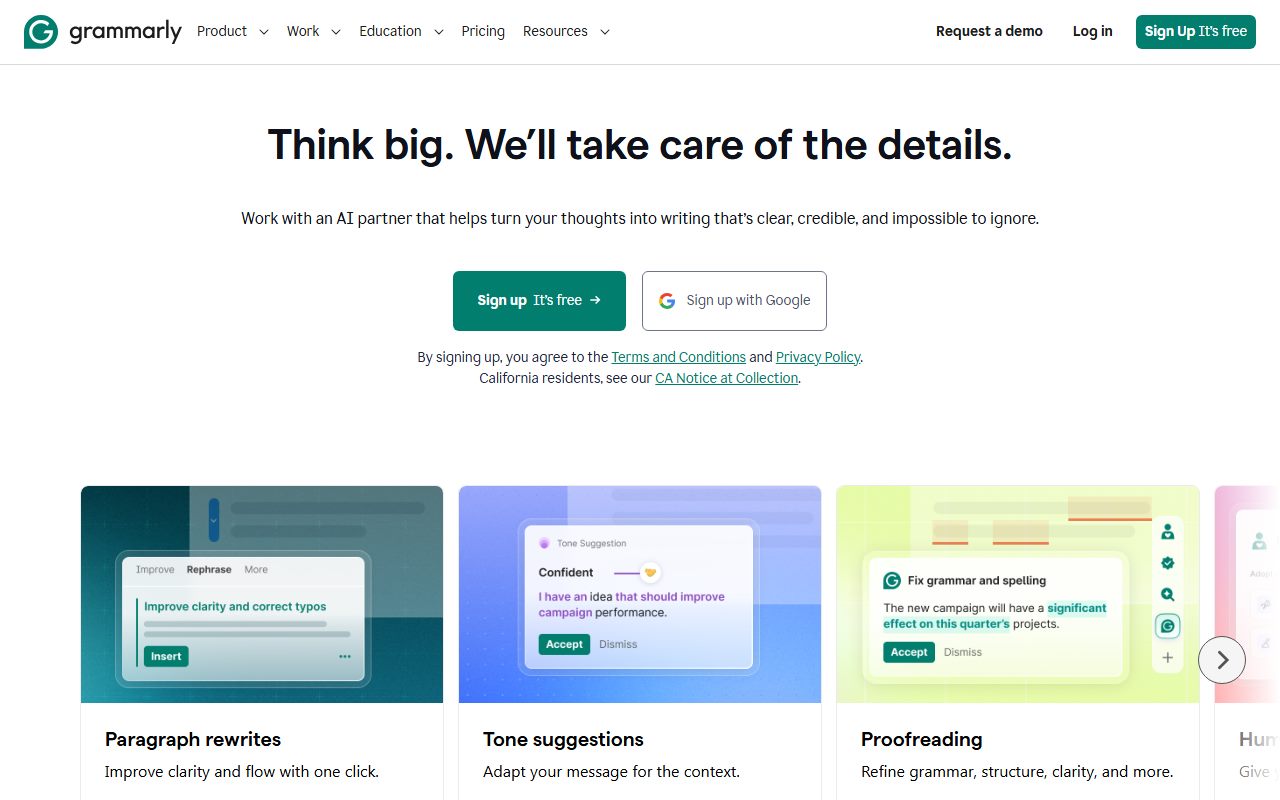
Per the plans page (checked October 7, 2026), the Free plan at $0 includes three things, in the vendor's own phrasing: write without spelling and grammar mistakes, see your writing tone, and generate text with 100 AI prompts. The Pro page repeats the same three items as the free baseline.
The first is the historical product: real-time underlining of spelling, grammar and punctuation errors with a suggested fix. The second is the tone detector, which labels a piece of writing - confident, friendly, formal - and sits on the free tier presumably because seeing the tone advertises being able to change it, which is paid. The third is the generative layer: a monthly allowance of prompts you can use to draft, rewrite, shorten or reply from within the same interface. The support article on prompts states that free users get 100 a month and that the allowance refills monthly on the anniversary of the day generative AI first became available in the account, not on the first of the month.
What the plans page does not enumerate, and what the public record makes clear, is where all of that runs. The product's distinguishing feature has always been that it follows you: a browser extension that works inside web apps and forms, desktop apps for Windows and macOS, a mobile keyboard, and integrations with the Microsoft and Google office suites. The free tier's correction layer runs in all of those places. That reach is why the ease score on this page is the highest of the four - there is almost no learning curve, because the product shows up where you already write.
Two things the free tier does not include are worth naming because they are the two things people most often assume it does: it does not rewrite a whole sentence for you with one click, and it does not check for plagiarism. Both are Pro.
What sits behind the paywall
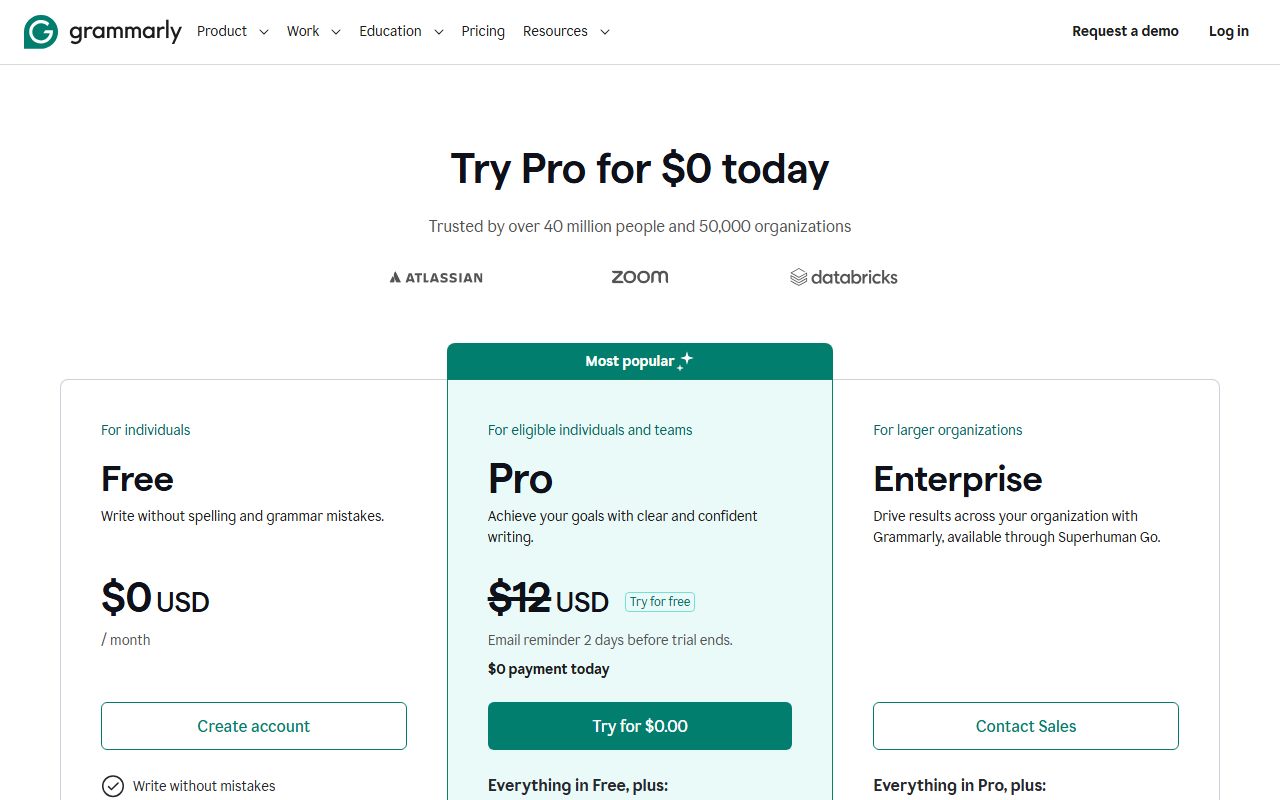
Per the Pro page as of October 2026, Pro is $12 per member per month billed annually or $30 per member per month billed monthly, and the plans page mentions a 7-day free trial. Enterprise is custom-priced. Read the current pages; these figures change.
What Pro adds, per the plans page, falls into three groups. The first is writing improvement rather than correction: rewrite full sentences with a click, adjust your writing tone, write fluently in English, and unlimited personalised suggestions. The second is verification: detect plagiarism and AI-generated text. The third is volume and team features: 2,000 AI prompts per member per month, priority support, team analytics, one style guide and one brand tone, and snippets and knowledge-sharing features for teams. Enterprise, per the same page, adds single sign-on, SCIM provisioning, data-loss prevention, bring-your-own-key encryption, custom roles, dedicated support, and unlimited style guides and brand tones.
A note on the prompt counts, because the vendor's pages disagree. The plans page and the Pro page both say 2,000 prompts a month for Pro. A support article that was still live on October 7, 2026 says Premium users get 1,000 prompts a month and Enterprise users 2,000. The most plausible reading is that the support article predates the rename of Premium to Pro and the increase in allowance, but this page cannot confirm that. If the exact number matters to you, the plans page is the newer document.
The structural reading: the free tier fixes what is wrong, and Pro changes what is there. For a lot of people that line is exactly where their need stops - they want the typo caught, not the sentence rewritten - and for them the free tier is the product. The people who will feel the paywall are those writing in a second language, where the fluency and tone tools are the point, and anyone who needs the plagiarism check.
Who it is for, and who should skip it
The free tier suits anyone whose writing is mostly their own and who wants a safety net under it. Native English speakers writing email, documents and messages all day get the correction layer everywhere, a tone warning before the sharp reply goes out, and a hundred AI prompts to try drafting with. For that person the upgrade question is genuinely optional.
Who should skip the free tier, or go straight to Pro: people writing in English as a second language, for whom the vendor's own list of Pro features - fluency, tone adjustment, full-sentence rewrites - is exactly the list of things they need. Students and editors who need a plagiarism or AI-detection check, which is Pro-only per the plans page. And teams who want a shared style guide or brand voice, which starts at Pro and only becomes unlimited on Enterprise.
Who should pause before installing: anyone who regularly types confidential material into web forms and has not read the privacy section below. The product's reach is also the reason the data question is sharper here than for a chat assistant you visit deliberately.
For the adjacent job - rephrasing text you already have rather than correcting it - the QuillBot review on this site covers a free tier shaped around a paraphraser with a 125-word limit. The two are often compared, and the honest summary is that one corrects where you write and the other rewrites what you paste.
Limits and what users report
Three themes recur in public discussion and are consistent with the documentation.
The first is the upsell. Because the free tier shows you the count of Pro suggestions it is withholding - advanced issues it has found but will not explain - users on public forums describe the free experience as a constant reminder of what they are not paying for. That is a design choice, not a bug, and whether it bothers you is personal. It is also why the value score is not higher: the free tier is genuinely useful, but it is built to make the paid tier feel necessary.
The second is suggestion quality, which this page cannot grade. The general pattern reported publicly for grammar checkers is that they are reliable on mechanical errors, occasionally wrong on style, and that accepting every suggestion flattens a distinctive voice. It is a reviewer, not an author; read the suggestion before accepting it.
The third is the AI-detection feature, which is Pro-only and deserves a caution regardless of tier. No AI-text detector is reliable enough to make a consequential decision on, and anyone using it to judge a student or a contractor is treating a probabilistic signal as evidence. Plagiarism detection against published text is a different and more defensible check.
On the prompts: 100 a month is enough to learn what the generative layer does and not enough to draft with daily, and the refill is on an account anniversary per the support article, not the first of the month.
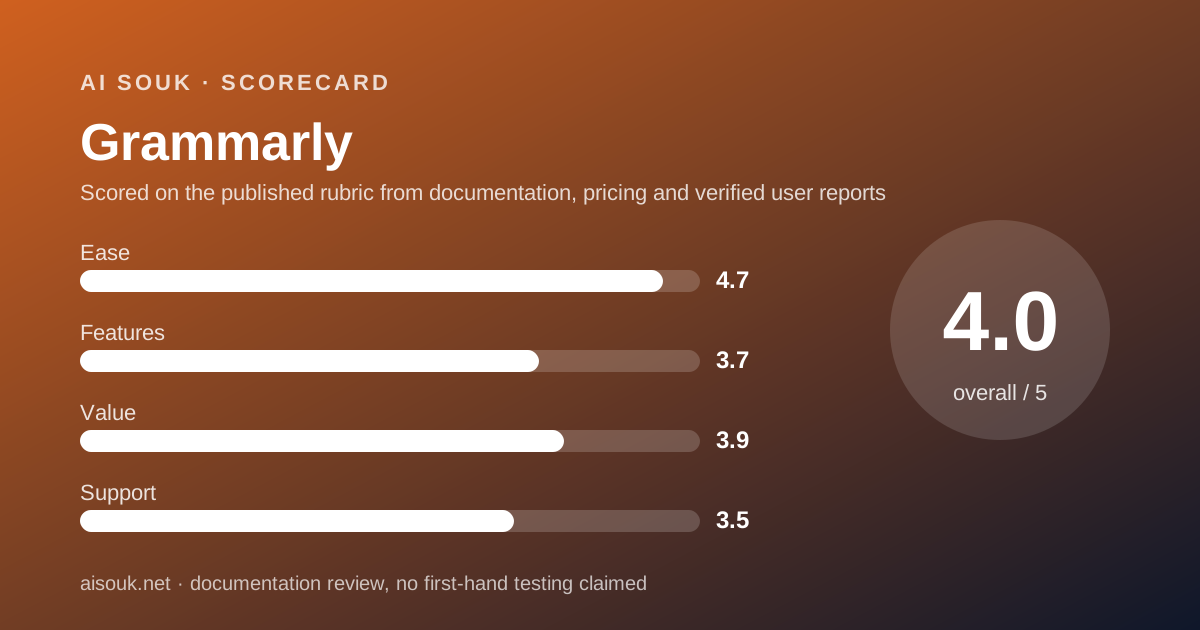
The sub-scores reflect all this. Ease is the highest on this site's writing pages because setup is install-and-forget. Features is middling because the free tier corrects but does not improve. Support is middling because free users get self-service documentation and the support articles are, on at least one point, out of date.
Privacy and data use
This is the section to read before installing an extension that sees everything you type, and it starts with a corporate fact: the privacy policy linked from grammarly.com redirected, on October 7, 2026, to superhuman.com, where it identifies the controller as Superhuman Platform Inc., formerly Grammarly, with Grammarly Inc. among its subsidiaries. The product has not changed name; the company has. Read the policy at the address it actually lives at.
On training, the policy states that the company uses personal data to develop and improve AI subject to your settings, and that you can decide whether it may use your content to train its AI models by adjusting the training controls in your account settings. This page cannot tell you what the default state of that control is on a new free account today; find it before you write anything you would not want in a training set. On commercial use, the policy states that the company makes money when users buy paid products and not by selling or monetising user content. On retention, it states data is kept as long as necessary to provide the products, complete transactions, meet legal obligations and resolve disputes. On deletion, it describes rights to access and to request deletion under applicable privacy law.
The practical point that is specific to this product: an always-on writing assistant is, by design, a keylogger with good intentions. It has to see the text to check it. The vendor documents the ability to turn the extension off for specific websites, and the sensible configuration is to do that for banking, health portals, password managers and any internal system that handles client data, before relying on the training setting to protect you. A tool that never saw the text cannot have stored it.
For organisations, the Enterprise tier's documented controls - bring-your-own-key encryption, data-loss prevention, SSO - are the answer to this problem, and a free consumer account is not. That decision belongs with whoever owns the risk.
Alternatives worth a look
The comparison most people want is with QuillBot, reviewed on this site. The two overlap less than their marketing suggests. QuillBot's free tier is built around a paraphraser that rewrites up to 125 words at a time in two modes, plus a grammar checker, a summariser and a translator with their own caps. Grammarly's free tier is built around correction inside every app you use. If your problem is a sentence you have already written and want said differently, QuillBot's free tier does the thing Grammarly charges for. If your problem is catching mistakes as you type across a working day, Grammarly's reach is the thing QuillBot does not match. Many people use both for free and never pay either, which is a legitimate outcome.
For drafting from nothing, a general AI assistant will do more per month for free than 100 prompts; the trade is convenience, since the writing tools work inside the text box and the assistant works in a separate tab.
For research rather than prose, this is the wrong category entirely. Perplexity is for finding out what is true with sources attached, and NotebookLM is for interrogating documents you already have. Neither will fix your grammar, and this product will not find your facts.
Frequently asked
Is the free tier free forever? The plans page lists Free at $0 with no documented time limit. The 100 AI prompts refill monthly, per the support article.
What exactly do I get for free? Spelling, grammar and punctuation correction, tone detection, and 100 generative AI prompts a month, per the plans page as of October 2026.
Can I check for plagiarism for free? No. Plagiarism and AI-text detection are listed under Pro on the plans page.
What does Pro cost? Per the Pro page on October 7, 2026, $12 per member per month billed annually or $30 billed monthly, with a 7-day trial mentioned on the plans page. Check the current page.
How many AI prompts does Pro include? The plans page says 2,000 per member per month. A support article still says 1,000 for Premium and 2,000 for Enterprise. The plans page is the newer document.
Does Grammarly use my writing to train its AI? The privacy policy states the company develops and improves AI subject to your settings and that there is a training control in account settings. Find it before you rely on it.
Who owns Grammarly now? The privacy policy identifies Superhuman Platform Inc., formerly Grammarly, as the parent, with Grammarly Inc. as a subsidiary.
Why no screenshots? No account was opened for this page. That is what a documentation review means on this site.
Does this page earn a commission? No. There is no affiliate relationship with this vendor; the link goes to the official site.
Bottom line
Grammarly's free tier does one thing in more places than any rival: it catches spelling, grammar and punctuation mistakes inside the browser, the desktop, the phone keyboard and the office suite, with a tone label and 100 AI prompts a month on top. For someone whose writing is already competent and who wants a net under it, that is the product, and the upgrade is optional. For someone writing in a second language, or anyone who needs a plagiarism check, the free tier is a demonstration of a paywall - everything that improves rather than corrects is Pro, at $12 a month on an annual plan or $30 month to month as of October 2026.
Two things to do before trusting it with anything that matters: find the training control in account settings and read its current state, and turn the extension off on any site where the text is not yours to share. The product's reach is its strength, and reach is exactly what makes the data question sharper here than for a chat assistant you visit on purpose.
What this page cannot tell you, because the site's method requires saying so: what the suggestions look like on your writing, how often the free tier prompts you to upgrade, what the training control defaults to on a new account, or which of the vendor's two conflicting prompt counts is right this month. No account was opened and no screenshots were captured. The plans page and the privacy policy, at the addresses they currently live at, are the record.
Visit Grammarly
We have no affiliate relationship with this vendor. Link goes to the official site.