 AI
Planday Review 2026: Workforce Scheduling Simplified
Affiliate disclosure: this article contains affiliate links. If you buy through them we may earn a commission at no extra cost to you. It does not influence our editorial assessment.
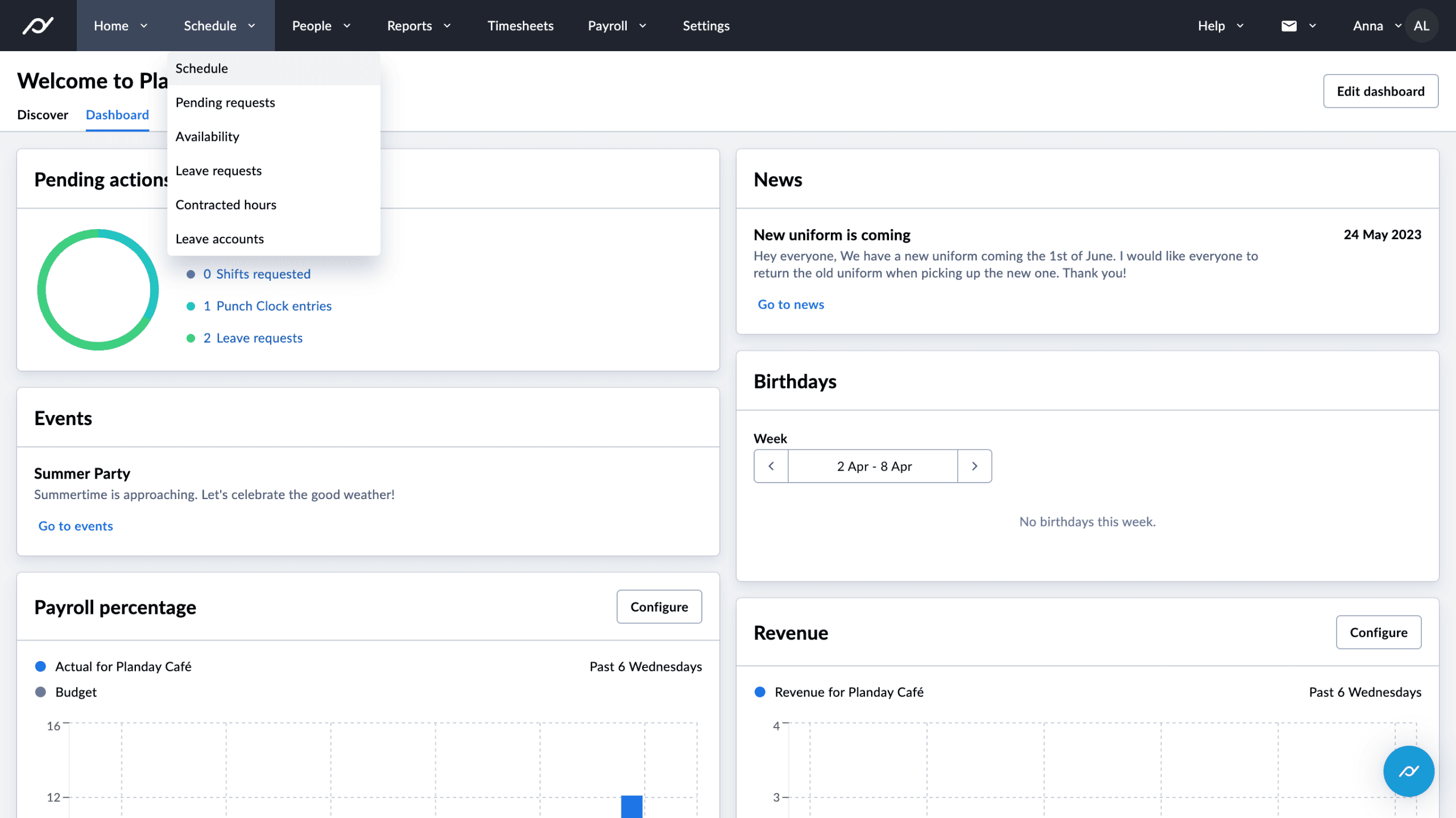
Planday is a cloud-based workforce management solution designed to simplify employee scheduling, time tracking, and communication. Targeted primarily at small to medium-sized businesses across sectors like retail, hospitality, and healthcare, it aims to reduce administrative burdens and improve operational efficiency. As of 2026, Planday supports seamless collaboration between managers and staff through intuitive mobile and desktop apps, making it easier to coordinate complex shift patterns.
The platform is especially beneficial for businesses with hourly workers or those that require flexible scheduling, such as restaurants, stores, and care providers. By centralizing scheduling and communication, Planday helps reduce costly errors like double-booking or understaffing. It also assists organizations in complying with labor laws by tracking hours and breaks accurately.
According to the vendor, Planday’s user-friendly interface minimizes training time for managers and employees, which is crucial for fast-paced environments. Its availability in multiple languages further supports diverse workforces. Overall, Planday offers a scalable solution that adapts to various operational needs while streamlining workforce management.
What is Planday?
Planday is a digital platform that centralizes employee scheduling and workforce management tasks into one accessible system. According to the vendor, it enables managers to effortlessly create, modify, and share schedules, while employees can view their shifts, swap or pick up shifts, and request time off through their mobile devices or desktop portals. This real-time visibility reduces scheduling conflicts and improves shift coverage.
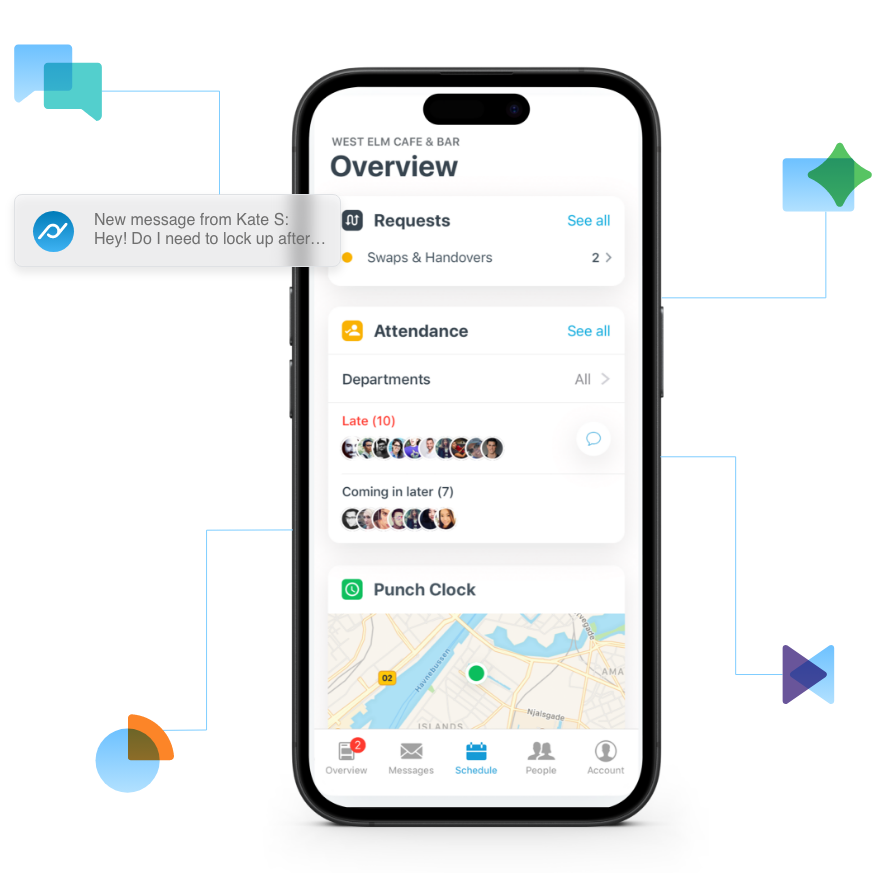
The system’s time and attendance features allow businesses to monitor actual hours worked, including clock-ins and clock-outs, breaks, and overtime. This data helps ensure compliance with labor regulations and simplifies payroll processing. Planday also supports geolocation tracking during clock-ins, adding a layer of accountability for remote or off-site employees.
Accessible via web browsers and dedicated iOS and Android apps, Planday keeps teams connected regardless of location. Managers can send announcements or direct messages to individuals or groups, fostering communication beyond scheduling. The platform also supports multi-location management, enabling businesses with several branches to oversee staffing from a central dashboard.
As of 2026, Planday serves thousands of organizations globally, with a focus on providing an integrated, easy-to-use solution that reduces administrative overhead and enhances workforce productivity.
Key features
- Employee Scheduling: Planday’s scheduling interface allows managers to build weekly or monthly shift plans using drag-and-drop functionality. It supports complex shift patterns, part-time and full-time schedules, and automated recurring shifts. Shift swapping and pick-up features empower employees to manage their availability, reducing no-shows and last-minute changes.

- Time and Attendance: The platform includes built-in clock-in/out options with support for biometric verification and geofencing. This ensures accurate work hour tracking and prevents time theft. Managers can monitor attendance in real time and receive alerts for missed punches or overtime, helping control labor costs.
- Communication Tools: Planday facilitates team communication through in-app messaging, group chats, and announcements. Employees receive push notifications for schedule changes, upcoming shifts, or important updates. This reduces reliance on email or external messaging apps, centralizing work-related communication.
- Leave Management: The system streamlines the process of requesting, approving, and tracking vacations, sick leave, and other absences. Leave balances and calendars are visible to both managers and employees, helping to avoid scheduling conflicts and ensuring adequate staffing.
- Reporting and Analytics: Planday provides detailed reports on labor costs, attendance patterns, shift coverage, and compliance metrics. These insights help managers identify inefficiencies, optimize staffing levels, and make informed decisions to improve workforce management.
- Integration Capabilities: Planday integrates with various payroll, HR, and point-of-sale systems, allowing seamless data flow between platforms. This reduces manual data entry and potential errors, streamlining payroll and administrative processes.
- Mobile Accessibility: With dedicated apps for iOS and Android, Planday ensures employees and managers can access schedules, communicate, and manage shifts on the go. Offline mode allows shift viewing even without internet connectivity, which is useful for remote or field employees.
Pricing
Planday’s pricing structure is tiered and varies based on the number of users and selected features. Specific pricing details are not publicly disclosed on the official website. Businesses interested in Planday should consult the vendor’s official pricing page or contact sales for customized quotes tailored to their size and requirements.
The vendor typically offers different plans that scale in functionality, from basic scheduling to more advanced workforce management capabilities. Potential customers should consider their essential needs—such as time tracking, integrations, and reporting—when evaluating which plan fits best.
Because pricing is quote-based, organizations are advised to inquire about any available onboarding support, training resources, or service-level agreements that may be included. Understanding the total cost of ownership is important for budgeting and long-term planning.
Pros and cons
Pros:
- User-friendly interface: Planday’s intuitive design reduces the learning curve for managers and employees, facilitating quick adoption.
- Robust mobile apps: Native iOS and Android applications provide flexibility for on-the-go scheduling and communication.
- Comprehensive communication tools: In-app messaging and notifications ensure timely updates and improve team coordination.
- Flexible scheduling options: Supports various shift types, recurring schedules, and employee-driven shift changes.
- Multi-location management: Ideal for businesses operating across multiple sites, allowing centralized oversight.
Cons:
- Pricing transparency: Lack of publicly available pricing may complicate initial evaluation for some businesses.
- Feature access tied to plans: Some advanced functionalities require higher-tier subscriptions.
- Reporting customization limits: While reporting is comprehensive, customization options may not meet all unique business needs.
- Integration complexity: Setting up integrations with certain third-party payroll or HR systems may require technical assistance.
Who should use it / who should not
Planday is best suited for small to medium-sized businesses that require streamlined employee scheduling and effective communication tools. Industries such as retail, hospitality, healthcare, and services stand to benefit greatly from its features. Businesses with hourly staff, flexible shifts, or multiple locations will find the platform’s capabilities particularly valuable.

The solution appeals to organizations aiming to reduce administrative workload and improve labor compliance without investing in complex enterprise software. Its mobile accessibility also makes it ideal for teams operating in dynamic or remote environments.
On the other hand, very large enterprises with complex HR and payroll ecosystems may find Planday’s offerings less comprehensive without significant customization. Companies that require transparent, fixed pricing upfront or highly specialized reporting might consider alternative solutions. Additionally, organizations with minimal scheduling needs or very small teams may find the platform’s scope more than necessary.
Alternatives to consider
- Deputy: Known for its strong compliance features and user-friendly scheduling, Deputy is suitable for businesses needing robust time tracking and attendance management alongside scheduling.
- When I Work: Emphasizing simplicity and clear pricing, When I Work offers scheduling and communication tools ideal for small to medium teams seeking straightforward workforce management.
- TSheets (by QuickBooks): Focused on time tracking with seamless QuickBooks payroll integration, TSheets caters to businesses prioritizing accounting synchronization alongside scheduling.
Each alternative provides unique strengths, so businesses should evaluate them based on specific operational needs, integration requirements, and budget considerations.
FAQ
Does Planday support integration with payroll systems?
Yes, Planday integrates with multiple payroll and HR systems, enabling automatic data transfer for hours worked and attendance. This reduces manual entry and helps streamline payroll processing.
Can employees request time off through Planday?
Employees can easily submit leave requests through the platform. Managers receive notifications and can approve or decline requests, with leave balances and calendars updated in real time.
Is Planday accessible on mobile devices?
Planday offers dedicated apps for both iOS and Android, allowing employees and managers to manage schedules, communicate, and receive notifications from anywhere.
Does Planday provide reporting features?
The platform includes a variety of reporting tools that generate insights on labor costs, attendance, and scheduling efficiency. Reports can be used to optimize staffing and control expenses.
Is there a free trial available?
Information about free trials is not explicitly stated on the official site. Interested users should check Planday’s website or contact sales to inquire about current trial or demo options.
How secure is employee data on Planday?
Planday employs industry-standard security protocols, including encryption and compliance with relevant data protection regulations, to safeguard user and employee information.
Verdict
Planday delivers a comprehensive and user-friendly workforce management platform tailored to the needs of small and medium businesses. Its strong scheduling, time tracking, and communication features help optimize labor resources and improve team coordination. While pricing transparency and integration complexity may require consideration, Planday remains a versatile choice for organizations seeking efficient employee management. Prospective users should evaluate their specific requirements to determine if Planday aligns with their operational goals.